
FastComet Hosting: Get Up to 8 Free Premium Products
Choosing reliable web hosting is an important step when starting a website, launching an online business, or building a WordPress project. Your hosting provider supplies the server environment that stores your website files, processes requests, connects databases, and makes your website accessible to visitors around the world.
If you are searching for FastComet Hosting, you may already be comparing hosting companies based on server performance, storage, pricing, security, customer support, and WordPress compatibility. However, there is another opportunity worth exploring before making your purchase.
WPCodeQuill has introduced a dedicated FastComet hosting giveaway through which eligible customers can receive premium WordPress themes, plugins, and PHP scripts with lifetime license access. The rewards depend on the hosting category purchased through the official WPCodeQuill affiliate link.
Customers purchasing eligible Shared Hosting can claim two premium WordPress themes and one premium plugin. VPS Hosting customers can claim three premium themes and three premium plugins, while Dedicated Hosting customers can select any eight eligible products from the WPCodeQuill marketplace, including themes, plugins, and PHP scripts.
All three reward categories require a minimum one-year hosting subscription, completion of the applicable FastComet refund period, and successful purchase verification.
In this guide, you will learn about FastComet hosting plans, available features, pricing considerations, how to purchase hosting through WPCodeQuill, how to install WordPress, and how to claim your free premium products. We will also explain important conditions so that you understand exactly what you receive before purchasing.
What Is FastComet Hosting?
FastComet is a web hosting provider offering hosting infrastructure for individuals, developers, businesses, and website owners. Its services include shared cloud hosting, WordPress hosting, reseller hosting, cloud VPS hosting, and dedicated CPU servers.
These hosting environments are designed for different website requirements. A beginner launching a personal blog may need an affordable shared hosting package, while a growing business or developer operating resource-intensive applications may need a more powerful hosting environment.
FastComet's shared hosting environment uses cPanel for website administration. Depending on the selected plan, customers can access tools for managing website files, databases, email accounts, domains, PHP versions, and applications.
For WordPress users, FastComet provides tools such as WordPress Toolkit and application installation options. Developers can also investigate the available PHP versions, development tools, cron jobs, database support, and other technical capabilities.
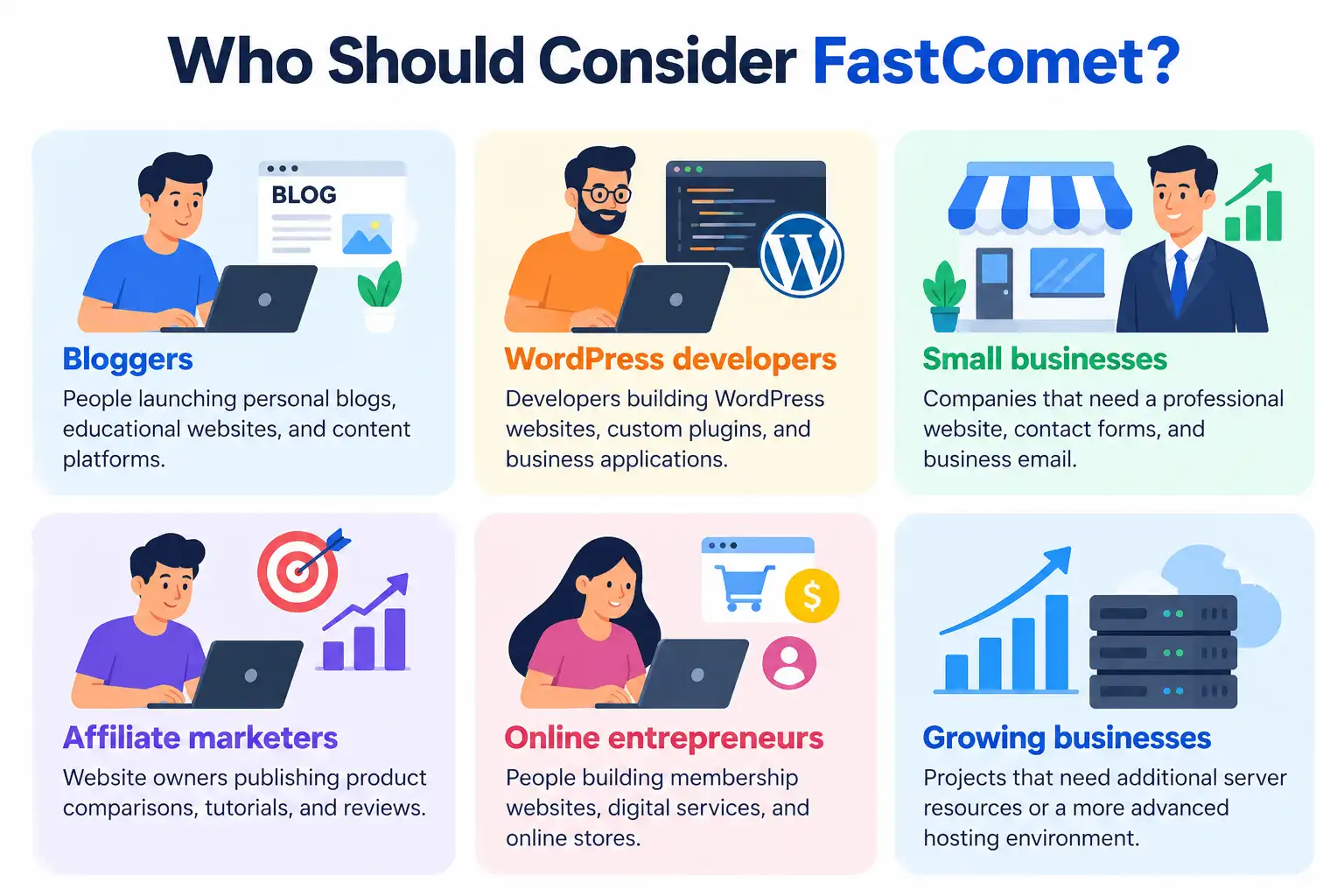
Who should consider FastComet?
- Bloggers: People launching personal blogs, educational websites, and content platforms.
- WordPress developers: Developers building WordPress websites, custom plugins, and business applications.
- Small businesses: Companies that need a professional website, contact forms, and business email.
- Affiliate marketers: Website owners publishing product comparisons, tutorials, and reviews.
- Online entrepreneurs: People building membership websites, digital services, and online stores.
- Growing businesses: Projects that need additional server resources or a more advanced hosting environment.
The best hosting plan depends on the resources your website actually requires. Before buying, check the technical specifications and subscription conditions rather than choosing a package based only on its promotional price.
FastComet Hosting Plans and Features
FastComet offers different hosting products for different technical requirements. Understanding these categories will help you choose the right service before claiming the WPCodeQuill giveaway.
1. Shared Cloud Hosting
Shared hosting is a common starting point for new websites. Multiple customers use a shared hosting infrastructure, while their individual accounts and websites are managed separately.
It can be suitable for:
- New WordPress blogs.
- Personal websites and portfolios.
- Small business websites.
- Content publishing websites.
- Small projects and landing pages.
FastComet's shared hosting plans are offered with different storage and resource allocations. The official pricing page lists Starter, Essential, Plus, and Extra packages.
2. WordPress Hosting
WordPress hosting is designed to make it easier to operate websites using the WordPress content management system.
When evaluating a WordPress hosting package, consider its available CPU resources, memory, storage, PHP compatibility, caching, backups, security, and WordPress management tools.
FastComet provides WordPress-related management features, including its WordPress Toolkit and caching options on applicable plans.
For a website using several plugins, a large media library, or WooCommerce, it is particularly important to understand the resource limitations of the selected package.
3. VPS Hosting
Cloud VPS hosting is designed for projects that need a more controlled server environment and greater resources than an entry-level shared hosting account.
VPS hosting may be appropriate for:
- Growing business websites.
- Multiple web applications.
- Custom PHP applications.
- Resource-intensive websites.
- Development and deployment environments.
Before purchasing a VPS, check CPU, RAM, storage, bandwidth, operating system options, management arrangements, backup policies, and administrative access.
VPS administration can require additional technical knowledge, especially when managing server configurations, security updates, services, and application deployments.
4. Dedicated Hosting
Dedicated hosting is intended for projects requiring a dedicated physical server environment and more advanced infrastructure.
It may be relevant to businesses operating demanding applications, agencies managing substantial workloads, and developers who need greater control over server resources.
Dedicated hosting generally involves greater costs and technical considerations. It is not automatically necessary for a new blog or a small business website.
FastComet Hosting Pricing: Which Plan Should You Choose?
FastComet's official pricing page currently displays four shared hosting plans. The advertised prices and resources are shown below as a reference. Promotional pricing and checkout totals can change, so always verify the latest terms before ordering.
| Plan | Advertised price | Storage | CPU | RAM |
|---|---|---|---|---|
| Starter | $1.99/month | 10 GB | 1 core | 1 GB |
| Essential | $2.99/month | 20 GB | 2 cores | 2 GB |
| Plus | $3.99/month | 30 GB | 3 cores | 3 GB |
| Extra | $5.49/month | 40 GB | 4 cores | 4 GB |
Important pricing information: These are advertised monthly rates from FastComet's pricing page, not guaranteed month-to-month payment amounts. The regular prices displayed alongside the promotional prices are $9.95, $12.95, $17.95, and $24.95 respectively. Check the subscription period, full upfront payment, taxes, and renewal conditions on the actual checkout page.
Which shared hosting plan is suitable?
- Starter: Consider this option for a simple website with modest resource requirements.
- Essential: Consider it for a single WordPress website that needs more storage and processing resources.
- Plus: Consider it if you need to host multiple websites and require greater resources.
- Extra: Consider it if your projects require more storage and higher listed resource allocations.
Do not select a plan simply because it has the highest specifications. Compare your expected traffic, application requirements, website count, and available budget.
Official pricing and specifications: FastComet hosting plans and pricing.
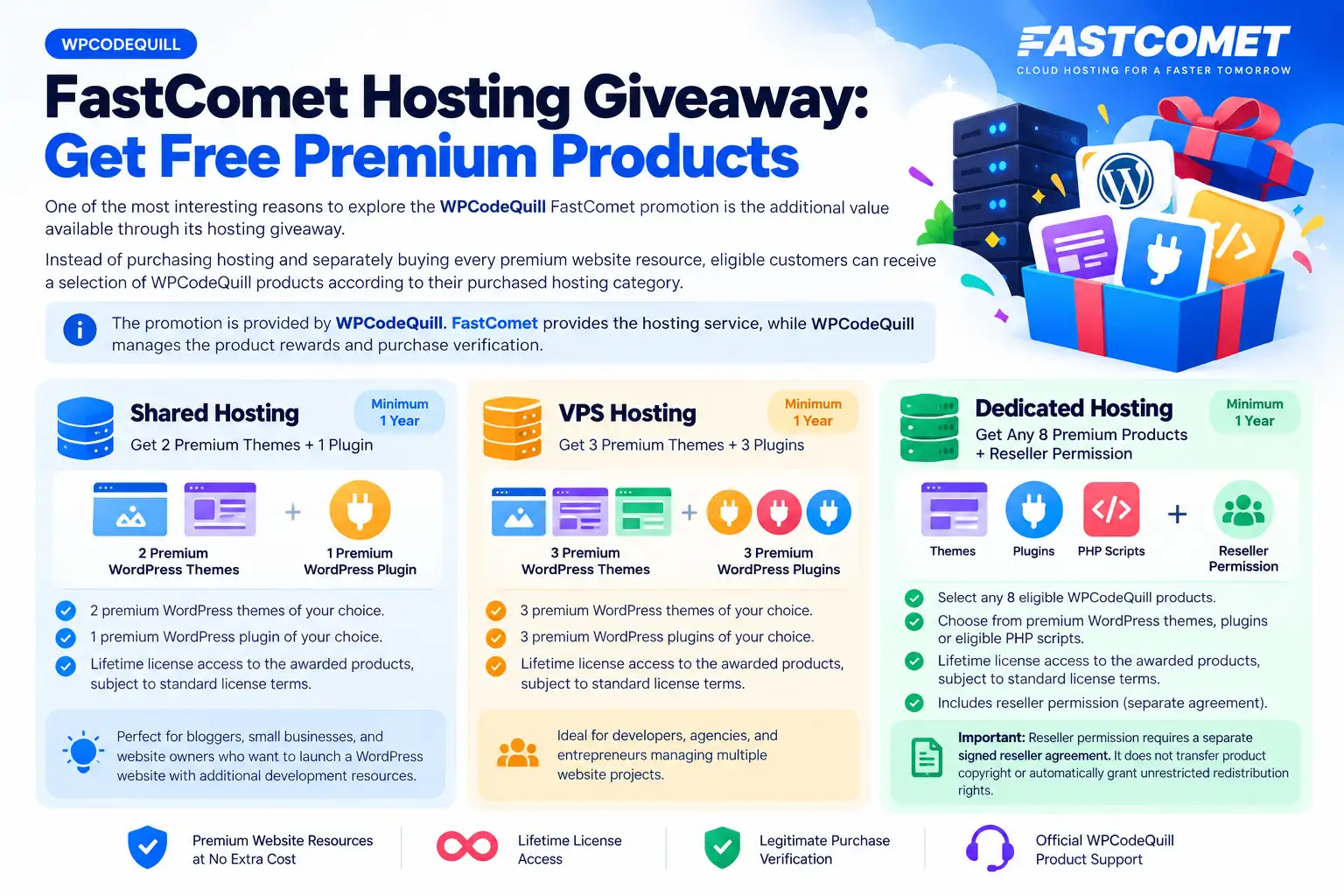
WPCodeQuill FastComet Hosting Giveaway: Get Free Premium Products
One of the most interesting reasons to explore the WPCodeQuill FastComet promotion is the additional value available through its hosting giveaway.
Instead of purchasing hosting and separately buying every premium website resource, eligible customers can receive a selection of WPCodeQuill products according to their purchased hosting category.
The promotion is provided by WPCodeQuill. FastComet provides the hosting service, while WPCodeQuill manages the product rewards and purchase verification.
Shared Hosting: Get 2 Premium Themes + 1 Plugin
Customers purchasing an eligible FastComet Shared Hosting package with a minimum one-year subscription can claim:
- 2 premium WordPress themes of their choice.
- 1 premium WordPress plugin of their choice.
- Lifetime license access to the awarded products, subject to standard license terms.
This package is suitable for website owners who want to launch a WordPress website and receive additional development resources.
For example, a blogger may select a content-focused theme and a business-style theme for different projects, together with a plugin that provides functionality for their website.
VPS Hosting: Get 3 Premium Themes + 3 Plugins
Customers purchasing eligible FastComet VPS Hosting with a minimum one-year subscription can claim six premium products:
- 3 premium WordPress themes of their choice.
- 3 premium WordPress plugins of their choice.
- Lifetime license access to the awarded products, subject to standard license terms.
This package offers more product choices for developers, agencies, and entrepreneurs managing multiple website projects.
Dedicated Hosting: Get Any 8 Premium Products + Reseller Permission
Customers purchasing eligible FastComet Dedicated Hosting with a minimum one-year subscription can claim any eight eligible WPCodeQuill products.
The selection can include:
- Premium WordPress themes.
- Premium WordPress plugins.
- Eligible PHP scripts.
The dedicated hosting reward package also advertises WPCodeQuill reseller permission.
Important reseller condition: Reseller permission requires a separate signed reseller agreement. It does not transfer product copyright or automatically grant unrestricted redistribution rights.
FastComet giveaway comparison
| Benefit | Shared | VPS | Dedicated |
|---|---|---|---|
| Minimum subscription | 1 year | 1 year | 1 year |
| Premium themes | 2 | 3 | Part of 8-product selection |
| Premium plugins | 1 | 3 | Part of 8-product selection |
| PHP scripts | Not included | Not included | Eligible selection |
| Total products | 3 | 6 | 8 |
| Lifetime license access | Yes | Yes | Yes |
| Reseller permission | No | No | Separate agreement |
Product selection is subject to the applicable giveaway package limits and standard licensing terms.
How to Purchase FastComet Hosting Through WPCodeQuill
To qualify for the WPCodeQuill giveaway, you must purchase an eligible FastComet hosting package through the designated WPCodeQuill affiliate link.
Simply visiting FastComet directly or purchasing through an unrelated coupon website does not satisfy the published giveaway purchase requirement.
Step 1: Visit the official WPCodeQuill FastComet offer page
First, open the dedicated FastComet hosting promotion page:
Visit WPCodeQuill FastComet Hosting Giveaway
Read the hosting categories, free product benefits, eligibility conditions, and claim instructions before continuing.
Step 2: Choose your hosting category
Select the hosting category that matches your website requirements and desired giveaway package.
- Choose Shared Hosting for a suitable beginner or smaller website project.
- Choose VPS Hosting if your application requires a more capable server environment.
- Choose Dedicated Hosting if your project genuinely needs dedicated infrastructure.
Remember that the free product selection depends on the purchased hosting category, not simply on how much you spend on separate WPCodeQuill products.
Step 3: Click the official FastComet purchase link
Use the purchase button provided on the WPCodeQuill FastComet offer page.
This is an important step because the promotion requires a purchase through the official WPCodeQuill affiliate link.
After clicking the link, you will be directed to FastComet's hosting website to complete your hosting order.
Step 4: Select an eligible hosting plan
Review the available FastComet hosting options and choose a suitable package.
Check the resources, website limits, storage, subscription duration, and other technical details. Make sure that the selected service matches the category you intend to claim under the WPCodeQuill promotion.
Step 5: Select a minimum one-year subscription
The WPCodeQuill giveaway requires a minimum hosting subscription of one year.
Review the billing duration carefully before continuing. If you select a shorter subscription, your purchase will not satisfy the published minimum-term requirement.
Step 6: Review the complete payment amount
Before paying, inspect the checkout summary.
- Confirm the selected FastComet hosting plan.
- Check the subscription duration.
- Review the total upfront payment.
- Check applicable taxes and optional services.
- Review the renewal price.
- Read FastComet's refund and cancellation policy.
The WPCodeQuill giveaway page does not specify a mandatory coupon code. The important requirement is using its designated affiliate purchase link.
Step 7: Complete your hosting purchase
Provide the requested account and billing information and complete payment through FastComet's official checkout.
Use an active email address that you can access. You will need your registered FastComet email when submitting the WPCodeQuill reward claim.
After purchasing, save your invoice, order confirmation, hosting plan name, purchase date, and account details.
Step 8: Wait for the applicable refund period to expire
Do not submit your reward claim immediately after purchasing.
The published WPCodeQuill promotion requires the applicable FastComet refund period to be completely completed before the rewards are issued.
The purchase must remain valid and must not be refunded or cancelled.
Check the applicable refund period directly with FastComet rather than assuming a fixed number of days for every hosting category.
How to Claim Your Free WPCodeQuill Products
After completing the required hosting subscription and refund-period conditions, you can submit your giveaway claim.
Step 1: Open the giveaway claim page
Visit the official FastComet hosting giveaway page.
Find the Submit Your Giveaway Claim section and prepare the required information.
Step 2: Complete the claim form
The published form requests the following information:
- Full name.
- Contact email.
- FastComet registered email.
- Hosting category.
- Hosting plan name.
- Purchase date.
- Invoice or order reference, if available.
Provide accurate information that matches your FastComet account and purchase details.
Step 3: Complete WhatsApp verification
After submitting the claim, follow the verification instructions provided by WPCodeQuill through WhatsApp.
Keep your hosting invoice and order confirmation available in case purchase verification requires additional information.
Step 4: Select your eligible products
Once your purchase has been successfully verified, you can select products according to your hosting category.
For example:
- Shared Hosting customers select two themes and one plugin.
- VPS Hosting customers select three themes and three plugins.
- Dedicated Hosting customers select any eight eligible themes, plugins, or PHP scripts.
Step 5: Receive your product license details
After successful verification and product selection, WPCodeQuill provides the awarded product lifetime license activation details.
Follow the activation instructions supplied with your selected products. Keep your license information secure and review the applicable license agreement for usage, updates, activation limits, and reseller conditions.
How to Use FastComet Hosting After Purchase
After activating your hosting account, the next step is to configure your website. For WordPress users, the process can be completed through the hosting control panel.
Step 1: Log in to your FastComet account
Open the FastComet client area and sign in using your registered email and password.
Locate your active hosting service and use the available control-panel login option.
FastComet provides documentation covering its cPanel environment and website management tools.
Read the official FastComet cPanel tutorials.
Step 2: Connect your domain
If you registered a domain with another company, you can generally connect it to your hosting account by configuring its DNS records or nameservers.
Use the exact DNS information supplied by FastComet. Before changing existing DNS settings, save the current configuration, especially if your domain is already connected to business email services.
Wait for the DNS changes to become visible and test the domain before continuing.
Step 3: Enable SSL
HTTPS is important for protecting communication between website visitors and your website.
Check the SSL options available with your FastComet plan and activate the appropriate certificate for your domain.
After activation, test your website using the HTTPS address and ensure that WordPress uses the correct secure website URL.
Step 4: Install WordPress
FastComet documents WordPress installation through available application management tools and manual installation.
If your hosting account includes an appropriate installer, the general process is:
- Open cPanel.
- Locate the WordPress installation or management tool.
- Select your domain.
- Choose the installation directory.
- Enter your website title and administrative email.
- Create a strong administrator username and password.
- Review the installation settings.
- Complete the installation.
- Log in to your WordPress dashboard.
If you prefer manual installation, FastComet's documentation explains how to upload WordPress files, create a MariaDB database, configure the installation, and create an administrator account.
Read FastComet's manual WordPress installation guide.
Step 5: Install your WPCodeQuill theme and plugin rewards
Once your WordPress website is operational and your product claims have been approved, you can install the selected WPCodeQuill themes and plugins.
The general process is:
- Download the awarded product files using the supplied instructions.
- Log in to your WordPress administration dashboard.
- Open Appearance and then Themes to install a theme.
- Alternatively, open Plugins and select Add New Plugin to upload a plugin ZIP file.
- Activate the installed product.
- Enter the license information when required.
- Configure the available product settings.
- Test the website to ensure everything works correctly.
Always verify compatibility with your WordPress version, PHP version, and other installed extensions before activating a new product.
Why Are Premium Themes, Plugins, and PHP Scripts Useful?
Building a website often requires more than hosting and a domain. You may also need a suitable design, additional functionality, and tools for managing content or business operations.
Premium WordPress themes
A WordPress theme controls much of your website's visual presentation, including layouts, typography, navigation, and content display.
A suitable theme can help you create:
- Professional business websites.
- Blogs and news portals.
- Portfolio websites.
- Product landing pages.
- Educational websites.
Explore the WPCodeQuill premium WordPress themes collection to understand the types of design resources available.
Premium WordPress plugins
Plugins extend WordPress functionality without requiring you to build every feature from scratch.
Depending on your project, plugins can help with:
- Website administration.
- SEO-related functionality.
- WooCommerce customization.
- Content management.
- Website optimization.
- Additional business features.
Browse the WPCodeQuill WordPress plugins collection for available extensions.
PHP scripts
PHP scripts can be useful when building applications that operate independently of WordPress.
For example, a developer may want to create a job portal, directory website, membership platform, or other custom web application.
Dedicated Hosting customers can select eligible PHP scripts as part of their eight-product reward selection.
Explore the WPCodeQuill PHP scripts collection.
Important Things to Check Before Purchasing FastComet
Although the giveaway provides additional value, your hosting purchase should primarily be based on your website's technical requirements.
1. Initial price and renewal price
Check the promotional price and the regular renewal price. Some hosting offers require payment for a complete subscription term even when the advertised amount is shown as a monthly equivalent.
2. CPU and RAM
CPU and memory affect the processing resources available to your website. Dynamic websites with many plugins, database queries, or active users should be evaluated carefully.
3. Storage and website limits
Check the storage allowance and the number of websites supported by your selected plan. Also consider database limits and file or inode restrictions.
4. Backup and recovery
Understand the backup frequency, retention period, restoration procedure, and any additional charges. Maintain independent backups for important websites.
5. PHP compatibility
Developers should check the PHP versions and extensions available with the hosting plan.
For example, if your PHP application requires PHP 8.2, verify that PHP 8.2 is available and that the required extensions and database configuration are supported.
6. Migration assistance
If you are moving an existing website, check the available migration allowance and whether the hosting provider assists with files, databases, DNS, and email configuration.
7. Refund policy
Read FastComet's applicable refund and cancellation terms. This is especially important because the WPCodeQuill reward is issued only after the applicable refund period has expired and the purchase remains valid.
Advantages and Limitations of the WPCodeQuill FastComet Offer
| Advantages | Important limitations |
|---|---|
| Additional premium themes and plugins. | Minimum one-year hosting subscription. |
| Six products with the VPS reward package. | Rewards are not issued immediately. |
| Eight eligible products with Dedicated Hosting. | Purchase must use the designated affiliate link. |
| Lifetime license access to awarded products. | Standard license conditions still apply. |
| Reseller permission for the Dedicated package. | Requires a separate signed reseller agreement. |
The main benefit is the additional software value associated with an eligible hosting purchase. However, the promotion should not be confused with free hosting. Customers still pay FastComet for their hosting subscription.
Common Mistakes to Avoid When Purchasing
- Purchasing directly without the designated link: The giveaway requires the official WPCodeQuill affiliate purchase link.
- Selecting a subscription shorter than one year: This does not meet the published minimum eligibility requirement.
- Expecting immediate rewards: You must wait for the applicable refund period to expire.
- Using incorrect account information: Ensure that your FastComet registered email matches the information supplied in your claim.
- Assuming a coupon is mandatory: The published FastComet giveaway specifies an affiliate link, not a mandatory coupon code.
- Ignoring renewal costs: Compare the introductory payment with the regular renewal amount.
- Choosing an unsuitable plan: Select hosting according to your actual website requirements.
- Misunderstanding lifetime licensing: Lifetime license access is subject to the standard license agreement and does not automatically mean unlimited redistribution or copyright ownership.
Conclusion: Is FastComet Hosting Worth Considering?
FastComet Hosting is worth evaluating if you need a hosting environment for a WordPress website, business project, blog, or compatible PHP application.
Its shared hosting plans provide different resource levels, while VPS and Dedicated Hosting are options for projects with more demanding infrastructure requirements. The correct choice depends on your budget, application requirements, website traffic, and technical needs.
The additional WPCodeQuill giveaway makes the offer particularly interesting for website owners and developers who also need premium website resources.
With an eligible one-year Shared Hosting subscription, you can claim two premium themes and one plugin. VPS Hosting offers three themes and three plugins, while Dedicated Hosting offers a selection of eight eligible themes, plugins, or PHP scripts, together with reseller permission subject to a separate agreement.
To qualify, remember to purchase through the official WPCodeQuill FastComet affiliate link, complete the applicable hosting refund period, and submit your claim for verification.
Before ordering, review the FastComet plan specifications, total payment, renewal pricing, refund conditions, and website requirements. Making an informed decision will help you get more value from your hosting subscription.
Ready to get started?
Visit the dedicated WPCodeQuill FastComet offer page, choose your eligible hosting category, follow the official purchase link, and review the giveaway conditions before completing your order.
Get FastComet Hosting + Claim Your Free Premium Products
Promotional disclosure: The FastComet hosting service is provided by FastComet. The premium product giveaway described in this article is provided by WPCodeQuill and is subject to its eligibility requirements and standard license terms. WPCodeQuill uses an affiliate purchase link for this offer and may receive a referral commission from qualifying purchases. Always review the current terms before ordering.
Frequently Asked Questions
Q: What is the WPCodeQuill FastComet hosting giveaway?
It is a WPCodeQuill promotion that provides eligible FastComet hosting customers with premium WordPress themes, plugins, and PHP scripts. The number and type of products depend on the hosting category purchased.
Q: How many free products can I receive with FastComet Shared Hosting?
Eligible Shared Hosting customers can claim two premium WordPress themes and one premium WordPress plugin, making three products in total.
Q: What do I get with FastComet VPS Hosting?
Eligible VPS Hosting customers can claim three premium WordPress themes and three premium plugins, making six products in total.
Q: What is included with FastComet Dedicated Hosting?
Eligible Dedicated Hosting customers can select any eight eligible WPCodeQuill products, including WordPress themes, plugins, and PHP scripts. The package also advertises reseller permission, subject to a separate signed agreement.
Q: Do I need a coupon code to claim the FastComet giveaway?
The dedicated WPCodeQuill giveaway page does not specify a mandatory coupon code. It requires customers to complete their purchase through the official WPCodeQuill FastComet affiliate link.
Q: When will I receive my free products?
You can submit your claim after the applicable FastComet refund period has completely expired. WPCodeQuill must verify that your purchase is valid, eligible, and not refunded or cancelled before issuing the rewards.
Q: Can I choose my own themes and plugins?
Yes. The promotion allows customers to select eligible products according to their purchased package limits. Shared customers select two themes and one plugin, VPS customers select three themes and three plugins, and Dedicated customers select any eight eligible products
Q: Does WPCodeQuill provide hosting support?
FastComet provides the hosting service, hosting infrastructure, billing, technical hosting support, and refund arrangements. WPCodeQuill manages the separate product giveaway, eligibility verification, and awarded product license information.



Discussion (0)
Join the Conversation
Please log in to post a comment.
Log In to Comment