
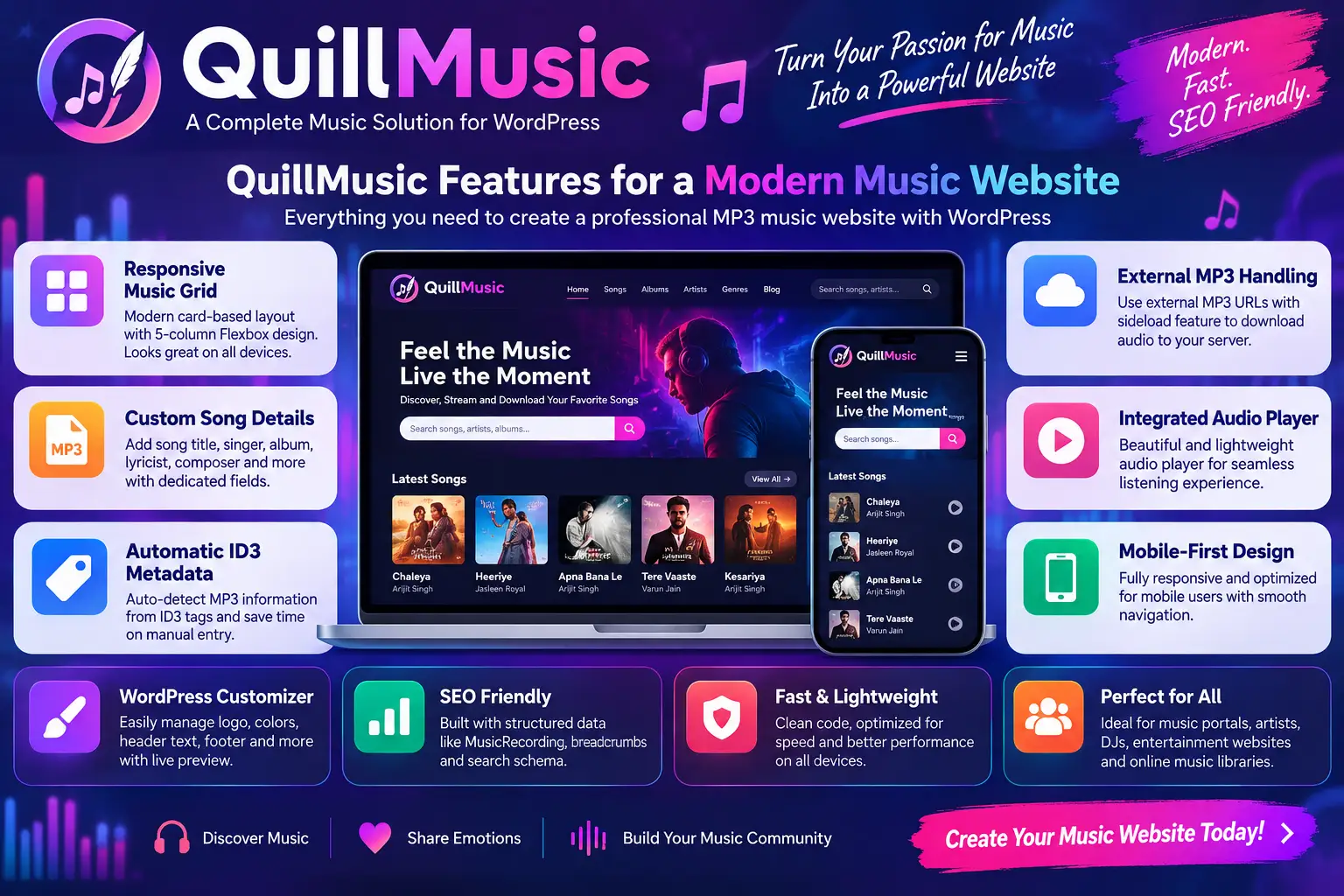
QuillMusic – MP3 Music WordPress Theme Like PagalWorld
Building a music-focused website with WordPress can be much easier when the theme is designed around songs, artists, albums, audio players, categories, search pages, and mobile browsing from the beginning. A general-purpose blog theme can publish music, but it may require considerable customization before it feels like a dedicated music portal.
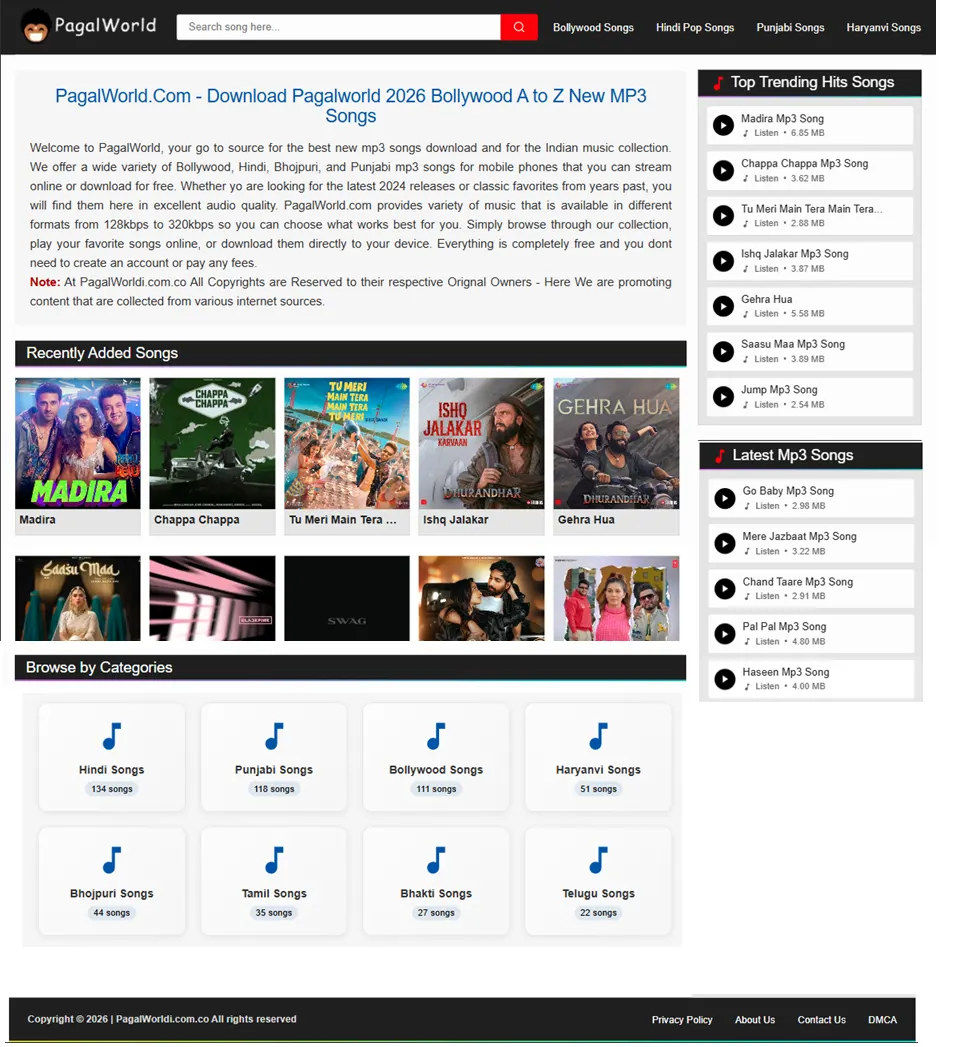
QuillMusic – MP3 Music WordPress Theme Like PagalWorld is designed for exactly this type of project. WPCodeQuill describes QuillMusic as a mobile-first WordPress theme for music websites, MP3 portals, song websites, entertainment platforms, artists, DJs, and other music-focused projects. Its feature set includes a responsive music grid, dedicated song information fields, MP3 metadata handling, external MP3 importing, an integrated audio player, and music-oriented schema markup. View the QuillMusic WordPress Theme to see its current features and product details.
The phrase “PagalWorld WordPress Theme” or “WP Pagal Song Theme” is commonly useful as a search description for a familiar music-portal-style layout: a homepage containing song cards, categories, artist information, search, audio playback, and a simple browsing experience. It should not, however, be interpreted as an official connection with any third-party website or brand.
There is also an important distinction between the design of a music website and the rights to the music published on it. A WordPress theme can provide the technical interface for organizing and displaying audio, but it does not automatically give a site owner permission to redistribute copyrighted recordings. Music publishers should only upload, stream, or distribute audio for which they have the necessary rights, licenses, permission, or another valid legal basis. The U.S. Copyright Office explains that musical works and sound recordings can involve separate copyright-protected works and that use of another creator's material generally requires an appropriate legal basis. Read the U.S. Copyright Office guidance for musicians.
What Is QuillMusic?
QuillMusic is a WordPress theme built specifically around music publishing and music discovery. Instead of treating a song as an ordinary blog article, it adds a workflow centered on fields such as song title, singer, album, lyricist, composer, and MP3 information.
According to the current WPCodeQuill product page, QuillMusic includes a modern card-based interface, a responsive five-column Flexbox music grid, an MP3 meta box, automatic ID3 metadata extraction, external MP3 handling, an inline audio player, WordPress Customizer integration, and music-related structured data features.
This approach can be useful for several different types of websites:
- Independent artist websites
- Music blogs and review websites
- Legal music download portals
- Licensed promotional music sites
- DJ and producer websites
- Entertainment websites
- Podcast or audio-oriented publishing projects
- Music discovery websites
- Websites featuring original or royalty-cleared audio
The main advantage of a specialized theme is not simply visual design. It is the combination of presentation and workflow. When the content model, front-end layout, audio player, metadata fields, and mobile navigation all support the same publishing objective, maintaining a large music library can become more organized.
Why Choose an MP3 Music WordPress Theme?
A music website behaves differently from a normal blog. Visitors may arrive looking for a particular song, singer, album, genre, playlist, or audio preview. They often want to identify content quickly, see the important metadata, play an audio sample, and continue browsing related content.
A dedicated music theme can make these actions more obvious.
| General Blog Theme | Music-Focused Theme |
|---|---|
| Article-first presentation | Song and audio-first presentation |
| Generic featured image layouts | Music cards and media-focused layouts |
| Standard post metadata | Fields for singer, album, composer and related information |
| Generic media handling | Dedicated MP3 publishing workflow |
| Navigation designed for articles | Navigation designed for songs, categories and artists |
This does not mean a generic WordPress theme cannot build a music site. It can. The difference is how much customization is required to make the visitor experience feel purpose-built.
QuillMusic Features for a Modern Music Website
Responsive Music Grid
Music websites frequently display many songs on the same page, so the visual hierarchy needs to work across desktop, tablet, and mobile screens. QuillMusic uses a responsive card-based music grid designed to keep song browsing compact and organized. The current product page describes a five-column Flexbox layout and fluid responsive behavior.
This type of presentation can be especially useful for:
- Latest songs
- Popular tracks
- Genre archives
- Artist archives
- Search results
- Album pages
- Music category pages
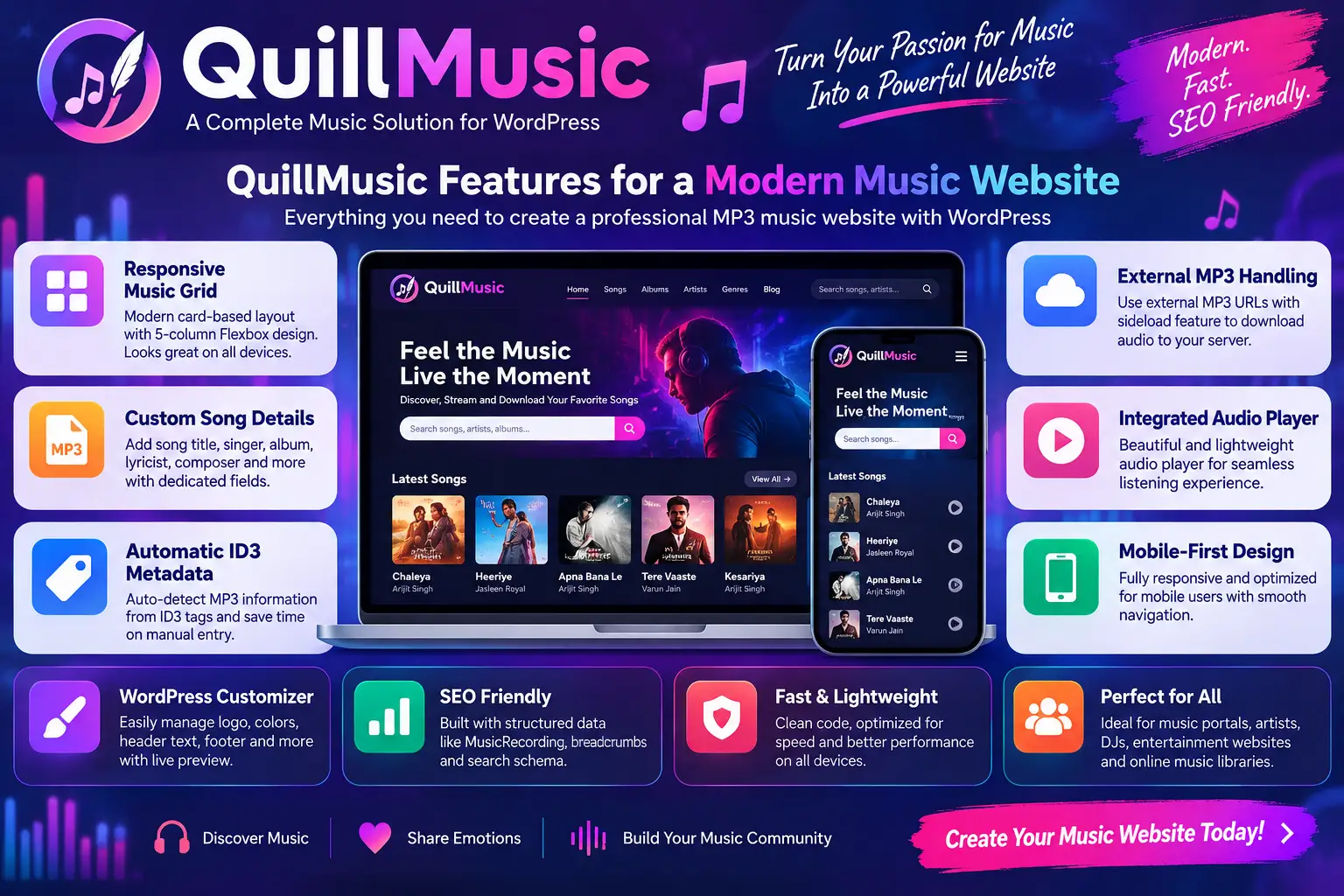
Custom Song Details and MP3 Fields
One of the most useful concepts in a music site is structured song information. Instead of putting every detail into a long paragraph, dedicated fields can make important metadata easier to manage and display consistently.
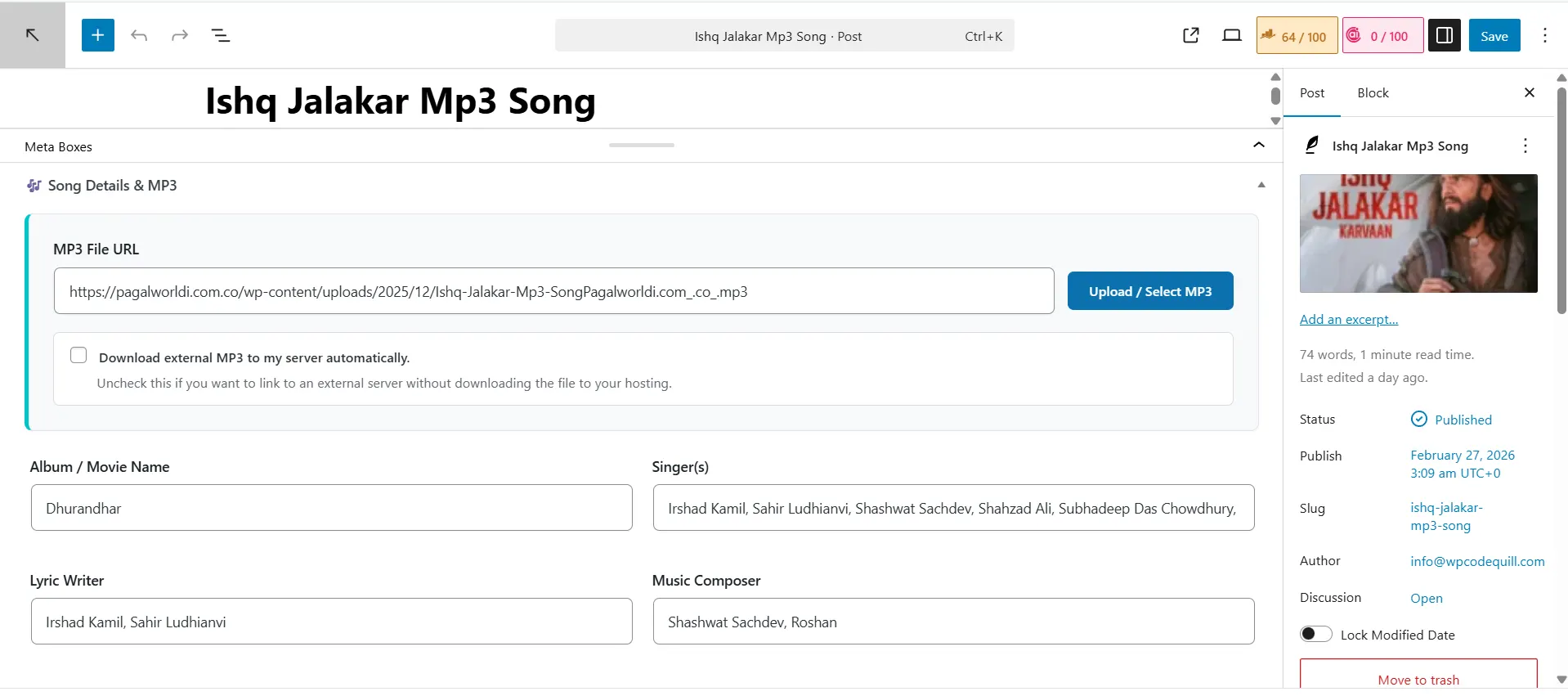
QuillMusic's current feature list includes dedicated fields for information such as album, singer, lyricist, and composer. This gives administrators a repeatable publishing workflow instead of creating each song page from scratch.
Consistent metadata can also make a large music library easier for visitors to navigate. When each song uses the same fields, readers quickly learn where to look for the artist, album, composer, or other information.
Automatic ID3 Metadata Detection
Manually entering music information for hundreds of files can become repetitive. QuillMusic includes an ID3 metadata feature that can read available information from MP3 files and use it to populate supported song details.
This can reduce repetitive data entry, but it should still be treated as an assistance feature rather than a replacement for editorial review. Metadata embedded in an audio file can be incomplete, outdated, incorrectly formatted, or inconsistent with the information you want to publish.
A good workflow is to let the theme retrieve available metadata, then review the title, artist, album, composer, and other fields before publishing.
External MP3 Handling
QuillMusic supports an external MP3 URL workflow. According to the product documentation, administrators can provide an external MP3 URL, with the theme supporting a sideloading process that can download the audio to the site's server.
This can be useful when the original audio file is hosted elsewhere or when a publisher has a controlled storage workflow.
However, the technical ability to import an audio file does not create permission to copy it. Before downloading or re-hosting external audio, confirm that the source permits the use and distribution method you intend to use.
Integrated Audio Player
An audio player is an important part of a music website because visitors may want to preview content without leaving the page.
WordPress itself supports native audio embedding through its Audio block. The official WordPress documentation explains that the Audio block can embed music, podcasts, and other sound files directly into a page or post. See the official WordPress Audio block documentation.
QuillMusic extends the music-focused approach by providing an integrated player within its theme experience, making the audio interface part of the overall song layout.
Mobile-First Interface
A large percentage of music discovery can happen on smartphones, so a music portal needs to be comfortable on small screens. QuillMusic is described by WPCodeQuill as mobile-first and includes responsive navigation and fluid grids.
For a mobile visitor, good design means more than shrinking the desktop page. Buttons should remain easy to tap, song titles should remain readable, audio controls should be accessible, menus should be simple, and content should not become crowded.
QuillMusic and the “PagalWorld-Style” Music Website Concept
When people search for a PagalWorld WordPress Theme or WP Pagal Song Theme, they may be looking for a recognizable music-portal structure rather than a specific piece of software.
That structure often includes:
- A music-heavy homepage
- Song thumbnails or cover art
- Artist and album information
- Genre and category browsing
- Search functionality
- Individual song pages
- Audio playback
- Mobile navigation
- Large libraries organized into clear sections
QuillMusic is built around similar music-site requirements, but its practical use should depend on the content you are legally entitled to publish.
For example, the same visual architecture could be used for a site publishing independent artists, licensed promotional releases, public-domain recordings, original compositions, podcasts, DJ mixes where redistribution is permitted, or a catalog of tracks supplied by participating artists.
This distinction is important for long-term website quality. A professional music business should build its design around a legitimate content strategy rather than assuming that a theme itself provides music rights.
How to Build a Music Website With QuillMusic
Step 1: Choose Your Music Website Model
Before installing a theme, decide what the website will publish.
Possible models include an independent artist portal, music magazine, licensed download site, original music library, DJ platform, soundtrack archive, or entertainment publication.
Your content model determines what categories, metadata, storage, licensing, and navigation you will need.
Step 2: Prepare WordPress Hosting
Your hosting environment should be suitable for WordPress and for the amount of audio content you expect to manage. Storage requirements can increase quickly when a website hosts many audio files, especially high-bitrate files or multiple versions of recordings.
Before choosing a plan, compare storage, database resources, backup options, PHP support, SSL, server limits, and expected traffic.
You can also review the WPCodeQuill hosting guide when evaluating hosting options.
WordPress currently recommends PHP 8.3 or greater, MariaDB 10.6 or greater or MySQL 8.0 or greater, and HTTPS for new installations. Always check the current WordPress requirements because software requirements can change over time. See the official WordPress requirements.
Step 3: Install WordPress
Set up WordPress on your chosen hosting account and confirm that the administrative dashboard, database, SSL certificate, and domain configuration are working correctly.
For a more detailed setup workflow, see WPCodeQuill's WordPress installation guide.
Step 4: Install and Activate QuillMusic
WPCodeQuill's current instructions use the normal WordPress theme installation workflow: open the WordPress dashboard, go to Appearance, add a new theme, upload the QuillMusic ZIP file, install it, and activate it. The product also includes a dedicated license section for license activation.
Once the theme is active, review the available Customizer settings and establish the visual identity of the site.
Step 5: Configure Your Branding
Use a clear site logo, an easy-to-read navigation structure, consistent cover artwork, and a recognizable typography system.
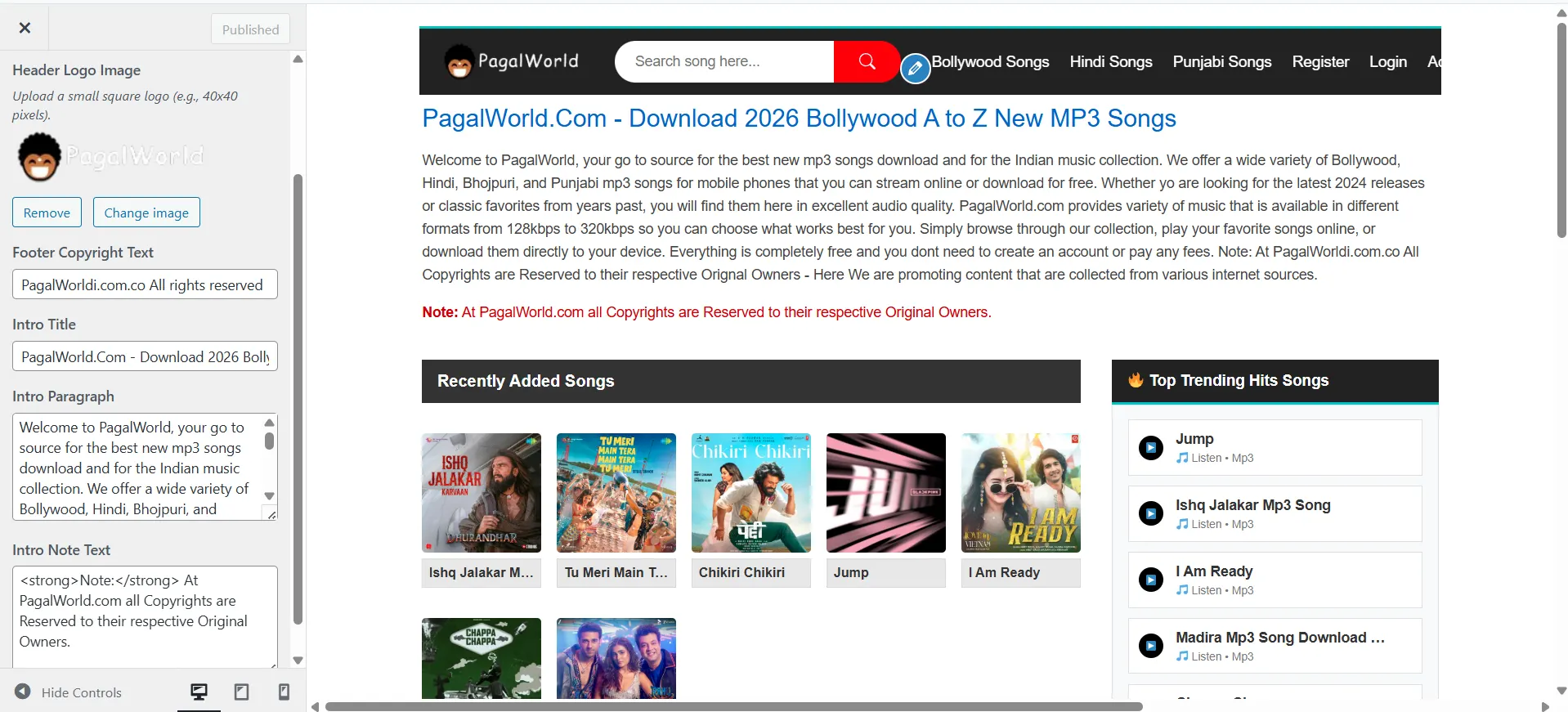
According to the current product documentation, supported Customizer options include the header logo, homepage introduction text, and footer text.
Step 6: Create Your Music Taxonomy
A good music website needs logical organization. Depending on your project, you might create categories around genres, languages, artists, years, moods, formats, or release types.
Avoid creating dozens of tiny categories simply because they are possible. A smaller number of useful categories can be easier for both readers and administrators.
Step 7: Add Songs Carefully
Create a new post and enter the song information using the dedicated song fields. Upload the authorized audio file or use an approved external source according to your workflow.
Review automatically detected metadata before publication. Check the title, artist, album, cover image, composer, and other information for accuracy.
Step 8: Test the Site on Mobile
Open your website on an actual smartphone and test the homepage, search, category pages, song pages, audio player, menus, buttons, and forms.
Do not assume that a responsive theme automatically means that every content block is perfect on every device. Your actual song titles, images, advertising, embeds, and customizations can change the experience.
SEO Best Practices for a QuillMusic Website
A specialized music theme can provide a good technical foundation, but SEO still depends heavily on the quality and usefulness of your content.
Google's guidance says that helpful, reliable, people-first content should be created primarily for people rather than search engines. It also encourages publishers to provide original information, useful details, clear authorship where appropriate, and substantial value. Read Google's guidance on helpful, reliable, people-first content.
Create Unique Song Pages
Do not publish hundreds of pages containing nothing except a song title and a download button. A useful song page can contain meaningful metadata, an introduction, artist information, release context, genre information, album details, credits, and an appropriate audio preview.
Use Descriptive Titles
Your page title should clearly explain what the user will find. A useful pattern might include the song title, artist, album, and release context when appropriate.
Build Useful Category Pages
Category pages should help visitors discover music rather than simply acting as automatically generated lists.
For example, a genre page could include a short introduction explaining the category, followed by curated song cards and related artists.
Write Useful Descriptions
Google's SEO documentation emphasizes useful, readable, well-organized content and advises publishers to create original material rather than simply rewriting information from other sources. Read Google's SEO Starter Guide.
For a music website, that could mean adding original artist biographies, release explanations, genre guides, music reviews, production notes, interviews, playlist descriptions, and educational material.
Use Relevant Structured Data Carefully
QuillMusic's product documentation lists MusicRecording, CollectionPage, Breadcrumbs, and WebSite SearchAction schema among its SEO-oriented features.
Structured data should accurately describe the content that actually appears on the page. It should not be used to claim information that visitors cannot see or that does not accurately represent the page.
Copyright and Legal Considerations for MP3 Websites
This is one of the most important sections for anyone planning an MP3 website.
Music is not automatically free to reuse just because a file is available online. The U.S. Copyright Office explains that copyright can cover both musical compositions and sound recordings, and that using someone else's protected material generally requires permission, licensing, a public-domain work, or another applicable legal limitation or exception. Review the Copyright Office's musician guidance.
For a responsible music website, keep records of your rights and permissions. Depending on your business model and jurisdiction, relevant documentation might include:
- Ownership records
- Licensing agreements
- Artist permissions
- Distribution agreements
- Public-domain research
- Creative Commons license terms where applicable
- Records of original recordings
Do not assume that giving credit alone gives you permission to distribute an MP3. Attribution can be useful, but it does not automatically replace a license or permission requirement.
If your business model involves licensed downloads or streaming, obtain legal advice appropriate to your jurisdiction and the exact rights involved. Music licensing can involve different rights in compositions and recordings.
Performance and Speed Tips for Large Music Libraries
A music site can become media-heavy very quickly, so performance deserves attention from the beginning.
- Optimize cover images: Avoid uploading unnecessarily large images.
- Choose appropriate audio settings: Extremely large audio files can increase storage and bandwidth requirements.
- Use caching: Cache pages where appropriate while ensuring dynamic features continue to work.
- Limit unnecessary plugins: Only install tools that genuinely improve the site.
- Monitor hosting resources: Large libraries and traffic growth can change your server requirements.
- Keep the theme and WordPress updated: Maintenance is part of long-term website reliability.
WPCodeQuill also maintains a broader WordPress website design and development guide covering information architecture, responsive design, performance, security, SEO, and ongoing maintenance.
Best Practices for a Professional Music Portal
A good music website should feel organized before it feels complicated. Visitors should understand what the website offers within seconds.
Keep Navigation Simple
Use a small number of clear primary navigation items. Depending on your project, these might include Home, Artists, Albums, Genres, Latest Songs, and Contact.
Make Search Easy to Find
Search is especially valuable for large music libraries. Visitors who already know the artist or song title should be able to reach relevant content quickly.
Use Consistent Cover Artwork
Different image dimensions and inconsistent compositions can make a music grid look messy. Establish a standard artwork ratio and use it consistently.
Show Important Metadata Clearly
Visitors should not have to read an entire page just to discover the artist, album, genre, or release details.
Provide Context, Not Just Files
A website with useful editorial context can offer much more value than a directory of files. Consider interviews, artist profiles, reviews, genre guides, production stories, playlists, and music education content.
Common Mistakes to Avoid
Using Copyrighted Music Without Permission
The theme does not grant music distribution rights. Always confirm the rights associated with the recordings you publish.
Creating Thin Song Pages
Hundreds of nearly empty pages can create a poor user experience. Add meaningful, original information where it improves the visitor's understanding.
Ignoring Mobile Users
A desktop layout that looks perfect can still be uncomfortable on a phone. Test real devices rather than relying only on a desktop browser.
Uploading Huge Images
Large cover images can unnecessarily increase page weight. Resize and compress images before publishing.
Installing Too Many Plugins
More plugins do not automatically mean more functionality worth having. Each plugin should serve a clear purpose and be kept updated.
Relying Entirely on Automatic Metadata
ID3 extraction can save time, but automatic metadata should be reviewed. A human should catch spelling errors, inconsistent artist names, wrong albums, and incomplete information.
Using Keywords Repeatedly
There is no need to repeat “PagalWorld WordPress Theme” or “WP Pagal Song Theme” throughout every paragraph. Natural topical coverage is more useful than awkward repetition.
Who Is QuillMusic Best Suited For?
| Website Type | Potential Fit |
|---|---|
| Independent music website | Strong use case |
| Artist or DJ website | Useful for showcasing tracks and information |
| Music blog | Useful for combining articles and audio content |
| Licensed music portal | Suitable when the publisher has the necessary rights |
| Entertainment website | Useful for music-focused sections |
| Unauthorized music distribution site | Theme does not provide legal permission to distribute copyrighted music |
Frequently Asked Questions
1. What is QuillMusic – MP3 Music WordPress Theme Like PagalWorld?
QuillMusic is a dedicated WordPress theme for music-focused websites. It provides a responsive music layout, song metadata fields, MP3-related tools, audio playback functionality, and music-oriented SEO features. The “PagalWorld-like” description refers to the type of music-portal layout some users are searching for; it does not indicate an official relationship with a third-party service.
2. Can I use QuillMusic to create an MP3 download website?
Yes, the theme is designed for music and MP3 publishing workflows. However, you should only offer downloads or other forms of distribution for audio that you are legally entitled to publish and distribute. The theme itself does not grant copyright permissions.
3. Does QuillMusic support automatic MP3 metadata?
Yes. The current product documentation states that QuillMusic can read available ID3 information from MP3 files and use supported metadata to reduce manual data entry.
4. Can I use an external MP3 URL?
Yes. QuillMusic supports an external MP3 URL workflow, including a sideloading feature described on the current product page. Before importing any external audio, make sure you have the necessary permission or rights to do so.
5. Is QuillMusic mobile-friendly?
Yes. WPCodeQuill describes QuillMusic as mobile-first and includes responsive grids and mobile navigation as part of the theme's feature set.
6. Does WordPress support MP3 audio without a special theme?
Yes. WordPress includes native audio functionality through its Audio block, which can embed music and other sound files into posts and pages. A specialized theme such as QuillMusic adds a music-focused presentation and workflow on top of WordPress's core capabilities. See WordPress's official Audio block documentation.
7. Is QuillMusic an official PagalWorld theme?
No. QuillMusic is a WPCodeQuill product. The terms “PagalWorld WordPress Theme” and “WP Pagal Song Theme” may describe the type of design or search intent, but they should not be interpreted as an official partnership, endorsement, or ownership relationship.
8. Can QuillMusic help with SEO?
The product includes music-focused structured data features and a responsive layout, but a theme alone does not guarantee search rankings. Useful original content, accurate metadata, technical quality, accessibility, internal linking, and a good user experience all remain important. Google's guidance recommends creating helpful, reliable, people-first content rather than content designed primarily to manipulate rankings. Learn more from Google Search Central.
Conclusion
QuillMusic – MP3 Music WordPress Theme Like PagalWorld is positioned as a specialized WordPress solution for building a modern music-focused website. Instead of forcing site owners to assemble a generic theme, custom fields, audio interface, responsive grid, and music publishing workflow from separate components, QuillMusic brings many of those ideas together in one theme.
The current WPCodeQuill product information highlights features including a responsive five-column music grid, dedicated song metadata fields, ID3 tag extraction, external MP3 handling, an integrated audio player, WordPress Customizer options, mobile navigation, and music-related structured data.
For anyone searching for a PagalWorld WordPress Theme or WP Pagal Song Theme, the important question should not simply be whether the homepage looks similar to a familiar music portal. The more useful question is whether the theme gives you an efficient, maintainable, mobile-friendly, and organized publishing workflow for the type of music content you are legally allowed to publish.
That makes content rights, website structure, metadata accuracy, performance, SEO, and mobile usability just as important as the visual design.
For a serious music project, start with the content model, select suitable WordPress hosting, install and configure QuillMusic, establish consistent song metadata, optimize your media, test your pages on mobile devices, and publish only music for which you have appropriate rights or permissions.
When those fundamentals are in place, QuillMusic can provide a focused foundation for creating a professional music portal, artist website, entertainment platform, licensed music library, or original audio publishing website with WordPress.






Discussion (0)
Join the Conversation
Please log in to post a comment.
Log In to Comment