
Web Hosting Comparison
Choosing hosting can look simple until you start comparing plans. Almost every hosting company advertises fast servers, affordable pricing, SSL certificates, backups, website builders, WordPress support, and attractive introductory offers. The difficult part is figuring out which features actually matter for your particular website.
This web hosting comparison guide is designed to make that decision easier. Instead of focusing only on the cheapest advertised monthly price, we will compare the major types of web hosting, explain the features you should evaluate, discuss common hosting providers, and show how to choose a plan for WordPress, business websites, blogs, ecommerce stores, and PHP applications.
There is also an important difference between an introductory hosting price and the amount you may pay when the plan renews. That is why a proper comparison should look at the entire hosting package rather than one promotional number.
If you are considering Hostinger, WPCodeQuill also promotes the WPCODEQUILL coupon/referral option. The code should be treated as a way to check for an available promotional discount, while the final price and conditions should always be confirmed on Hostinger's checkout page.
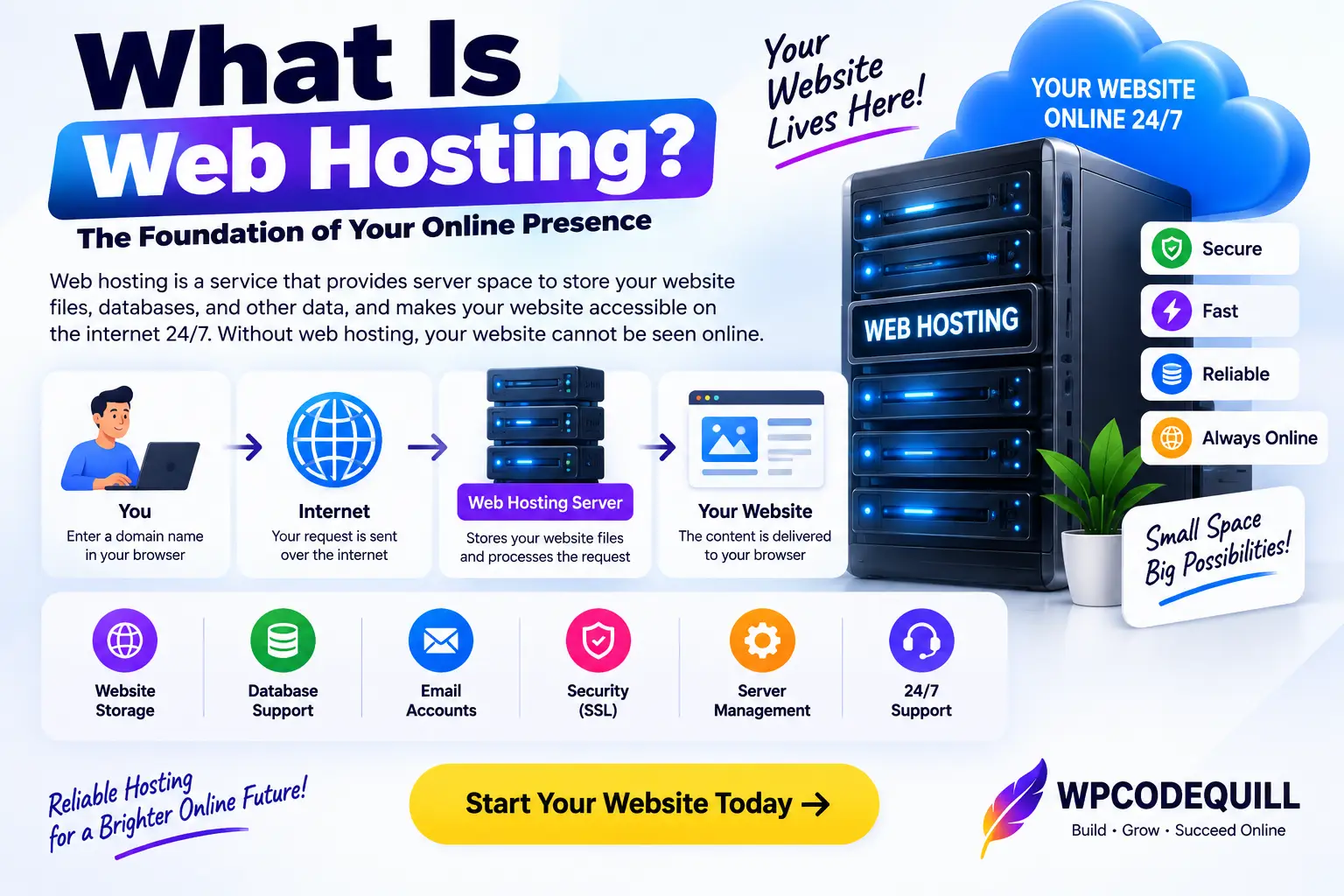
What Is Web Hosting?
Web hosting is the service that provides the server environment used to store and deliver your website files, databases, media, applications, and other resources to visitors.
When somebody enters your domain name into a browser, the browser needs to locate the server responsible for that website and request its content. The hosting server then processes the request and sends the required files or generated response back to the visitor.
For a WordPress website, this normally involves PHP, a database such as MySQL or MariaDB, HTTPS, a web server, and the WordPress application itself. WordPress currently recommends hosting that supports PHP 8.3 or newer, MySQL 8.0 or newer or MariaDB 10.11 or newer, and HTTPS. WordPress.org's official requirements are a useful reference when checking hosting compatibility.
For other applications, requirements can be different. A custom PHP script might need a particular PHP version and extensions, while a Node.js application may require specific runtime and deployment features.
Why a Web Hosting Comparison Matters
The cheapest hosting plan is not automatically the right hosting plan. A website that receives only a few visitors per day has very different needs from a busy WooCommerce store, a membership website, or a web application.
A useful comparison should consider the following:
- Website and application requirements
- CPU and memory resources
- Storage capacity and storage technology
- Number of websites allowed
- Database limits
- Backups and restoration options
- SSL and security features
- CDN and caching features
- Customer support
- Migration options
- Initial pricing and renewal pricing
- Scalability
These factors become particularly important when you plan to keep a website online for several years. A small difference in the initial price may be less important than whether the hosting plan can handle the website after it grows.
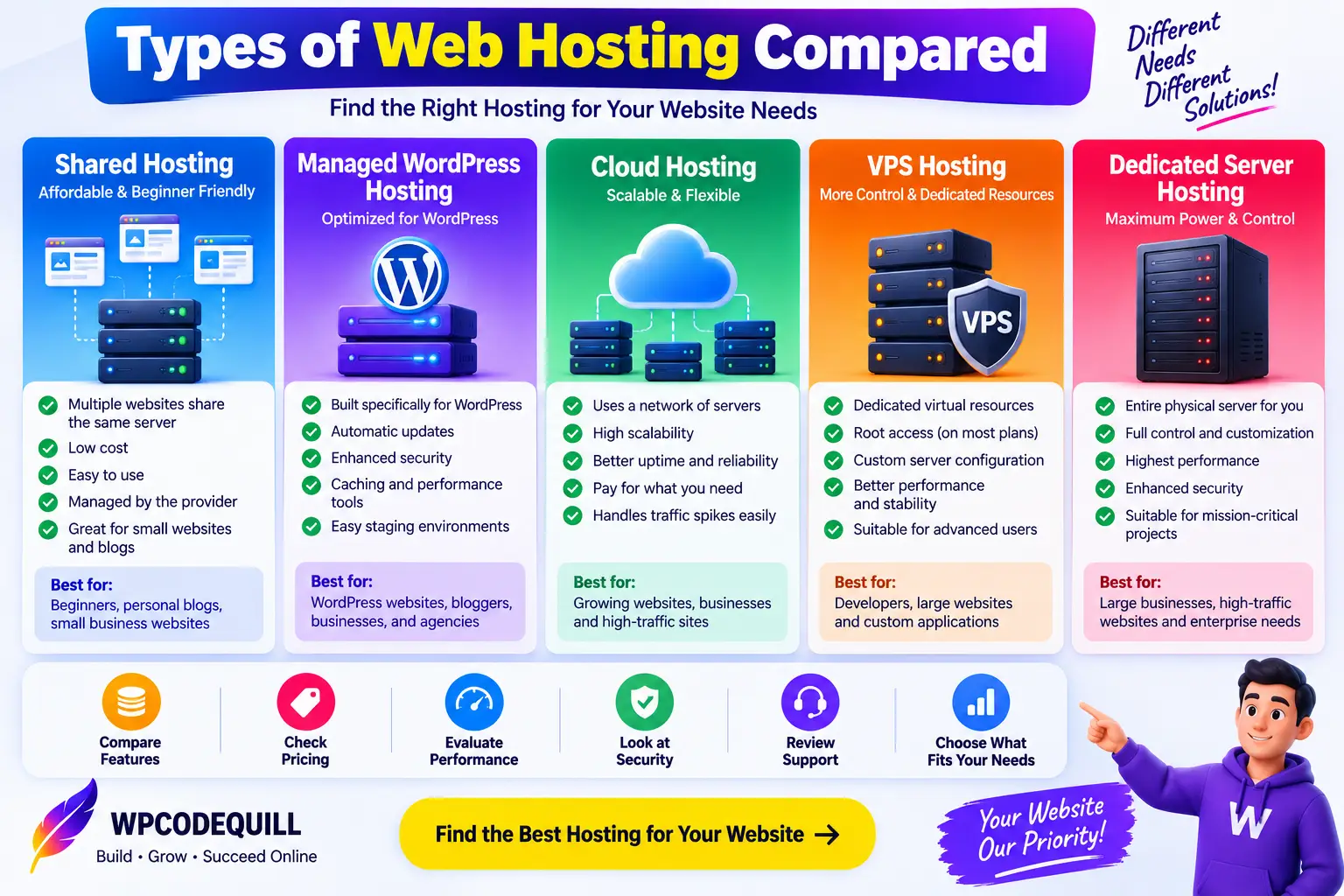
Types of Web Hosting Compared
The first part of a good web hosting comparison is understanding the major hosting categories.
Shared Web Hosting
Shared hosting places multiple websites on the same server environment. The infrastructure and underlying resources are shared among customers, which allows providers to sell hosting at relatively low prices.
Shared hosting is commonly used for blogs, portfolios, small business websites, landing pages, and new WordPress projects.
Advantages:
- Usually inexpensive to start
- Easy for beginners
- Managed server environment
- Suitable for many small websites
Limitations:
- Resources are shared
- Advanced server customization may be limited
- Very busy websites may eventually need more resources
For a new site, shared hosting can be a practical starting point as long as the selected plan meets the site's requirements.
Managed WordPress Hosting
Managed WordPress hosting is designed specifically for WordPress websites. Depending on the provider and plan, it may include automatic updates, caching, staging tools, backups, security features, WordPress-specific support, and simplified management.
This type of hosting is attractive to bloggers, businesses, agencies, and site owners who want to spend less time managing server details.
When comparing managed WordPress plans, look beyond the words “managed WordPress.” Check the actual inclusions because services vary significantly between providers and plans.
Cloud Hosting
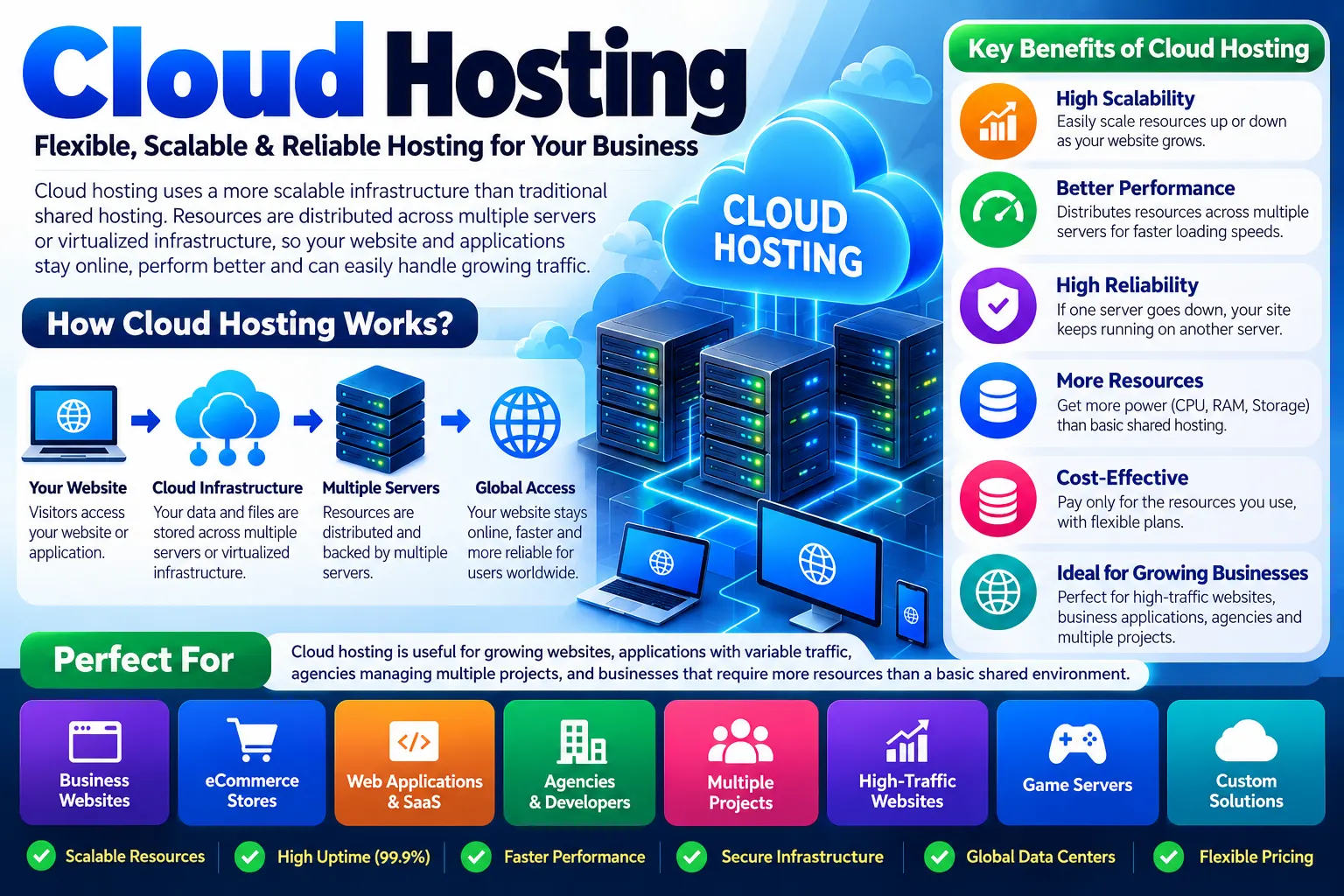
Cloud hosting uses a more scalable infrastructure than traditional shared hosting. Depending on the provider, resources may be distributed across or backed by multiple servers or virtualized infrastructure.
Cloud hosting can be useful for growing websites, applications with variable traffic, agencies managing multiple projects, and businesses that require more resources than a basic shared environment.
VPS Hosting
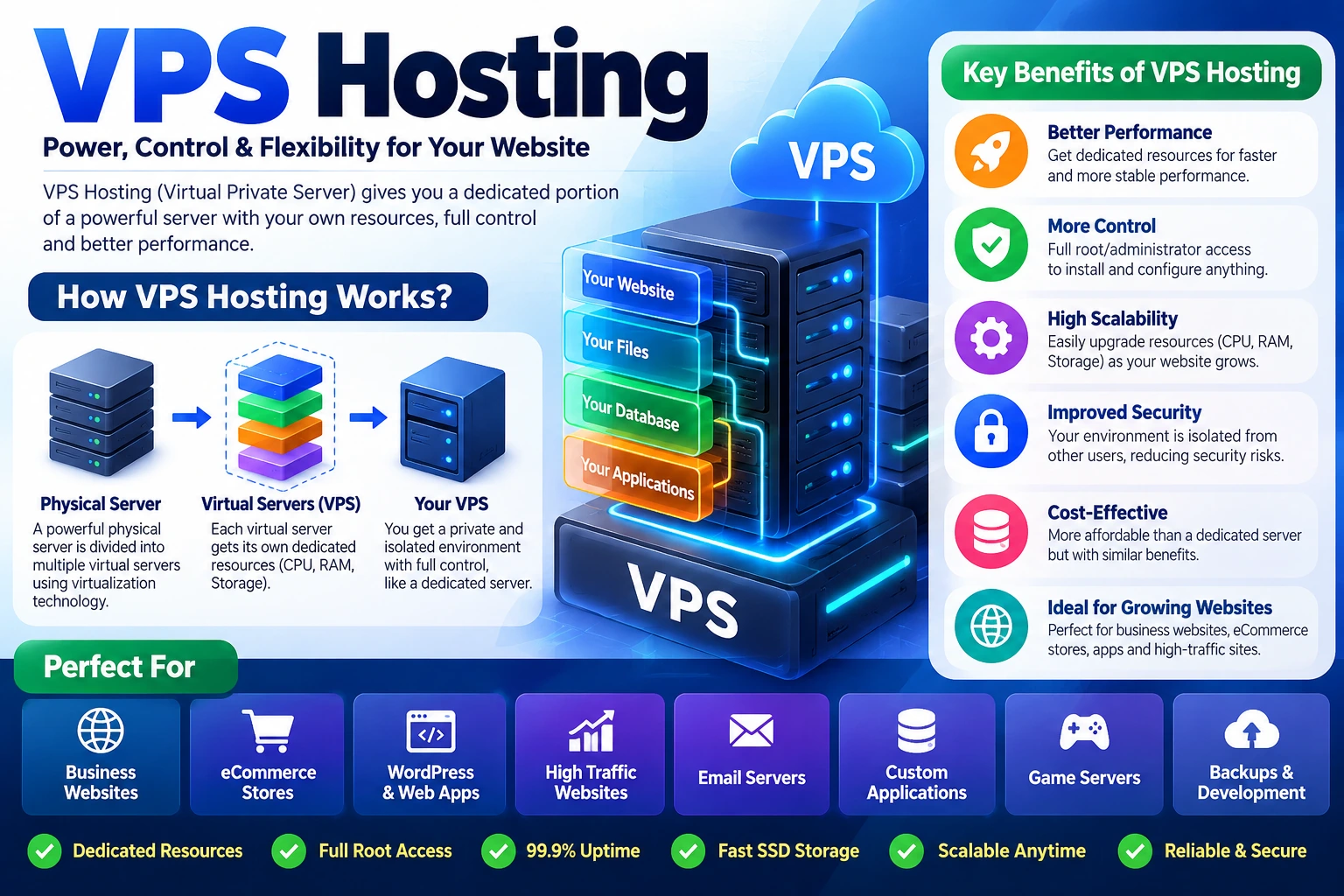
A virtual private server provides an isolated virtual server environment with greater control and dedicated resource allocations compared with traditional shared hosting.
VPS hosting can be a good fit for developers and businesses that need custom server configurations, specific software stacks, root-level access, or more predictable resources.
The trade-off is complexity. A VPS can require significantly more technical knowledge, especially when the server is unmanaged.
Dedicated Server Hosting
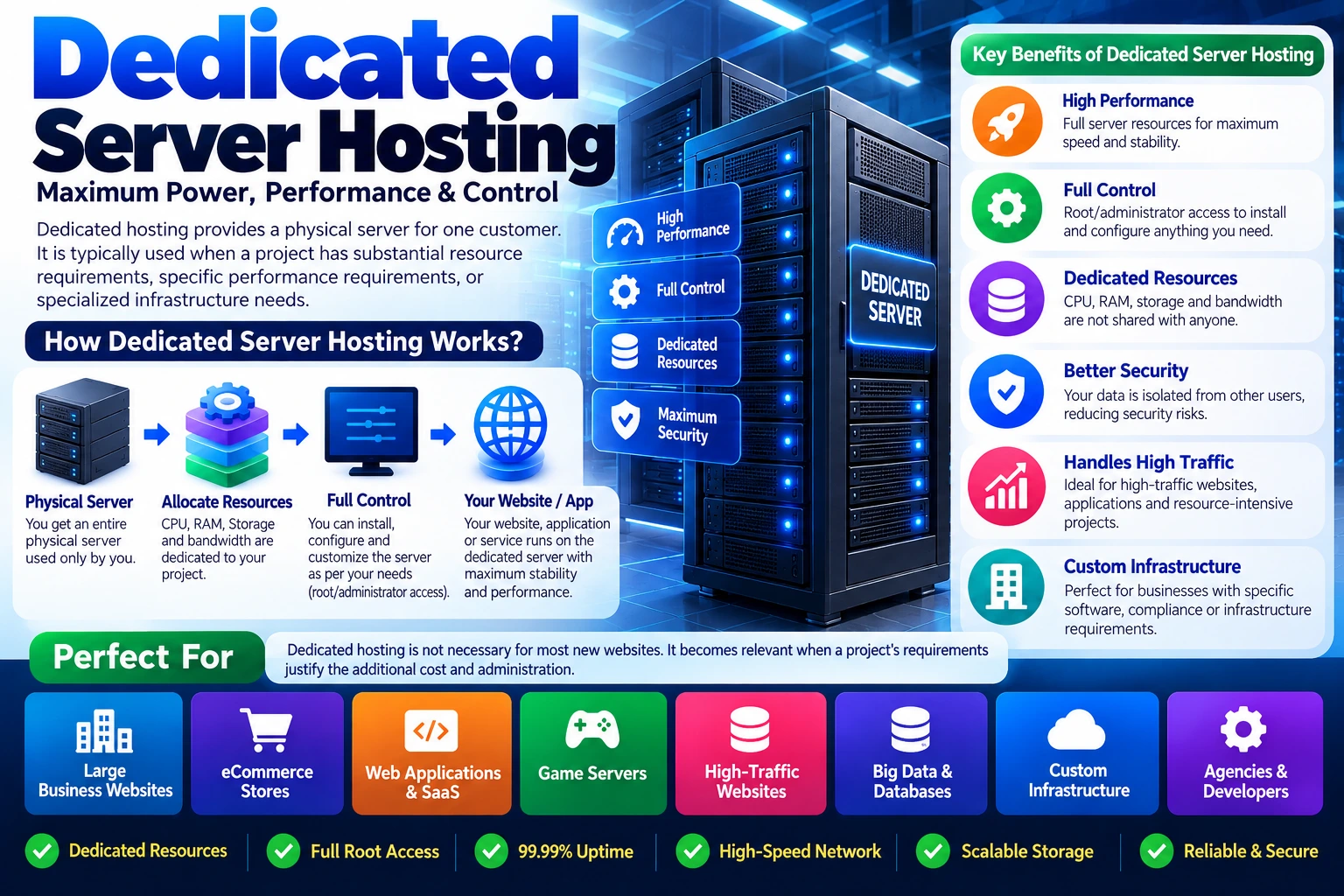
Dedicated hosting provides a physical server for one customer. It is typically used when a project has substantial resource requirements, specific performance requirements, or specialized infrastructure needs.
Dedicated hosting is not necessary for most new websites. It becomes relevant when a project's requirements justify the additional cost and administration.
Web Hosting Comparison: What Features Actually Matter?
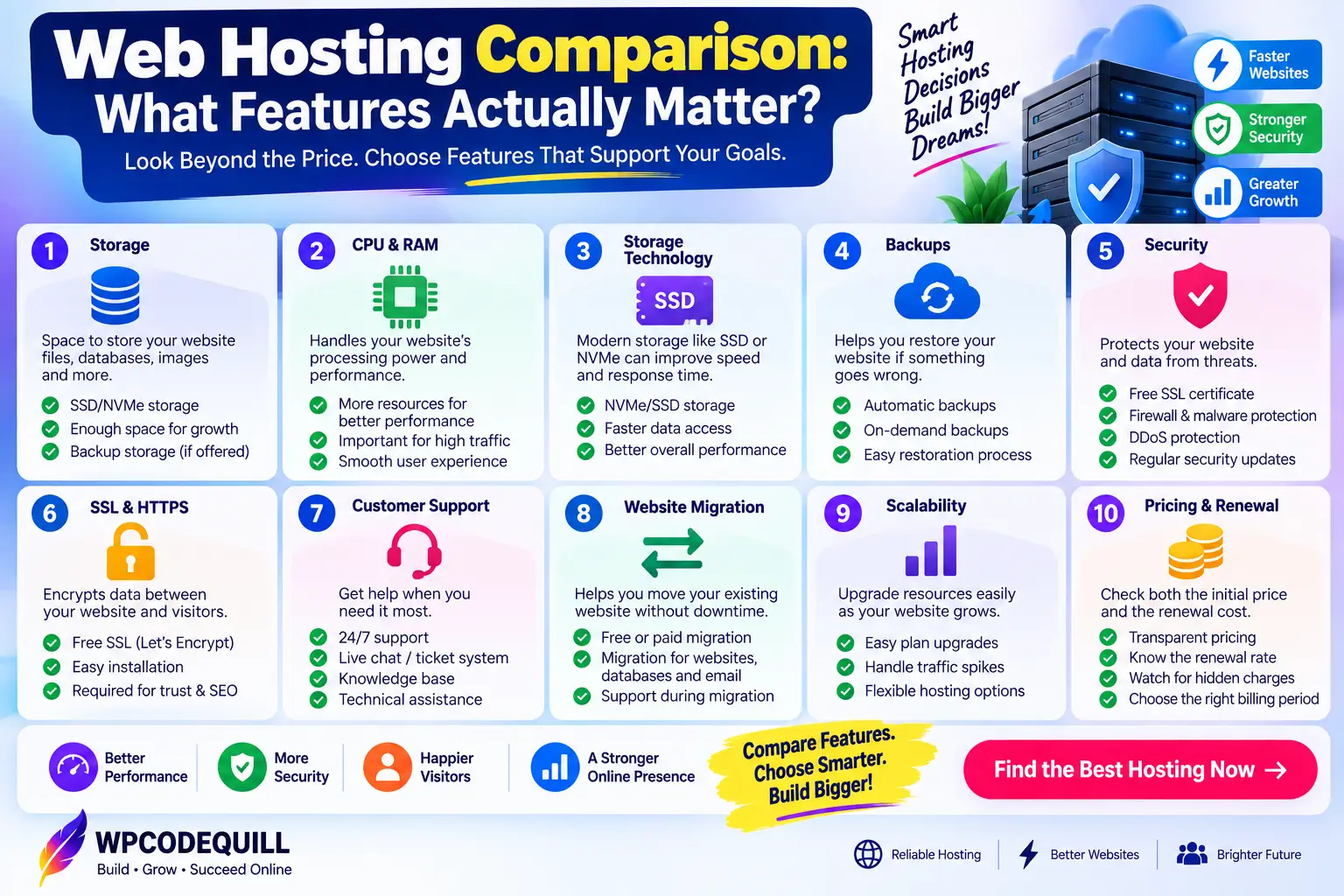
1. Storage
Storage determines how much data you can maintain on the hosting account. Website files, databases, images, videos, logs, email, and backups may all consume storage depending on how the provider structures its service.
Do not select a plan simply because its storage number is large. The type of storage and other server resources also matter.
2. CPU and RAM
CPU and memory are particularly important for dynamic websites such as WordPress, WooCommerce, forums, membership platforms, and custom applications.
A website with many plugins and database queries can consume considerably more resources than a simple static website.
3. Storage Technology
Many modern hosting providers use SSD or NVMe-based storage. Storage technology can affect file operations and database workloads, although overall website speed depends on the complete server stack rather than the storage device alone.
For that reason, evaluate CPU, RAM, PHP workers, caching, web-server technology, and database performance alongside storage.
4. Backups
Backups are one of the most important hosting features to investigate before purchasing.
Look for information about:
- Backup frequency
- Backup retention
- On-demand backups
- Restore procedures
- Whether backups are stored separately
- Whether backups cover files and databases
Never assume that a plan called “backup included” provides the exact recovery options you need. Read the plan documentation carefully.
5. Security
A hosting comparison should also evaluate security features. Common protections may include SSL, firewalls, malware scanning, DDoS mitigation, account isolation, automatic updates, backups, and security monitoring.
However, hosting security does not replace good website administration. Keep WordPress, themes, plugins, frameworks, and server-side applications updated and use strong authentication.
6. SSL and HTTPS
HTTPS encrypts communication between a visitor's browser and the website. For websites handling login details, forms, ecommerce transactions, or customer information, HTTPS is especially important.
Many hosting plans now include an SSL certificate, but confirm how it is issued, renewed, and managed.
7. Customer Support
Support quality becomes important when something breaks and you need assistance quickly.
Check whether the host provides live chat, ticket support, documentation, or other support channels. Also consider whether support covers only infrastructure problems or helps with application-level problems as well.
8. Website Migration
If you already have a website, migration assistance can save significant time.
Before switching providers, find out whether migration is included, whether there are limits on the number of migrations, and whether the provider handles databases, SSL, email, DNS, and other configuration details.
Web Hosting Comparison: Popular Providers
WPCodeQuill's current hosting comparison page presents several providers covering different use cases, including Hostinger, FastComet, HostArmada, Bluehost, Verpex, Cloudways, Namecheap, and BigRock.
Rather than treating one provider as universally appropriate, compare them according to your requirements.
| Provider | Common Use Case | Things to Compare |
|---|---|---|
| Hostinger | Beginners, WordPress, small businesses, growing websites | Plan resources, renewal pricing, website limits, backups, support and scalability |
| FastComet | Performance-focused WordPress projects | CPU/RAM allocation, storage, traffic allowances and WordPress tools |
| HostArmada | Cloud-based websites and higher-resource projects | CPU/RAM, NVMe storage, backups and scalability |
| Bluehost | WordPress users and small businesses | WordPress management, resources, domain terms and renewal pricing |
| Verpex | PHP-heavy and multi-website projects | Website limits, RAM, CPU, backups, server technology and support |
| Cloudways | Managed cloud deployments and larger projects | Cloud provider, server resources, management costs and scalability |
| Namecheap | Budget-conscious websites and domain customers | Hosting resources, renewal terms, storage and support |
| BigRock | Local businesses and smaller projects | Resource limits, email, domains, pricing and renewal terms |
The WPCodeQuill web hosting comparison page provides a broader side-by-side view of these providers and their advertised features.
The figures and promotional offers shown by hosting providers can change. Always verify the current plan details directly with the hosting company before ordering.
Hostinger in a Web Hosting Comparison
Hostinger is particularly relevant for buyers looking for an easy-to-manage hosting platform with WordPress support, website tools, email features, backups, SSL, and multiple hosting tiers.
Hostinger's current Indian web hosting page displays several plans, including entry-level hosting, multi-website plans, an unlimited-website tier, and cloud hosting. The exact resources, storage, website limits, backup schedules, introductory prices, and renewal prices differ by plan.
That makes plan selection more important than simply deciding whether you want “Hostinger.” Two customers using Hostinger may have completely different requirements.
For example, a single beginner website does not necessarily need the same plan as an agency managing multiple websites. Similarly, a WooCommerce store with a large product catalog may need more resources than a small brochure website.
Hostinger also currently advertises a 30-day money-back guarantee on its web hosting pages, but applicable terms and exclusions should be checked before purchasing.
How to Choose the Right Web Hosting Plan
For a New Personal Blog
Start by looking for an affordable plan that supports WordPress, SSL, backups, an adequate database environment, and enough storage for your content.
You probably do not need VPS or dedicated hosting for a new low-traffic blog.
For a Small Business Website
Prioritize reliability, security, professional email requirements, backups, support, and the ability to upgrade later.
A business website may not receive large traffic, but it can still be valuable because it generates leads or establishes your online identity.
For Multiple WordPress Websites
Check the number of websites allowed by the plan. Also compare storage, databases, email accounts, backups, and resource allocations.
A plan that supports multiple websites may be more practical than purchasing separate entry-level hosting accounts.
For WooCommerce
Online stores require more attention to hosting performance because ecommerce requests may involve product searches, carts, customer accounts, payment processing, and database operations.
Look for adequate CPU and RAM, strong database performance, caching, backups, security, and scalability.
For PHP Applications
Developers should check the server environment before purchasing.
Important questions include:
- Which PHP versions are supported?
- Are required PHP extensions enabled?
- Which database engines are available?
- Are cron jobs supported?
- Is SSH access available?
- Are file and process limits documented?
- Can memory limits be increased when required?
- Are staging environments available?
For example, the AioTalent Hub PHP script page documents specific PHP, database, PDO, cURL, and GD requirements. This is a good example of why application requirements should be checked before choosing hosting.
Hostinger Coupon WPCODEQUILL
For readers who decide that Hostinger fits their requirements, WPCodeQuill promotes the coupon/referral code:
WPCODEQUILL
The practical approach is to open the Hostinger referral/discount link, select the plan you want, proceed through checkout, enter the coupon where supported, and verify the final price.
Do not assume that one coupon automatically applies to every Hostinger product or every future promotion. Hosting companies can change product pricing, promotions, billing periods, and eligibility conditions.
The current WPCodeQuill Hostinger page also makes an important distinction between the Hostinger discount option and the separate WPCodeQuill giveaway.
According to the current WPCodeQuill promotion rules, purchasing through the discount option with WPCODEQUILL does not qualify for the separate giveaway. Customers who specifically want the WPCodeQuill product giveaway must follow the designated giveaway purchase process instead.
You can review the current terms on the WPCodeQuill Hostinger Partner and Giveaway page.
Initial Hosting Price vs Renewal Price
This is one of the most important sections in any web hosting comparison.
Many hosting plans are promoted using a monthly equivalent based on a longer subscription period. The amount paid at checkout can therefore be substantially different from the monthly number shown in the headline.
The renewal rate can also be higher than the introductory price.
For example, Hostinger's current Indian hosting page displays introductory rates together with renewal rates for its listed plans. Rather than relying on an advertisement or third-party article, check the provider's checkout page for the exact total applicable to your order.
Before buying, calculate:
- Total amount due today
- Length of the initial subscription
- Renewal amount
- Number of websites included
- Domain renewal terms
- Any optional add-ons
- Tax or other applicable charges
Domain names are another recurring cost worth remembering. ICANN explains that registered domain names normally need to be renewed to continue using them, and renewal terms are governed by the registrar agreement. See ICANN's domain renewal guidance.
Web Hosting Comparison for WordPress Users
WordPress users should compare hosting at the application level rather than looking only at storage.
A suitable WordPress environment should support current versions of PHP and the required database technology. WordPress.org currently recommends PHP 8.3 or newer, MySQL 8.0 or newer or MariaDB 10.11 or newer, and HTTPS.
After that baseline, compare caching, server performance, backup policies, staging, security, migration assistance, email, CDN availability, and support.
Also remember that hosting is only one part of WordPress performance. A slow theme, oversized images, poorly written plugin code, excessive third-party scripts, inefficient queries, or unoptimized databases can create performance problems even on capable infrastructure.
For readers setting up WordPress after purchasing hosting, the WPCodeQuill WordPress installation guide provides a step-by-step setup reference.
How to Compare Hosting Before You Buy
A simple scoring worksheet can make comparisons much easier.
| Factor | Question to Ask |
|---|---|
| Price | What is the total amount I pay today? |
| Renewal | What will the service cost after the promotional period? |
| Websites | How many sites can I host? |
| Storage | How much storage is included and what type is it? |
| Resources | What CPU, RAM, process or execution limits apply? |
| Backups | How often are backups created and how long are they retained? |
| Security | Which protections are included? |
| Support | How can I contact support when something goes wrong? |
| Migration | Will the host help move my existing website? |
| Scalability | Can I upgrade without rebuilding the website? |
| Compatibility | Does the server support my CMS or application? |
Best Practices When Buying Web Hosting
Read the Actual Plan Details
Marketing headlines are useful for getting a quick overview, but the plan details contain the information you need for a proper comparison.
Think About Two Years, Not Two Minutes
A hosting plan should be evaluated over the expected lifetime of the project. Consider initial payment, future renewals, domain costs, upgrades, and possible migration requirements.
Keep Independent Backups
Even when your hosting provider includes backups, maintaining an additional backup outside the primary hosting account can provide another recovery option.
Choose a Plan You Can Upgrade
You do not necessarily need to purchase the highest tier at launch. A sensible starting point is one that meets your current requirements while giving you a clear upgrade path.
Check the Hosting Location
Server location can influence network latency. If most of your audience is in India, for example, consider whether the provider has an appropriate nearby infrastructure option or CDN support.
Separate Hosting From Your Domain Decision
You do not always have to purchase a domain from the same company as your hosting. Domains and hosting can be managed separately, provided DNS is configured correctly.
Common Web Hosting Mistakes to Avoid
Choosing Only by Monthly Price
The lowest headline price may correspond to a long prepayment period or limited resources. Compare the entire order.
Ignoring Renewal Pricing
A hosting plan should be affordable not just today but also when you intend to renew it.
Buying Too Many Resources Too Early
High-resource hosting is useful when a project needs it. For a new website with very little traffic, paying for resources you cannot currently use may not be necessary.
Ignoring Technical Requirements
A hosting package is only useful if your CMS, plugin, theme, framework, or PHP application can run on it.
Assuming Unlimited Means Unlimited in Every Situation
Terms such as “unlimited websites” or “unmetered bandwidth” should always be read together with the provider's acceptable-use policy and other resource limitations.
Not Planning for Backups
A website is an asset. Make sure you understand how recovery works before you need it.
Final Web Hosting Comparison Checklist
Before clicking the payment button, confirm all of the following:
- Your hosting plan supports your CMS or application.
- The number of allowed websites is sufficient.
- Storage is adequate for current and expected needs.
- The CPU and memory limits are appropriate.
- Backups and restoration policies are clear.
- SSL/HTTPS is included or easily available.
- Security protections meet your requirements.
- Support channels are acceptable.
- Migration options are available if you need them.
- The total upfront cost is within your budget.
- The renewal price is acceptable.
- Domain renewal terms are understood.
- Any coupon or promotional code has actually been applied at checkout.
- You understand any promotional eligibility conditions.
Conclusion
A good web hosting comparison is not simply a list of the cheapest hosting companies. It is a process of matching server resources, technology, support, security, backups, scalability, and long-term cost with the needs of your website.
For beginners, shared or managed WordPress hosting can provide a straightforward path to getting online. Growing websites may need higher-resource plans or cloud hosting, while technically demanding applications may benefit from VPS or dedicated infrastructure.
Hostinger is one of the options worth comparing because its current hosting range covers beginner websites, multi-site projects, WordPress websites, ecommerce use cases, and cloud-based projects. However, the right plan depends on the actual requirements of your website rather than simply the provider name.
For buyers who choose Hostinger, WPCodeQuill currently promotes the WPCODEQUILL coupon/referral option. Check the current offer and final checkout price carefully before purchasing. Also remember that the Hostinger discount route and the WPCodeQuill giveaway are separate promotional options and have different eligibility conditions.
Most importantly, compare the total cost, not just the advertised monthly number. Review the renewal price, technical limits, backups, security, support, website allowance, and upgrade path. Taking those factors into account will help you choose web hosting that remains practical as your website grows.
For a broader provider-by-provider comparison, visit the WPCodeQuill web hosting guide, and check the official provider documentation before placing your order.
Frequently Asked Questions
Q: What should I look for in a web hosting comparison?
Compare price, renewal cost, storage, CPU, RAM, website limits, backups, SSL, security, support, migration options, compatibility, and scalability. The correct priorities depend on your website.
Q: Which web hosting is suitable for WordPress?
A suitable WordPress host should meet WordPress's current technical requirements and provide a stable PHP/database/HTTPS environment. Managed WordPress hosting can also provide additional WordPress-focused management tools.
Q: Is shared hosting good for beginners?
Shared hosting can be a practical starting point for small websites because it is generally easier to manage and less expensive than VPS or dedicated hosting. The appropriate choice depends on the project's requirements.
Q: Should I choose Hostinger or another hosting company?
Compare the providers based on your own requirements. Hostinger currently offers multiple hosting levels, while other providers may differentiate themselves through resource allocations, server technology, support, cloud infrastructure, or developer features.
Q: Can I use the WPCODEQUILL coupon with Hostinger?
WPCodeQuill currently promotes WPCODEQUILL as a Hostinger referral/discount coupon. Apply it where supported and verify the final checkout price before purchasing.
Q: Can I use WPCODEQUILL and claim the WPCodeQuill giveaway?
No. The current WPCodeQuill promotion states that purchases using the discount/coupon option are not eligible for the separate WPCodeQuill giveaway. Customers interested in the giveaway must follow the designated giveaway purchase process.
Q: Should I buy yearly or multi-year hosting?
Longer terms can reduce the monthly-equivalent promotional price, but they also require a larger upfront payment. Compare the total initial cost, renewal pricing, and how long you expect to use the hosting.
Q: Can I upgrade hosting later?
Many hosting providers offer upgrades between plans or hosting categories. Before purchasing, check the provider's documented upgrade paths and understand whether resource increases can happen without a manual migration.





Discussion (0)
Join the Conversation
Please log in to post a comment.
Log In to Comment