Limited Time 🎉 Launch Offer – Save 45% on your first purchase. Use code NEWUSER
WPCodeQuill - Digital Marketplace for PHP Scripts and Themes
★★★★★ Trusted by 1000+ Users
Instant Download
Secure Payments
Lifetime Updates
Verified Code
24/7 Support
WPCodeQuill
Login / Register
Trending Product

Quill Membership for WooCommerce – Digital Subscription

A premium WooCommerce membership solution for digital product stores. Create dynamic subscription plans, restrict digital downloads by category, enforce custom user download limits, and automate role assignments seamlessly.

5.0 (0 Reviews)
|
15+ sales
|
Verified Author
$39.00 $14.82

Why Choose Quill Membership for WooCommerce – Digital Subscription?

Dynamic Membership Plans

Create flexible membership plans such as Silver, Gold, Premium, or custom membership levels.

Custom Download Limits

Set a specific number of downloads for each membership plan or enable unlimited downloads when required.

WooCommerce Product Integration

Connect membership plans directly to WooCommerce products through the product settings.

Digital Download Protection

Add controlled access to protected digital files and premium downloadable products.
How It Works

01
Install the Plugin
Download the wc-quill-membership.zip file after purchase. Log into your WordPress Admin Dashboard. Navigate to Plugins → Add New Plugin and click Upload Plugin. Select the ZIP file, click Install Now, and then Activate.
02
Activate Your License
Navigate to the new Quill Membership tab in the WordPress sidebar. Open the License Validation tab. Enter your WPCodeQuill purchase code to unlock plugin features.
03
Configure Global Settings
Go to Quill Membership → Settings. Enable Auto-Activate Plan on Purchase. (Optional) Select a default WordPress User Role for new members.
04
Create Your Membership Plans
Open the Plans tab. Create plans such as Gold Plan or Silver Plan. Set Download Limits (enter -1 for unlimited). Set Expiry Days like 30 days or 365 days. Select which WooCommerce categories the plan can download from.
05
Start Selling
Edit any WooCommerce product (Products → Edit). In the Product Data box under the General tab find the Membership Plan dropdown. Select a plan to link the product. When a customer buys the product, the membership activates automatically.
Live Screenshots
Quill Membership for WooCommerce – Digital Subscription

A premium WooCommerce membership solution for digital product stores. Create dynamic subscription plans, restrict digital downloads by category, enforce custom user download limits, and automate role assignments seamlessly.

Changelog
v1.0.0 - 26 Mar 2026

Added custom membership plans with download limits and expiry rules. Added category-specific and product-specific download restrictions. Added automatic user role and plan assignment after WooCommerce purchase. Added premium admin dashboard for membership management. Added hard download blocking for WooCommerce digital files. Added unlimited download support using -1. Added manual override controls for user limits and expiry dates. Added frontend UI showing plan status and remaining downloads in the WooCommerce My Account page. Security improvement: Advanced license verification with weekly WP-Cron checks.

View Full Changelog
FAQ
1. What is Quill Membership for WooCommerce?
2. Can I create different membership plans?
3. Can I restrict downloads by WooCommerce category?
4. Can memberships activate automatically after purchase?
View All FAQs

Quill Membership for WooCommerce – Digital Download & Subscription Membership Plugin

Quill Membership for WooCommerce is a powerful WooCommerce Membership Plugin designed for digital product stores, software sellers, plugin developers, theme marketplaces, eBook websites, and online businesses that want to control access to downloadable products through flexible membership plans.

With Quill Membership, you can create custom subscription plans, set download limits, define membership expiry periods, restrict downloads by WooCommerce category, automatically activate memberships after purchase, and assign WordPress user roles based on membership settings.

It transforms your WooCommerce store into a flexible digital membership and download management platform without requiring you to build a complex membership system from scratch.

Build a Powerful WooCommerce Membership System

Quill Membership gives you complete control over how customers access your digital products. Create plans such as Silver, Gold, Premium, or any custom membership level and define exactly what each plan can access.

You can connect a WooCommerce product with a membership plan and automatically activate the customer's membership after a successful purchase. This creates a simple automated workflow for selling digital access through your existing WooCommerce store.

Dynamic Membership Plans

Create flexible WooCommerce membership plans based on your business requirements. Each plan can have its own download limits, expiry period, and allowed product categories.

  • Create unlimited membership plans.
  • Set custom membership names.
  • Configure download limits for each plan.
  • Set membership expiry periods.
  • Allow unlimited downloads when required.
  • Control which WooCommerce categories members can access.

Category-Based Digital Download Restrictions

One of the most useful features of Quill Membership is its category-based download restriction system. You can decide which WooCommerce product categories each membership plan is allowed to download from.

This makes it easy to create different access levels for your digital store. For example, a basic membership can provide access to selected products while a premium membership can unlock additional categories.

Custom Download Limits

Control how many downloads a customer can make with customizable download limits. Set a specific number of allowed downloads for a membership plan or use unlimited access when you want to remove download restrictions.

This gives digital product businesses greater control over file distribution and membership benefits.

Membership Expiry Control

Set custom membership expiry periods such as 30 days, 90 days, 180 days, or 365 days. Membership access can automatically expire according to the plan configuration.

This is useful for businesses selling time-based digital access, subscription packages, support memberships, software access, and other recurring or limited-duration services.

Automatic Membership Activation

Quill Membership can automatically activate a customer's membership after they purchase a WooCommerce product linked to a membership plan.

This removes the need for administrators to manually assign membership access after every purchase and creates a smoother customer experience.

Automatic WordPress User Role Assignment

Automatically assign a selected WordPress user role when customers become members. This allows you to integrate membership access with your existing WordPress user-management structure.

Role assignment can be configured from the plugin settings and used alongside your membership plans to create a more organized access-control system.

Advanced Digital File Protection

Quill Membership is designed with server-level digital file protection to provide greater control over access to protected downloadable assets.

This is particularly useful for businesses selling premium files such as WordPress plugins, themes, software, templates, documents, graphics, courses, eBooks, and other digital resources.

Customer Membership Dashboard

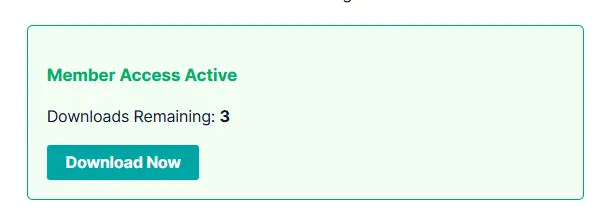
Customers receive a convenient membership experience directly inside their WooCommerce My Account area. The dashboard can display important membership information such as remaining downloads and membership expiry dates.

This gives customers a clear view of their current access without requiring them to contact the store administrator for basic membership information.

Modern SaaS-Style Admin Dashboard

Manage membership settings through a clean and modern SaaS-style administration dashboard. Configure plans, download limits, expiry settings, categories, user roles, and other membership options from a centralized interface.

The dashboard is designed to make membership management easier for WooCommerce store administrators.

WooCommerce Product Integration

Quill Membership integrates directly with WooCommerce products. When editing a WooCommerce product, you can select the membership plan that should be activated when the customer purchases that product.

This makes it easy to turn existing WooCommerce products into membership packages without creating a separate checkout system.

Perfect for Digital Product Stores

Quill Membership is especially useful for businesses selling digital products and downloadable resources.

  • WordPress plugins and themes
  • PHP scripts and software
  • eBooks and digital documents
  • Graphics and design resources
  • Templates and downloadable files
  • Online learning resources
  • Premium digital assets
  • Software download stores
  • Digital subscription platforms

Simple Membership Workflow

  1. Create a membership plan.
  2. Set the plan's download limit.
  3. Configure the membership expiry period.
  4. Select the WooCommerce categories available to members.
  5. Optionally configure a WordPress user role.
  6. Edit a WooCommerce product.
  7. Assign the membership plan to the product.
  8. A customer purchases the product.
  9. The membership is automatically activated.
  10. The customer can access eligible downloads according to the plan.

Why Choose Quill Membership for WooCommerce?

  • Flexible Membership Plans: Create customized membership levels for different customer groups.
  • Download Limits: Control how many downloads members can use.
  • Unlimited Downloads: Use unlimited access when required.
  • Category Restrictions: Control which WooCommerce categories each membership can access.
  • Expiry Management: Set custom membership durations.
  • Automatic Activation: Activate memberships automatically after purchase.
  • User Role Automation: Assign WordPress roles based on membership settings.
  • Digital File Protection: Add an additional layer of control around premium downloadable assets.
  • My Account Dashboard: Let customers view remaining downloads and expiry information.
  • WooCommerce Integration: Connect membership plans directly to WooCommerce products.
  • Modern Admin Interface: Manage the membership system from a centralized dashboard.

Who Is Quill Membership For?

Quill Membership for WooCommerce is ideal for WordPress developers, digital product sellers, software businesses, plugin and theme shops, online resource websites, eBook stores, and entrepreneurs who want to introduce controlled membership access to their WooCommerce store.

It is especially useful when you need more control over digital downloads, subscription access, download limits, membership expiry, and product-category permissions.

Quill Membership for WooCommerce – Key Features

  • Dynamic Membership Plans: Create flexible membership plans such as Silver, Gold, Premium, or custom membership levels.
  • Custom Download Limits: Set a specific number of downloads for each membership plan or enable unlimited downloads when required.
  • Membership Expiry: Configure custom membership durations such as 30, 90, 180, or 365 days.
  • Category-Based Download Access: Control which WooCommerce product categories members can access and download.
  • Automatic Membership Activation: Automatically activate the appropriate membership when a customer purchases a connected WooCommerce product.
  • Automatic User Role Assignment: Assign a selected WordPress user role when a membership is activated.
  • WooCommerce Product Integration: Connect membership plans directly to WooCommerce products through the product settings.
  • Digital Download Protection: Add controlled access to protected digital files and premium downloadable products.
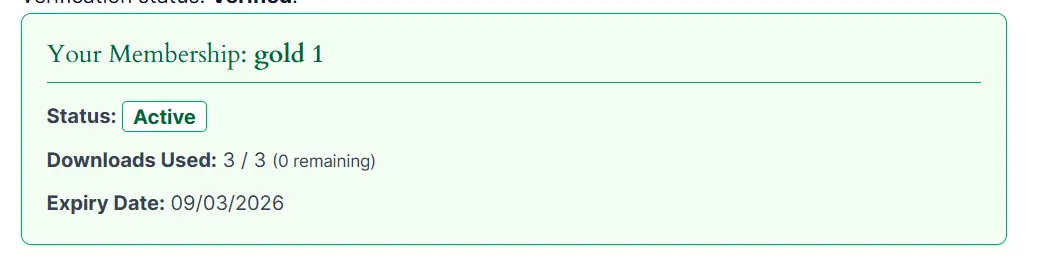
  • Customer Membership Dashboard: Allow members to view important membership information, including remaining downloads and expiry dates, from the WooCommerce My Account area.
  • Modern Admin Dashboard: Manage membership plans, restrictions, download limits, expiry settings, and other options from a dedicated administration interface.
  • License Validation: Activate and manage the plugin using a valid WPCodeQuill purchase license.
  • Flexible Membership Access: Create different access levels for different customer groups and digital product categories.
  • Automated Membership Workflow: Connect WooCommerce products with membership plans for an automated purchase-to-access experience.
  • WordPress 6.0+ Support: Designed for modern WordPress websites.
  • WooCommerce 7.0+ Support: Built to work with supported WooCommerce versions.
  • PHP 8.2+ Support: Developed for modern PHP environments.

Easy Installation & Setup

Installing Quill Membership is straightforward. Upload the plugin ZIP through your WordPress administration dashboard, activate the plugin, validate your purchase license, configure global settings, create membership plans, and connect those plans to your WooCommerce products.

Once configured, WooCommerce can automatically activate the appropriate membership when a customer completes the related purchase.

Start Selling Digital Memberships with WooCommerce

If you are looking for a WooCommerce Membership Plugin for digital downloads, Quill Membership provides a flexible solution for controlling premium file access, membership duration, download limits, product categories, and customer permissions.

Create your membership plans, connect them to WooCommerce products, protect your digital downloads, and give customers a clear membership experience with Quill Membership for WooCommerce.


System Requirements

  • WordPress: 6.0 or higher
  • WooCommerce: 7.0 or higher
  • PHP: 8.2 or higher
  • Database: MySQL-compatible database

Installation Instructions


Installation & Setup Instructions

1. Install the Plugin

  • Download the wc-quill-membership.zip file after purchase.
  • Log into your WordPress Admin Dashboard.
  • Navigate to Plugins → Add New Plugin and click Upload Plugin.
  • Select the ZIP file, click Install Now, and then Activate.

2. Activate Your License

  • Navigate to the new Quill Membership tab in the WordPress sidebar.
  • Open the License Validation tab.
  • Enter your WPCodeQuill purchase code to unlock plugin features.

3. Configure Global Settings

  • Go to Quill Membership → Settings.
  • Enable Auto-Activate Plan on Purchase.
  • (Optional) Select a default WordPress User Role for new members.

4. Create Your Membership Plans

  • Open the Plans tab.
  • Create plans such as Gold Plan or Silver Plan.
  • Set Download Limits (enter -1 for unlimited).
  • Set Expiry Days like 30 days or 365 days.
  • Select which WooCommerce categories the plan can download from.

5. Start Selling

  • Edit any WooCommerce product (Products → Edit).
  • In the Product Data box under the General tab find the Membership Plan dropdown.
  • Select a plan to link the product.
  • When a customer buys the product, the membership activates automatically.

Complete Update History

v1.0.0 — 26 March 2026
Initial Release feature
Added custom membership plans with download limits and expiry rules.
Added category-specific and product-specific download restrictions.
Added automatic user role and plan assignment after WooCommerce purchase.
Added premium admin dashboard for membership management.
Added hard download blocking for WooCommerce digital files.
Added unlimited download support using -1.
Added manual override controls for user limits and expiry dates.
Added frontend UI showing plan status and remaining downloads in the WooCommerce My Account page.
Security improvement: Advanced license verification with weekly WP-Cron checks.

Frequently Asked Questions

Quill Membership is a WooCommerce membership plugin designed for managing digital product access, subscription plans, download limits, membership expiry, and category-based download permissions.
Yes. You can create multiple membership plans such as Silver, Gold, Premium, or custom plans with individual download limits, expiry periods, and category access.
Yes. You can specify which WooCommerce product categories members are allowed to access and download based on their membership plan.
Yes. You can connect a WooCommerce product with a membership plan. When a customer purchases the configured product, the associated membership can be activated automatically.
Yes. Members can view important information such as their membership status, remaining downloads, and membership expiry through the WooCommerce My Account area.

No reviews yet. Be the first to review this product!

Please login to submit a review.
Need Help?

Our dedicated support team is available 24/7 to assist you.

Contact Support

1,000+

Happy Customers

100%

Safe & Secure Checkout

100%

Secure Product

24/7

Dedicated Support

Trusted by WordPress Professionals
and Site Owners Worldwide