Limited Time 🎉 Launch Offer – Save up to 45% on eligible digital scripts & plugins. Use code NEWUSER
WPCodeQuill - Digital Marketplace for PHP Scripts and Plugins
Verified Quality Code
Instant Digital Download
Encrypted Checkout
1-Year & Lifetime Update Options
Dedicated Author Support
WPCodeQuill
Login / Register
Themes

VeqaMovies – Movie Catalog WordPress Theme

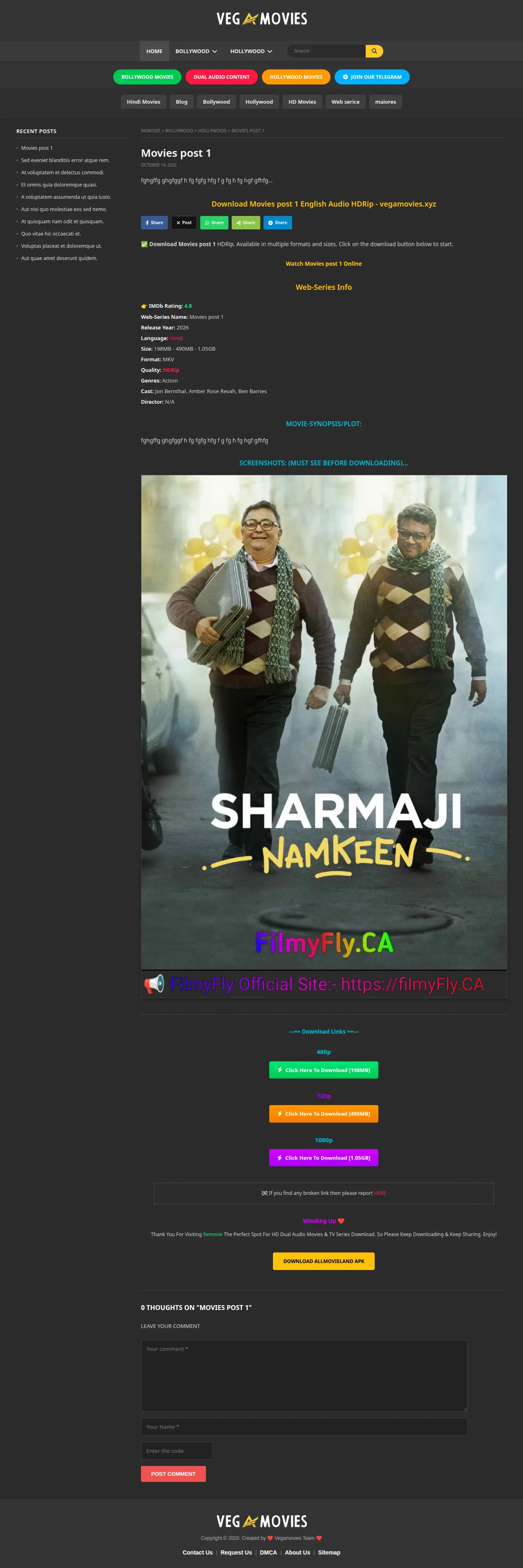
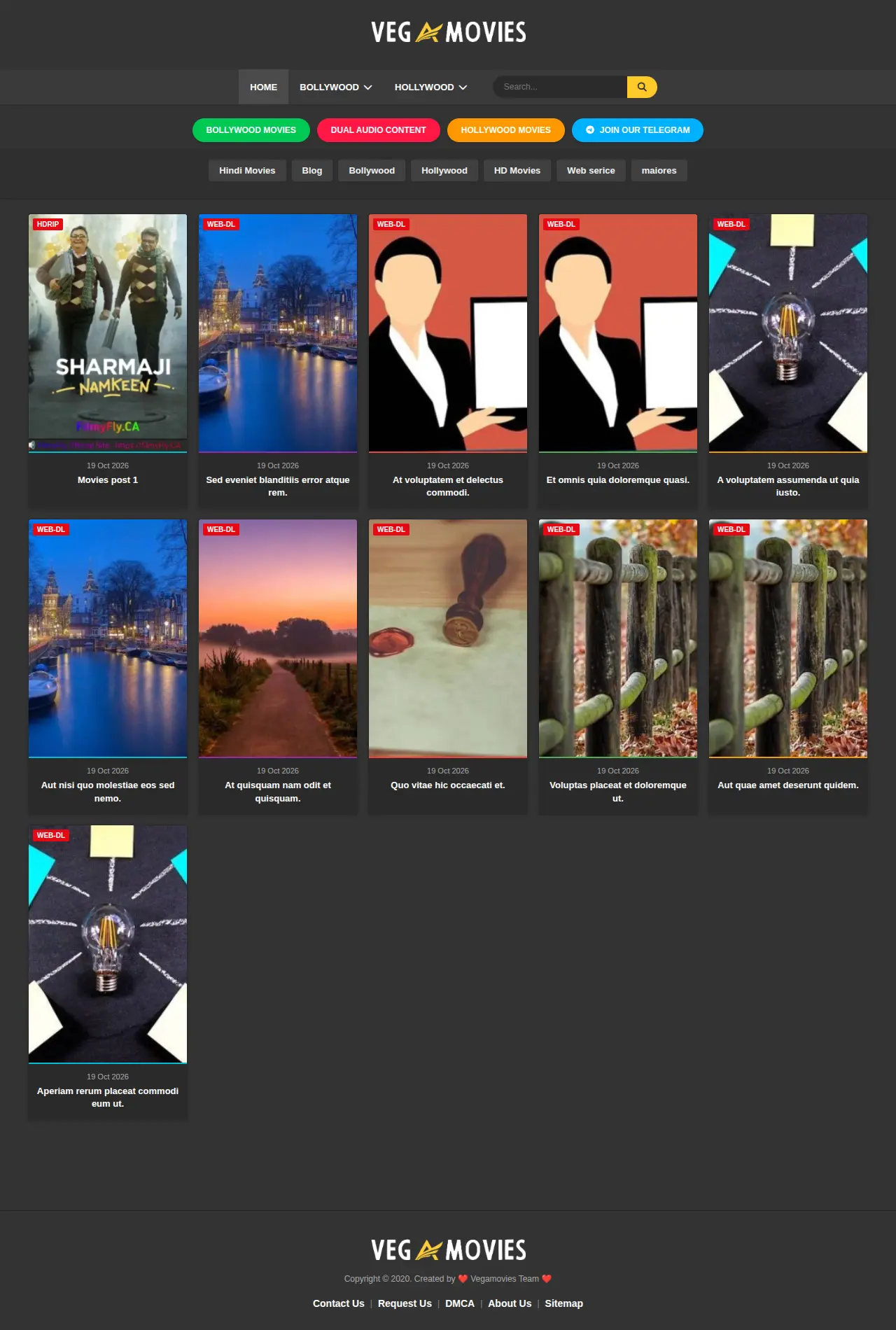
A WordPress theme for organizing and showcasing movie catalogs with clear categories, movie pages, and a browsing-friendly layout. Suitable for websites that publish or link to content they have the right to distribute.

|
2+ sales
|
Verified Codebase
$15.00
VeqaMovies – Movie Catalog WordPress Theme - Cover Thumbnail VeqaMovies – Movie Catalog WordPress Theme - Feature Screenshot 1 VeqaMovies – Movie Catalog WordPress Theme - Feature Screenshot 2
Experience VeqaMovies – Movie Catalog WordPress Theme live in action before purchasing.
View Live Demo

Key Features of VeqaMovies – Movie Catalog WordPress Theme

Movie catalog-style homepage

Category-based browsing

Individual movie detail pages

Sections for organizing movies by quality or file size

How It Works

01

Download

Download the theme ZIP file.
02

Upload Theme

In WordPress, go to Appearance → Themes → Add New → Upload Theme, select the ZIP file and click Install Now. Click Activate after installation.
03

Complete Install

Create your movie posts and categories, then configure your menus and homepage.

Interface & Admin Screenshots

Recent Releases
v1.0.0 - 07 Nov 2026

Initial Release

View Full Changelog
Common Questions
1. What is the Vega Movies WordPress Theme?
2. How do I install the theme?
3. What do I need before installing it?
4. Can I organize movies into categories?
View All FAQs

Vega Movies provides a movie-catalog-style layout for presenting films by category, quality, or other criteria. Create individual pages with movie details, posters, trailers, and authorized viewing or download links. Customize the content and categories to suit your website.

Functions and Features

  • Movie catalog-style homepage
  • Category-based browsing
  • Individual movie detail pages
  • Sections for organizing movies by quality or file size
  • WordPress posts and categories support
  • Menus, colors, branding, and other options may depend on the theme version

Note: Confirm the theme’s actual features and compatibility against its files and documentation before publishing this listing.


Installation Instructions

Installation

  1. Download the theme ZIP file.
  2. In WordPress, go to Appearance → Themes → Add New → Upload Theme.
  3. Select the ZIP file and click Install Now.
  4. Click Activate after installation.
  5. Create your movie posts and categories, then configure your menus and homepage.
Need assistance setting up your script or configuring your server? Visit our WPCodeQuill Help Center or reach out via Product Support.

License Scope & Permitted Use Notice

Regular License – 1 Year The Regular License allows installation and use on one website/domain and includes:
  • 1 year of software updates
  • 1 year of technical support
  • All future bug fixes released during the eligible support period
  • Commercial usage rights
  • Secure digital download
  • 7-day money-back guarantee
What happens after 1 year? Your website and installed software will continue working normally. However, software updates, technical support, and license-protected admin features will expire until you renew your license.
Extended License – Lifetime The Extended License allows installation and use on one website/domain and includes:
  • Lifetime software updates
  • Lifetime technical support
  • All future bug fixes
  • Commercial and agency usage
  • Dedicated support
  • Secure digital download
  • 7-day money-back guarantee
Lifetime License Benefits Your license remains valid for the lifetime of the product, providing access to eligible software updates and technical support according to the terms of our License Agreement.

Copyright & Permitted Content Compliance VeqaMovies – Movie Catalog WordPress Theme is provided as a standalone software management framework (CMS). No media files, copyrighted video streams, or third-party licensed media assets are included with the source code. Buyers are solely responsible for ensuring that all media, images, videos, links, and other content published or distributed through the software comply with applicable copyright laws, intellectual property rights, and hosting provider policies.
Complete Update History

v1.0.0 — 07 November 2026
Initial Release feature
Initial Release

Frequently Asked Questions

Vega Movies is a movie-catalog-style theme for organizing films into categories
and presenting them on a WordPress website.
In your WordPress dashboard, go to Appearance → Themes → Add New → Upload Theme. Choose the theme ZIP file, click Install Now, and then click Activate.
You need a self-hosted WordPress website and hosting that meets the requirements of your WordPress version and the theme.
You can use WordPress categories to organize movie posts. The way categories appear on the site depends on the theme’s features and configuration.
Harshit Saxena Verified buyer 19 Nov 2026
Best movie catalog theme on WordPress for speed and SEO structure. Clean header search bar makes finding any title effortless for users.
WPCodeQuill Admin reply:
Thank you, Harshit! Wishing your catalog site tons of traffic and growth.
Olivia Brooks Verified buyer 12 Nov 2026
Our entertainment directory looks way more organized now. The related titles strip and screenshot gallery on single movie pages boost session time.
WPCodeQuill Admin reply:
So glad the related titles and galleries are keeping visitors engaged, Olivia! Thanks for the 5 stars.
Rohan Kulkarni Verified buyer 3 Nov 2026
Clean category archives, language filters, and smooth mobile navigation. Very easy to tweak colors and logo inside WordPress without touching CSS.
WPCodeQuill Admin reply:
Thanks for the great review, Rohan! Easy customization without CSS is always our goal.
Samantha Reid Verified buyer 25 Oct 2026
Super lightweight WordPress movie catalog theme. Passed Core Web Vitals right after demo import and looks incredible in dark mode.
WPCodeQuill Admin reply:
Passing Core Web Vitals right out of the box is awesome to hear, Samantha! Thank you.
Aryan Khanna Verified buyer 17 Oct 2026
VeqaMovies looks ultra-crisp for a movie and web-series catalog! Instant quality badges, release year filters, and fast poster grids work like a dream.
WPCodeQuill Admin reply:
Thank you, Aryan! Glad the quality badges and filter grids are hitting the mark.
Please login to submit a review.
Dedicated Technical Support

Need help with installation, configuration, or license activation? Our support team is ready to assist.

Secure Checkout

Encrypted payment gateways

Instant Access

Immediate source code download

Clean Architecture

Built for Modern Web Standards

Dedicated Support

Documentation & author assistance

Verified digital solutions for
developers, agencies & site owners