Limited Time 🎉 Launch Offer – Save 45% on your first purchase. Use code NEWUSER
WPCodeQuill - Digital Marketplace for PHP Scripts and Themes
★★★★★ Trusted by 1000+ Users
Instant Download
Secure Payments
Lifetime Updates
Verified Code
24/7 Support
WPCodeQuill
Login / Register
Trending Product

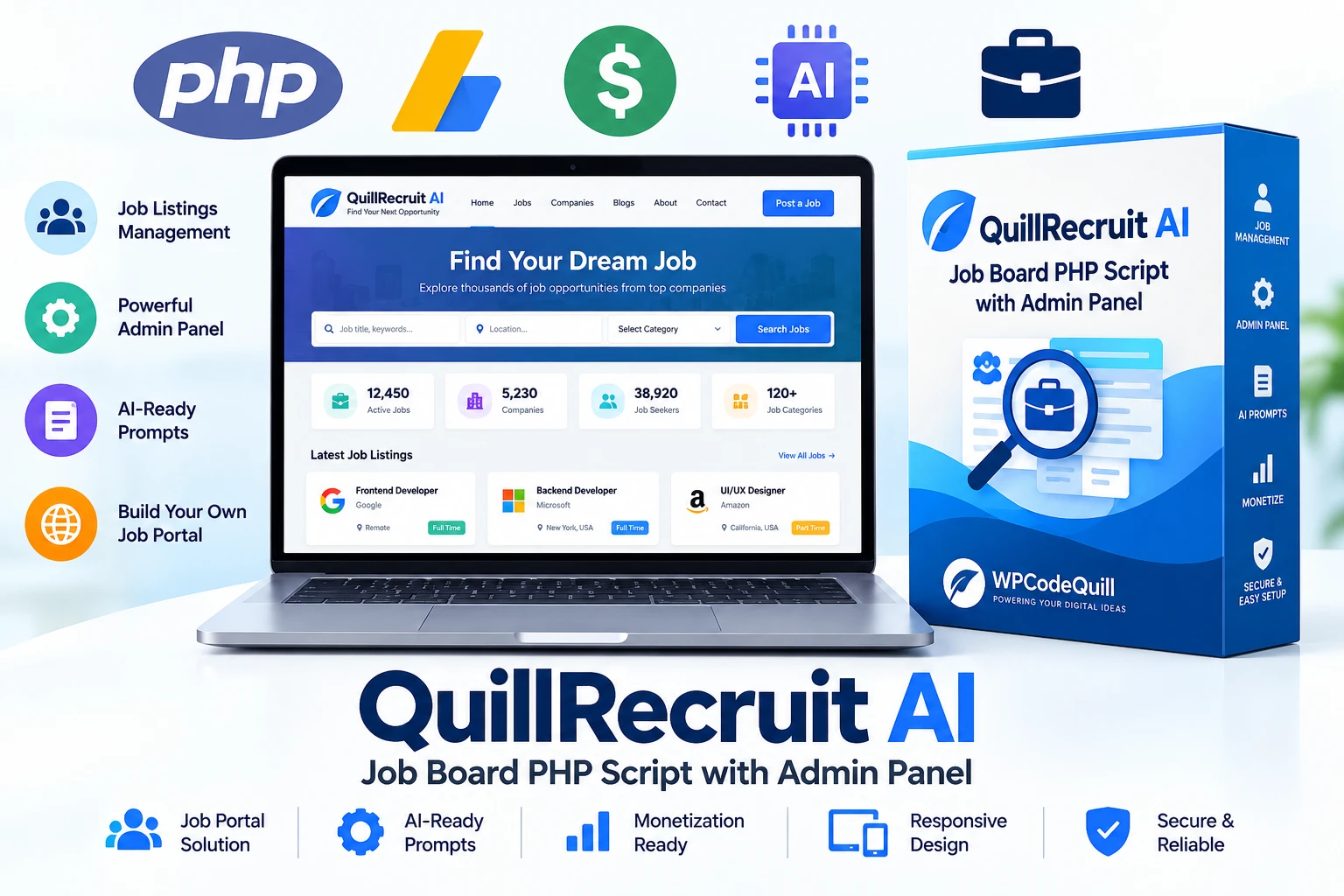
QuillRecruit AI – Job Board PHP Script with Admin Panel

QuillRecruit AI is a ready-to-use Job Board PHP Script with a powerful admin panel, job listing management, categories, pages, and AI-ready prompts. Build your own professional job portal, recruitment website, niche job board, or hiring platform using a flexible standalone PHP solution.
5.0 (1 Reviews)
|
154+ sales
|
Verified Author
₹2,103.20 ₹799.22
Live Screenshots
QuillRecruit AI – Job Board PHP Script with Admin Panel

QuillRecruit AI is a ready-to-use Job Board PHP Script with a powerful admin panel, job listing management, categories, pages, and AI-ready prompts. Build your own professional job portal, recruitment website, niche job board, or hiring platform using a flexible standalone PHP solution.
Changelog
v3.5.1 - 29 Jan 2026

- UPDATED: ai Prompt auto generate - FIXED: API Server description fetching errors. - FIXED: Lunch Ai auto Posting (Beta)

v3.5.0 - 23 Jan 2026

1. 🚀 New Features: 1. Live Theme Customizer: Added a WordPress-style slide-out panel on the frontend. Admins can now edit the following in real-time without reloading: i. Theme Colors: Header, Menu, and Primary Brand colors with instant live preview. ii. Site Identity: Website Title, Meta Description, and Footer Text. iii. Branding: Drag-and-drop upload for Website Logo and Favicon. 2. Frontend Admin Bar: Implemented a persistent top bar visible only to logged-in admins on the homepage. i. Quick links to Dashboard, New Post, Edit Page, and Logout. ii. Customize trigger to open the new Live Editor. 3. AJAX Saving: Settings in the Customizer now save instantly via ajax_save_customizer.php without refreshing the page. 2. 🎨 UI/UX Improvements 1. Admin Panel Overhaul: Completely redesigned the Admin interface to match the WordPress Admin aesthetic. i. New Sidebar Layout: Replaced the old layout with a fixed, responsive dark sidebar menu. ii. Modern Header: Added a unified Top Bar with user profile, "New" dropdowns, and quick actions. 2. Dashboard Redesign: Updated admin/index.php with a modern "Card Grid" layout for server stats, post counts, and system status. 3. Consistent Layouts: Applied the new Sidebar Wrapper (admin-wrapper) to all management pages: Manage Posts, Categories, Pages, Ad Manager, Settings 3. 🐛 Bug Fixes 1. Dropdown Menu Visibility: Fixed a CSS conflict where dropdown text was appearing white-on-white. Forced dark text for better readability. 2. Missing Sidebar Fix: Resolved critical layout issues where the sidebar was missing on homepage-databox-setting.php and color_setting.php. 3. Footer Path Error: Fixed a failed to open stream error in admin/index.php caused by an incorrect path to footer.php. 4. HTML Structure: Cleaned up unclosed and tags in footer.php that were breaking the layout on some pages. 4. ⚙️ Technical Updates File Structure: Created includes/wp_admin_bar.php for the frontend admin bar logic. Created includes/live_editor.js.php to handle JS logic separately. Created admin/ajax_save_customizer.php to handle backend processing securely. Session Security: Added strict session checks (session_start and loggedin verification) to all new include files to prevent unauthorized access.

v3.4.0 - 03 Jan 2026

- ADDED: AI Content integration for post descriptions. - ADDED: Modern Security Headers & XSS Protection. - UPDATED: Complete Admin Panel UI Redesign (Bootstrap 5). - UPDATED: Homepage Layout for better CTR. - FIXED: Minor CSS issues on mobile devices.

View Full Changelog
FAQ
1. What is QuillRecruit AI?
2. Is QuillRecruit AI an automated job posting script?
3. Does QuillRecruit AI include AI prompts?
4. Do I need an AI subscription to use the prompts?
View All FAQs

QuillRecruit AI – Job Board PHP Script with Admin Panel

QuillRecruit AI Job Board PHP Script with Admin Panel

QuillRecruit AI is a ready-to-use Job Board PHP Script with an Admin Panel designed for businesses, developers, freelancers, publishers, recruitment agencies, and entrepreneurs who want to build their own professional job listing website.

The platform provides a structured environment for managing job listings, categories, website pages, and other supported content through a centralized administration panel. It also includes ready-to-use AI prompts that can be copied and pasted into your preferred AI tool to help create job-related content more efficiently.

Unlike an automated job publishing service, QuillRecruit AI gives you control over the content creation and publishing process. You can use the provided AI prompts to generate suitable content, review it, make any required changes, and then publish it through your job board.

📌 What Is QuillRecruit AI?

QuillRecruit AI is a standalone Job Board PHP Script for creating and managing a professional job portal. It provides the foundation needed to launch a job listing website where administrators can organize employment opportunities and manage website content from an admin panel.

The script is suitable for creating general job boards, niche recruitment websites, local employment portals, company hiring websites, and specialized job listing platforms.

The included AI prompts provide an additional content-creation workflow. Administrators can copy a prompt, paste it into an AI service, review the generated information, and use the final content within their website.

Target Audience

  • Job board website owners
  • Recruitment agencies
  • Freelancers and PHP developers
  • Web development agencies
  • Entrepreneurs launching job portals
  • Publishers building employment websites
  • Niche job board operators
  • Businesses creating recruitment platforms

🚀 Build Your Own Job Board Website

Starting a job website from scratch can require significant development time. QuillRecruit AI provides a ready-made PHP foundation that can help reduce the amount of work required to build the core structure of a job listing platform.

Instead of developing every component from the beginning, you can install the script on compatible PHP hosting, configure the application, and begin managing your job-board content through the available administration features.

This makes QuillRecruit AI suitable for developers and entrepreneurs who want a practical starting point for a custom employment website.

💼 Job Listing Management

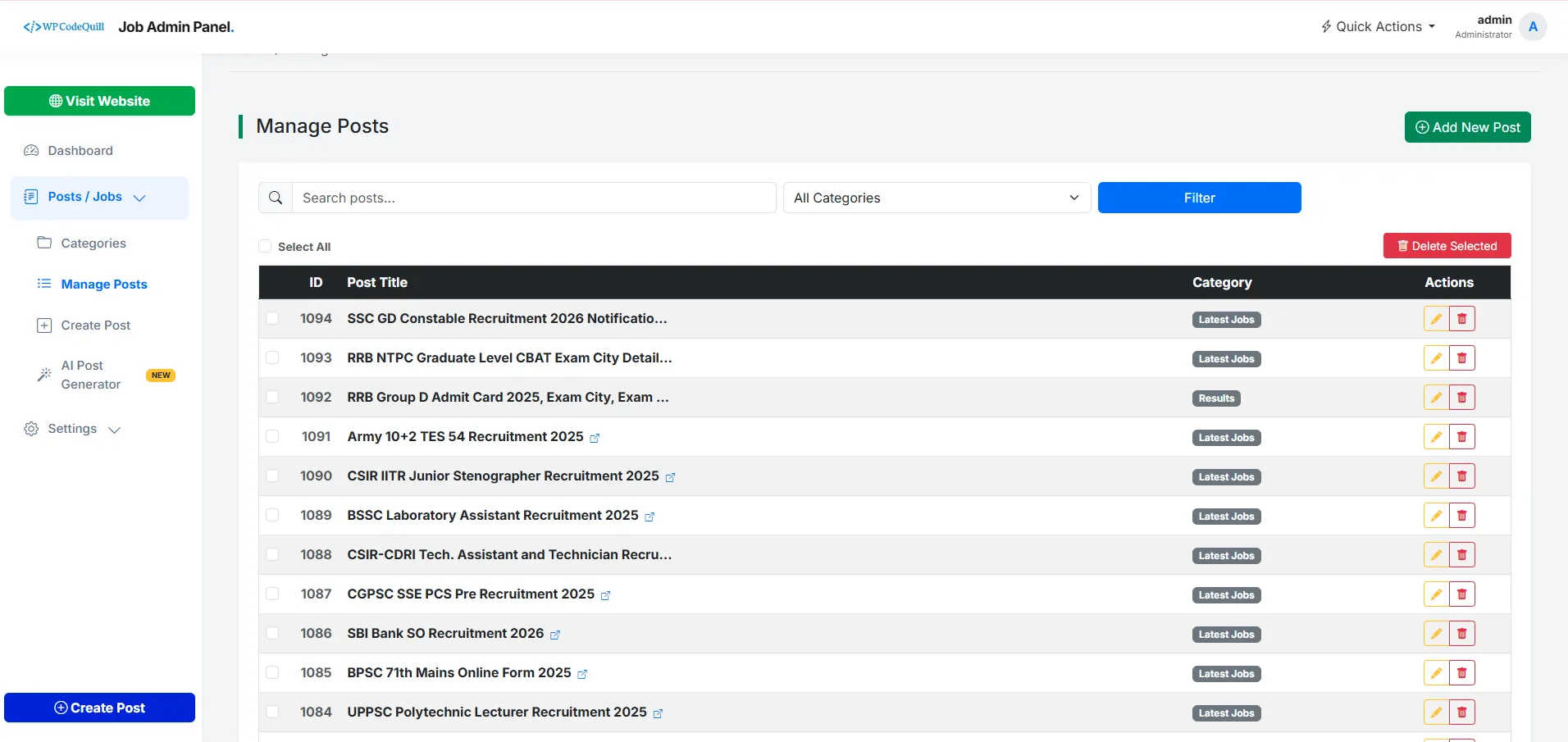
A professional job portal needs an organized way to manage employment listings. QuillRecruit AI provides a centralized environment for managing supported job content through the administration panel.

Administrators can create, edit, organize, and manage job listings according to the functionality included in the purchased version.

  • Manage job listings
  • Organize job information
  • Create relevant categories
  • Update existing listings
  • Manage website content
  • Control supported administrative settings

🤖 Ready-to-Use AI Prompts

The AI component of QuillRecruit AI is designed around ready-to-use prompts rather than automatic publishing.

You can copy the provided prompt and paste it into your preferred AI platform to help generate job descriptions, listing content, summaries, or other suitable website material.

A typical workflow can be:

  1. Choose the type of job content you want to create.
  2. Copy the relevant QuillRecruit AI prompt.
  3. Paste the prompt into your preferred AI tool.
  4. Provide the required job information.
  5. Review and fact-check the generated content.
  6. Edit the content when necessary.
  7. Add the final information to your job listing.
  8. Publish the listing through your website administration panel.

This approach gives website owners control over the final content instead of claiming that the PHP script automatically publishes AI-generated jobs.

✍️ Create Better Job Descriptions with AI

Writing individual job descriptions can take time, especially when a website contains many different types of employment opportunities.

With ready-to-use AI prompts, QuillRecruit AI can help simplify the content-writing stage. You can provide relevant information such as the job title, company, responsibilities, qualifications, location, salary information, and application instructions.

The AI-generated result should always be reviewed before publication to make sure the information is accurate, current, and appropriate for your audience.

🎯 Suitable for Different Job Niches

QuillRecruit AI is not restricted to one employment category. The script can be used as a foundation for different types of job-board websites.

  • Technology jobs
  • Remote jobs
  • Freelance opportunities
  • Marketing jobs
  • Healthcare careers
  • Education jobs
  • Finance careers
  • Local employment listings
  • Industry-specific jobs
  • Company recruitment websites

This broader positioning allows you to create a job website around the audience and employment category you want to serve.

⚙️ Powerful Admin Panel

The QuillRecruit AI Admin Panel provides a centralized area for managing the supported functionality of your job board.

Instead of modifying application files for every content change, administrators can use the available management interface to handle supported listings, categories, pages, and configuration options.

  • Centralized administration dashboard
  • Job listing management
  • Category management
  • Website page management
  • Content management
  • System configuration
  • License management

📂 Job Category Management

Organizing jobs into relevant categories helps visitors discover opportunities more easily.

QuillRecruit AI provides category-based organization for supported job listings, allowing administrators to structure their job portal around different industries, employment types, or other useful classifications.

A clear category structure can also make your website easier to navigate and can support a better overall content architecture.

🌐 Create a Professional Recruitment Website

QuillRecruit AI can be used as the foundation for a professional recruitment or job listing website.

You can build a website around a specific industry, geographic market, employment type, or professional audience while maintaining control over your own content and publishing workflow.

Because it is a PHP-based application, developers can deploy it independently from WordPress on compatible hosting environments.

📱 Responsive Website Experience

Job seekers increasingly access websites from smartphones and tablets. A modern job board therefore needs to provide a usable experience across different screen sizes.

QuillRecruit AI is designed to support a responsive website experience so visitors can browse supported job content from desktop computers, tablets, and mobile devices.

Before launching your website publicly, test important pages and job-listing workflows across the devices and browsers used by your target audience.

🔗 Job Search & Navigation

A useful job board should make it simple for visitors to discover relevant employment opportunities.

By organizing listings into logical categories and maintaining clear website navigation, you can create a more structured experience for visitors looking for specific types of jobs.

For larger websites, consider creating dedicated category pages and useful informational content around the industries and employment areas you cover.

📈 Build a Search-Friendly Job Website

QuillRecruit AI provides the application foundation, but your website's search visibility depends on the quality of your content, technical implementation, website structure, and SEO practices.

For sustainable SEO, focus on:

  • Original and useful job-related content
  • Descriptive page titles
  • Clear URLs
  • Logical website architecture
  • Useful internal links
  • Mobile-friendly pages
  • Fast page performance
  • Accurate job information
  • Appropriate structured data
  • Regular content maintenance

Read the Google SEO Starter Guide for official guidance on creating search-friendly websites.

🔗 Internal Linking for Job Websites

Internal links can help visitors discover related jobs, categories, guides, and other useful pages on your website.

For example, a technology job listing could link to a relevant technology jobs category, while a recruitment guide could link to useful job-search resources.

Use descriptive anchor text and only link to pages that genuinely provide additional value.

Google provides additional guidance on crawlable links and internal linking.

💡 Content Creation Workflow

QuillRecruit AI is designed to make the job-board content workflow easier without removing administrator control.

A practical workflow can include:

  1. Collect accurate job information.
  2. Use the appropriate AI prompt if you need assistance writing the listing.
  3. Review the generated content.
  4. Verify company, position, location, salary, qualification, and application information.
  5. Make manual corrections when necessary.
  6. Add the listing to your job board.
  7. Organize it under the appropriate category.
  8. Publish the final listing.

This workflow combines the convenience of AI-assisted writing with human review and editorial control.

👨‍💻 Standalone PHP Application

QuillRecruit AI is a standalone PHP script rather than a WordPress plugin.

This makes it suitable for developers who prefer an independent PHP application for building a dedicated job portal.

Developers can deploy the application on compatible PHP hosting and configure the required database and server environment according to the purchased release requirements.

For PHP development and configuration references, visit the official PHP documentation.

🛠️ Easy Installation

QuillRecruit AI is designed to provide a straightforward installation process on compatible PHP hosting environments.

The general deployment workflow includes uploading the application, configuring the required database and application settings, activating the license, and accessing the administration panel.

Always check the technical requirements included with your purchased version before installation because server requirements may vary between releases.

🔐 License Key & Protection

QuillRecruit AI includes a license management system for authorized installations.

After purchasing the script, use the valid license information supplied with your purchase to activate the application according to the product's licensing process.

License protection helps maintain controlled distribution of the premium application and provides legitimate customers with access to supported product updates and features according to their license.

🔒 Security Considerations

Security is an important part of operating any public-facing job portal.

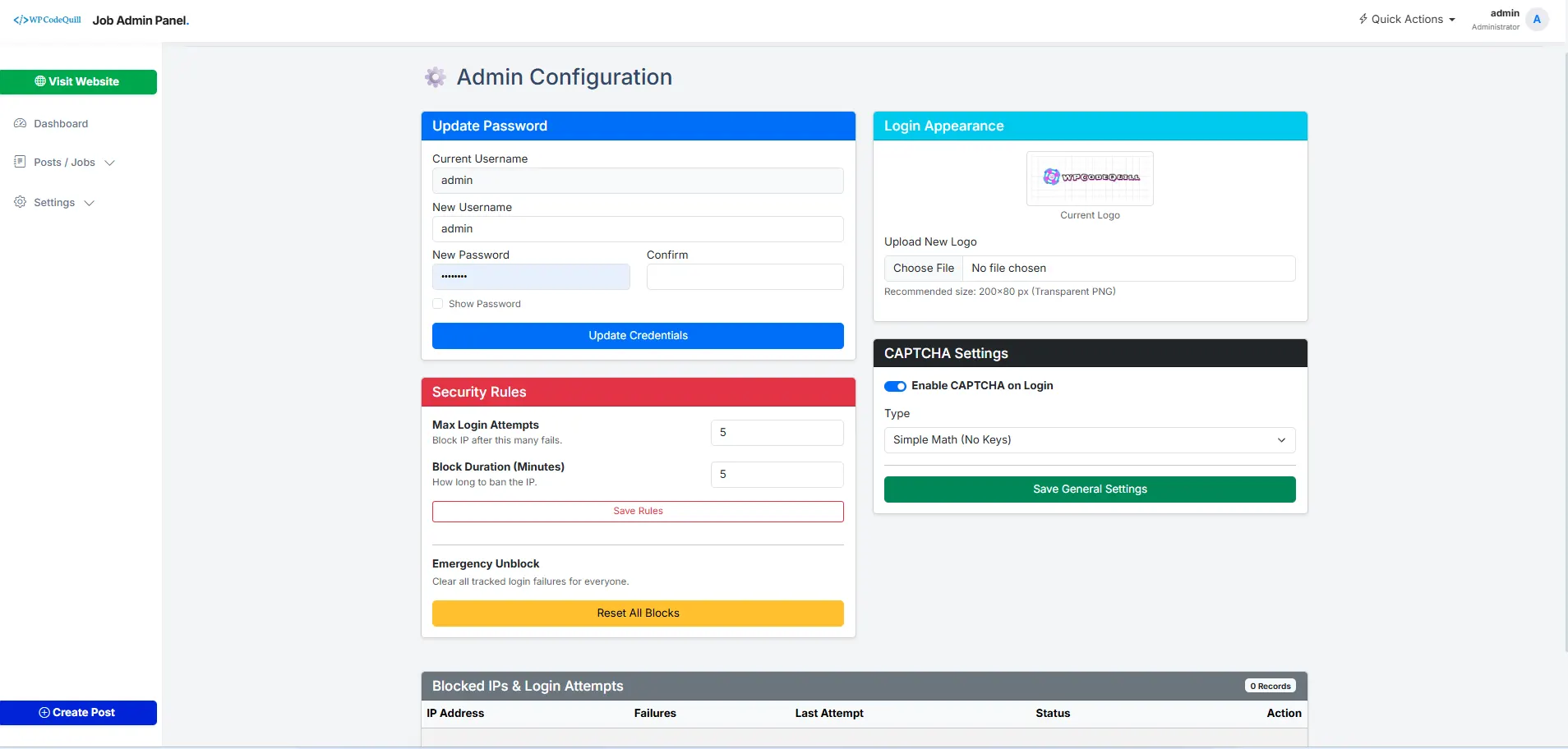
Administrators should keep the PHP environment, database software, server software, and application components updated. Strong administrator credentials and secure HTTPS configuration are also recommended for production websites.

Developers can use the OWASP Cheat Sheet Series as a useful reference for common web application security practices.

🗄️ Database Support

QuillRecruit AI requires a compatible database environment according to the requirements of the purchased release.

Before installation, check the product documentation for the required PHP version, database version, extensions, web-server configuration, and other technical requirements.

For database development and administration reference, see the official MySQL documentation.

💻 Technical Requirements

  • Application Type: Standalone PHP Script
  • PHP: Use the minimum version specified by your purchased release
  • Database: Compatible database environment according to the product requirements
  • Web Server: Compatible Apache or Nginx environment
  • HTTPS: Strongly recommended for production websites
  • Server Extensions: Install the extensions specified by your purchased release

Important: Do not rely on generic server requirements when installing the product. Always verify the requirements included with your current QuillRecruit AI package.

🎯 Who Is QuillRecruit AI For?

Entrepreneurs can use QuillRecruit AI as a starting point for launching a niche or general job board.

Recruitment agencies can use the platform to create a dedicated online job listing presence.

Developers can deploy the standalone PHP application as a foundation for compatible custom job-board projects.

Freelancers can use the script when developing suitable job listing websites for clients.

Publishers can create employment-focused websites and organize job-related resources in a centralized platform.

📊 Why Choose QuillRecruit AI?

  • Ready-Made PHP Solution: Start with an existing job-board application instead of building the core system from scratch.
  • Admin Panel: Manage supported job-board functionality from a centralized interface.
  • AI-Ready Prompts: Copy and use prepared prompts with your preferred AI platform.
  • Manual Publishing Control: Review and approve content before adding it to your website.
  • Job Categories: Organize supported listings into relevant categories.
  • Standalone PHP: Deploy independently from WordPress.
  • Flexible Use Cases: Build general or niche employment websites.
  • License Management: Support authorized product installations.
  • Developer Friendly: Suitable for compatible custom PHP environments.
  • Mobile-Friendly Experience: Provide access to your job content across supported devices.

🔎 How to Use the AI Prompts

Using the included AI prompts is simple:

  1. Open the QuillRecruit AI prompt provided with your product.
  2. Copy the prompt.
  3. Open your preferred AI service.
  4. Paste the prompt.
  5. Enter the relevant job information.
  6. Generate the draft content.
  7. Review and verify every important detail.
  8. Copy the approved content into your job listing.
  9. Publish the final listing through your admin panel.

Note: AI-generated information should always be reviewed before publication. Do not publish inaccurate job requirements, company information, salary details, application deadlines, or other important employment information without verification.

🌍 Create Different Types of Job Portals

The flexible concept of QuillRecruit AI allows you to build different types of job-board websites depending on your target audience.

  • Niche industry job boards
  • Local job listing websites
  • Remote work portals
  • Technology recruitment websites
  • Freelance job platforms
  • Company hiring portals
  • Professional career websites
  • Specialized recruitment websites

📚 Related WPCodeQuill Resources

If you are looking for other PHP-based website solutions, explore the WPCodeQuill PHP Scripts collection.

🛒 Get QuillRecruit AI

If you need a Job Board PHP Script with Admin Panel and ready-to-use AI prompts, QuillRecruit AI provides a practical foundation for launching your own employment website.

Build a general job board, niche recruitment portal, local employment website, or specialized hiring platform while maintaining control over your listings and publishing workflow.

Use the included AI prompts to speed up the content-writing process, review the generated information carefully, and publish only accurate and useful job listings.

Build your own professional job board with QuillRecruit AI – a ready-made PHP solution with AI-assisted content creation.

Browse PHP Scripts   |   Explore WPCodeQuill   |   Custom Development Services


System Requirements

✅ System & PHP Requirements for License Activation

QuillRecruit AI requires a compatible PHP hosting environment for application installation, database connectivity, and license activation.

🔐 License Activation Requirements

The license activation process may use server-side PHP functionality to communicate with the license service. Your hosting environment should support the following capabilities where required by your purchased version:

  • ✅ PHP sessions
  • ✅ MySQLi database connectivity
  • ✅ Secure HTTPS connections
  • ✅ JSON processing
  • ✅ Server-side HTTP requests for supported license validation

Your hosting provider should allow the PHP functions and extensions required by the current QuillRecruit AI release. Always check the technical requirements included with your purchased version before installation.

⚙️ Required PHP Extensions

The following PHP extensions are commonly required for the application and its supported license or database functionality:

  • OpenSSL: Used for secure HTTPS communication where supported.
  • JSON: Used for processing JSON data and API responses where required.
  • MySQLi: Used for supported MySQL database connectivity.
  • Session: Required for PHP session-based application functionality.
  • cURL: Recommended where the application uses cURL for secure server-to-server requests.

🗄️ Database Requirements

QuillRecruit AI requires a compatible MySQL or MariaDB database environment. The exact supported database version can depend on the release you purchased.

  • ✅ MySQL-compatible database
  • ✅ MariaDB-compatible database
  • ✅ MySQLi PHP extension enabled
  • ✅ Database user with the required application permissions

For the latest database compatibility information, always refer to the technical requirements supplied with your QuillRecruit AI package.

💻 PHP & Server Requirements

  • ✅ PHP 8.0 or a newer version supported by your purchased release
  • ✅ HTTPS/SSL recommended for production websites
  • ✅ Required PHP extensions enabled
  • ✅ MySQL or MariaDB database support
  • ✅ Apache or Nginx web server environment
  • ✅ Ability to make supported server-side HTTPS requests

Important: Do not assume that every hosting provider has the same PHP configuration. Some hosts disable specific PHP functions or extensions by default. Contact your hosting provider if you are unsure whether your server meets the requirements.

🔗 Query String & JSON Support

A compatible PHP environment should support normal URL query strings, HTTP requests, and JSON processing required by the application.

These capabilities can be used by PHP applications for passing configuration data, communicating with supported services, and processing structured responses.

🔒 HTTPS License Communication

SecureRoute-style server-side license communication should use HTTPS when communicating with the licensing service. HTTPS helps protect information while it is transmitted between your server and the remote service.

Make sure your hosting environment has a valid SSL certificate and allows outbound HTTPS connections required by the application.

🚀 cURL Recommended for Server-Side Requests

cURL is recommended for server-to-server HTTP and HTTPS requests when it is supported by the application. It provides a dedicated mechanism for making remote requests without depending on the PHP allow_url_fopen setting.

Using cURL can also make server-side request configuration more explicit and easier to troubleshoot on compatible hosting environments.

  • ✅ Suitable for server-to-server HTTP/HTTPS requests
  • ✅ Does not depend on allow_url_fopen for cURL requests
  • ✅ Supports secure HTTPS connections
  • ✅ Commonly available on modern PHP hosting
  • ✅ Useful for API and license-service communication where supported

Note: cURL availability is still dependent on your hosting provider. It should not be described as guaranteed to work on every hosting service.

❓ Is allow_url_fopen Required?

If the installed version of QuillRecruit AI uses file_get_contents() with a remote HTTPS URL for license validation, the hosting environment may require allow_url_fopen to be enabled.

If the application uses cURL instead, remote requests do not require allow_url_fopen specifically for cURL communication.

For the most accurate requirement, check the license-activation implementation and documentation included with your purchased version.

🌐 Is CORS Required?

CORS is generally associated with browser-based cross-origin requests. A server-side PHP request made directly from your hosting server does not normally use browser CORS rules in the same way as JavaScript running in a visitor's browser.

However, the exact requirements depend on how the application communicates with the license service and should be verified against the current implementation.

🛡️ Recommended Production Environment

For the best experience, use a reputable PHP hosting provider with a supported PHP version, HTTPS, MySQL or MariaDB, required PHP extensions, and outbound HTTPS connectivity.

Before purchasing hosting, confirm that the provider allows the PHP version and extensions required by your QuillRecruit AI release.

For PHP version information, see the official PHP supported versions .


Installation Instructions

⚙️ Installation Guide with Hosting Suggestions

  1. Create a new database and database user from your cPanel hosting account.
  2. Upload the QuillRecruit AI PHP script to your public_html directory.
  3. Extract the downloaded ZIP file and make sure the application files are in the correct directory.
  4. Open your website installation URL, such as https://yourdomain.com/install.
  5. Enter the required database and application details.
  6. Follow the on-screen installation steps to complete the setup.
  7. Log in to the QuillRecruit AI Admin Panel after installation.
  8. Activate the script using your valid license key.

Recommended Hosting:

Note: Hosting prices, discounts, promotional offers, and available plans may change. Check the hosting provider's website for the latest pricing and offers.

✏️ How to Add Manual Job Posts

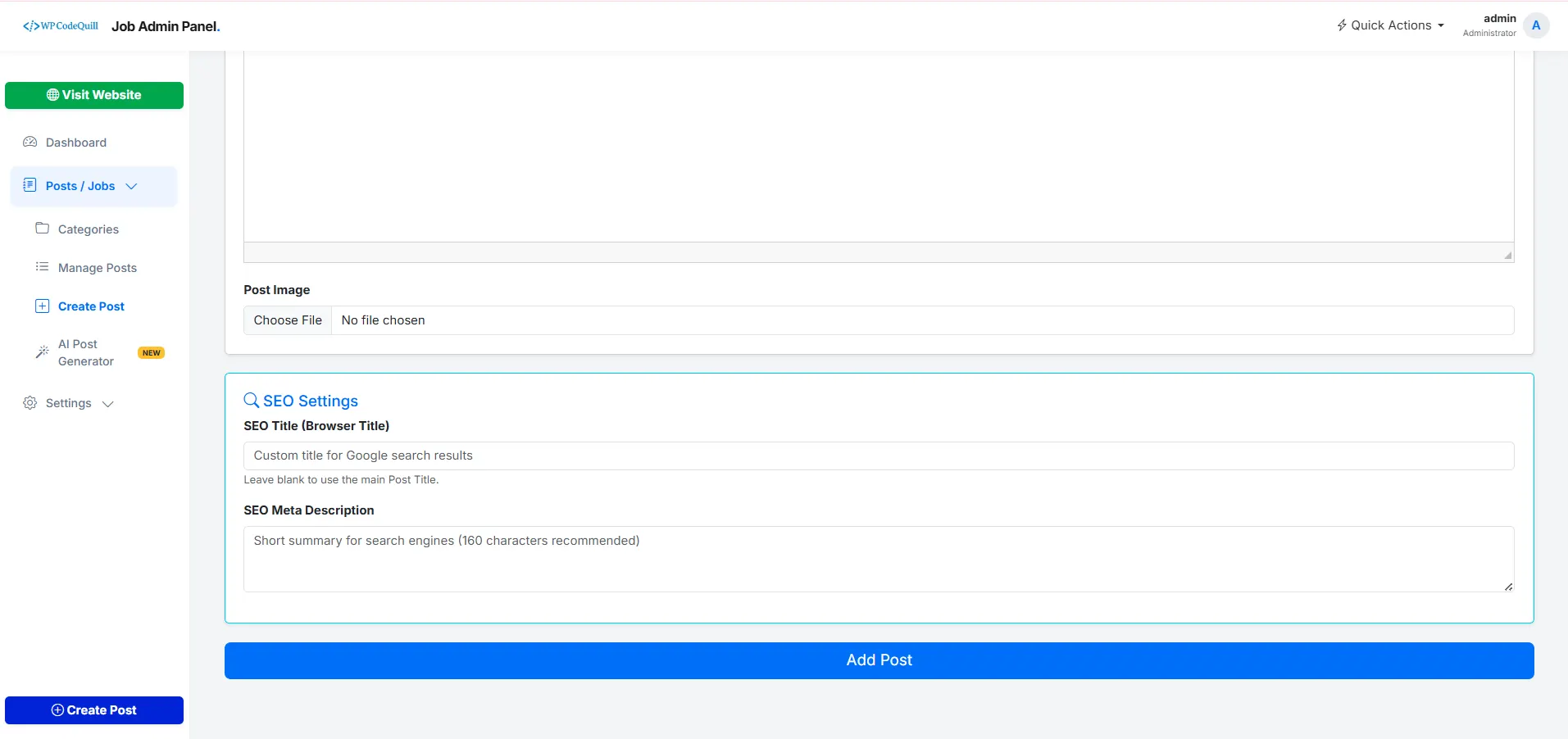
QuillRecruit AI allows administrators to manually create and manage job listings through the Admin Panel. You can review the information before publishing it on your website.

  1. Log in to the QuillRecruit AI Admin Panel.
  2. Open the Add Post section.
  3. Enter the job title and relevant job information.
  4. Add the job date, description, requirements, and application information.
  5. Add the appropriate application or company URL when required.
  6. Select a relevant job category.
  7. Review the information carefully.
  8. Publish the job post when it is ready.

Important: Always verify job information before publishing. This includes company details, job requirements, salary information, location, application URLs, and application deadlines.

🖥️ Full Admin Panel Overview

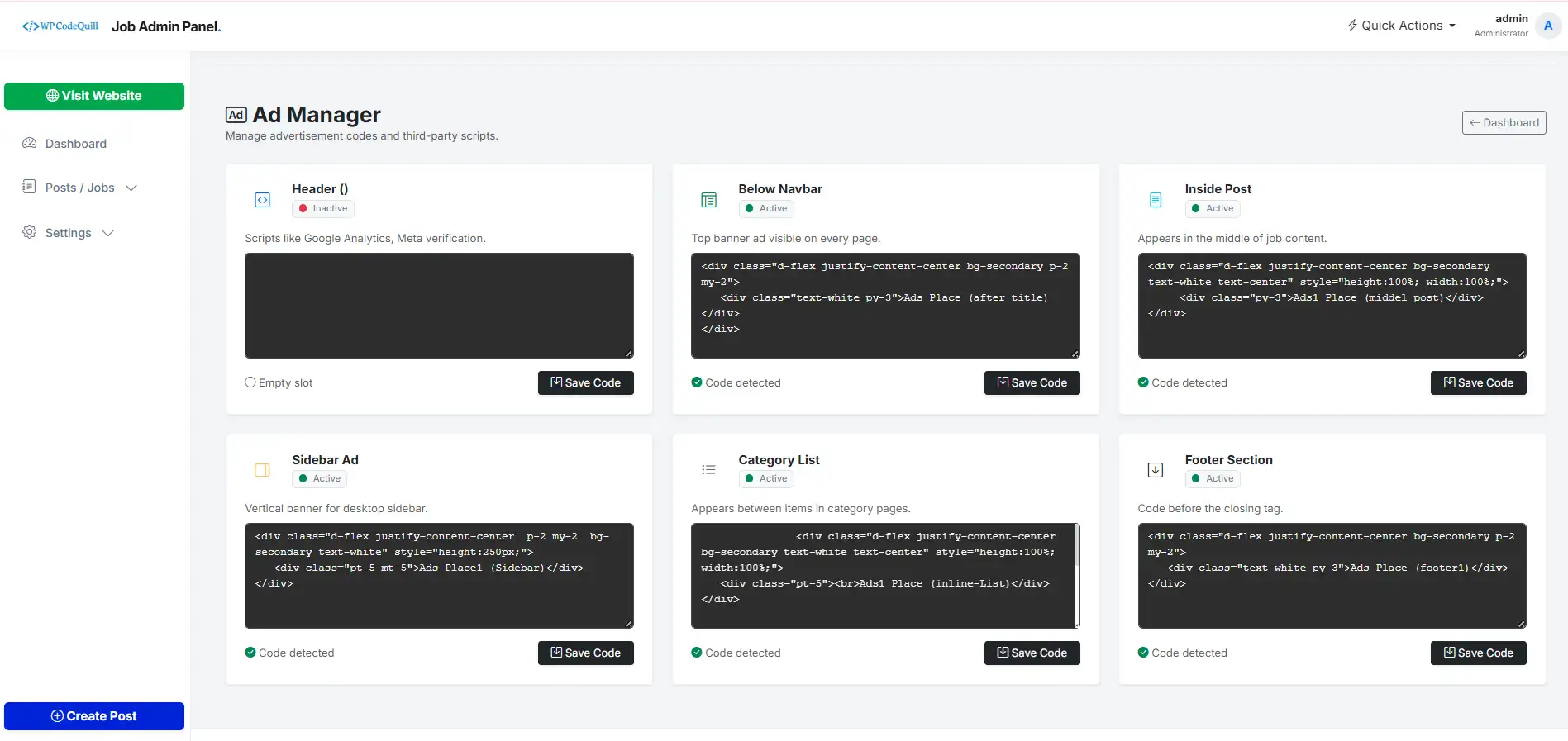
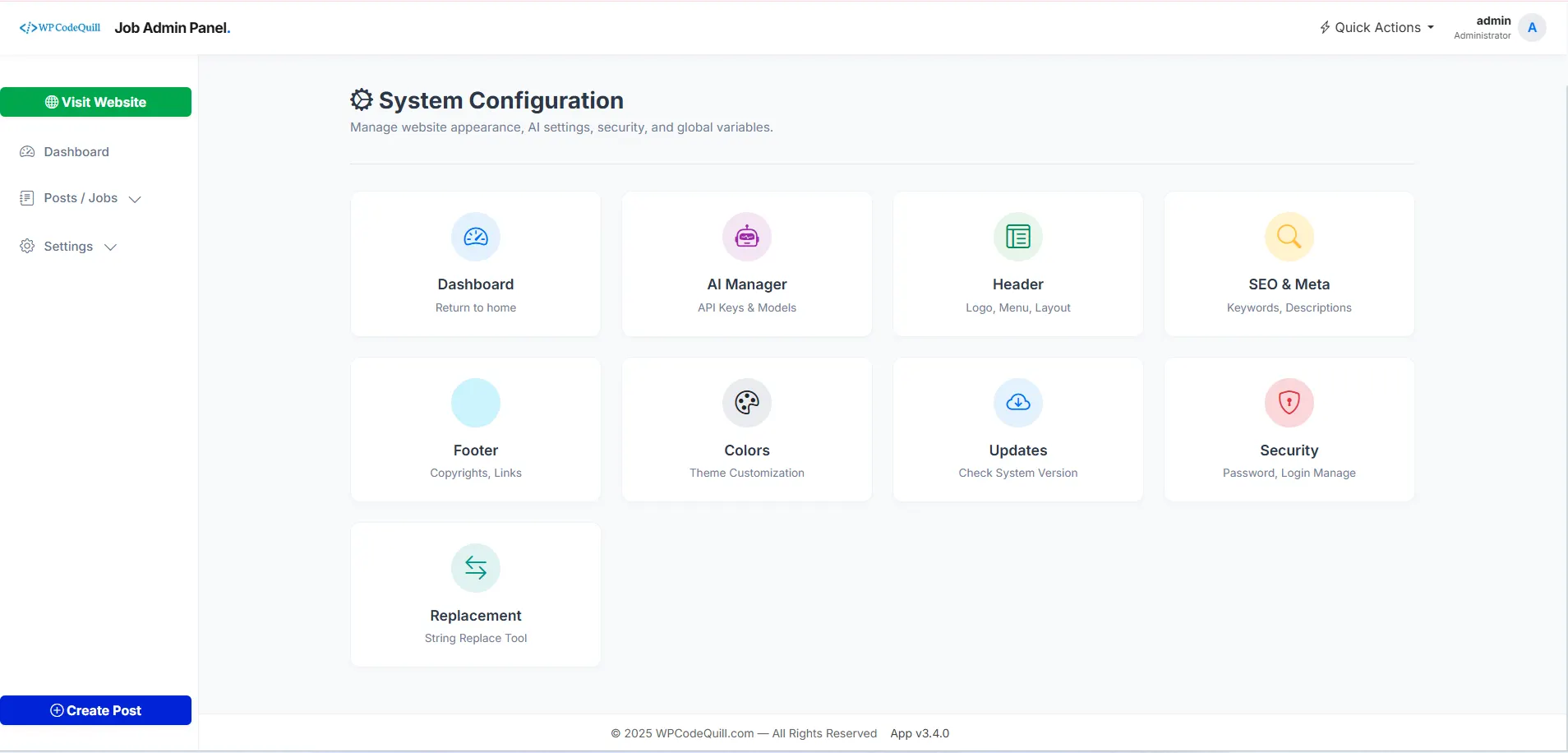
The QuillRecruit AI Admin Panel provides a centralized interface for managing your job-board website, content, categories, monetization settings, and other supported application options.

Feature Function
Dashboard View website statistics and recent job posts.
Add Post Create and manage manual job listings.
Add Category Organize job listings into relevant categories.
Add Pages Create important website pages such as About, Contact, Privacy Policy, and other supported pages.
AdSense Code Manage supported advertising or monetization code.
Sidebar Posts Manage supported highlighted or featured posts displayed in the sidebar area.
Settings Manage supported website settings, metadata, layout options, and license configuration.

🤖 How the AI Prompt Workflow Works

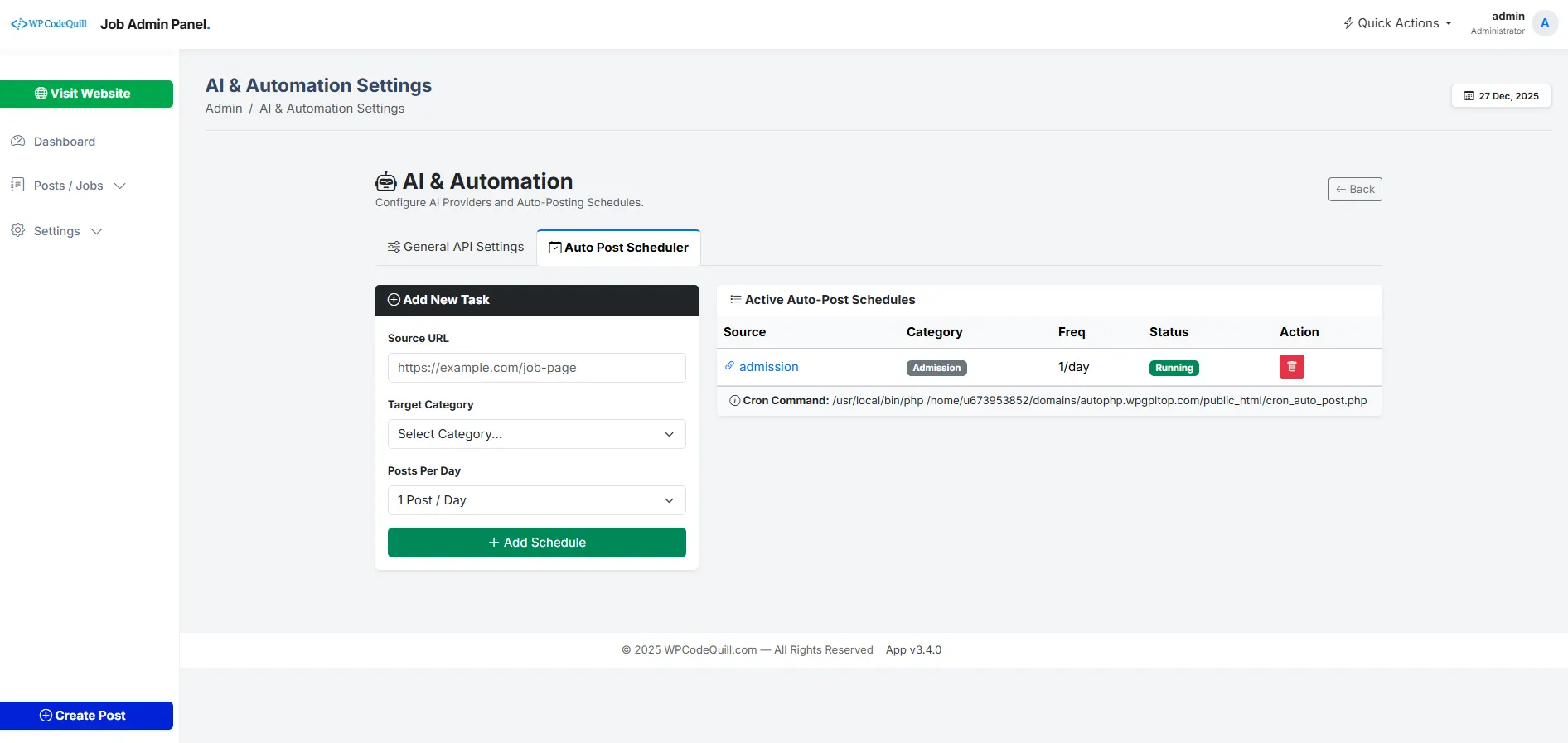
QuillRecruit AI does not automatically publish AI-generated jobs. Instead, the script provides a ready-to-use AI prompt workflow that can help you create job-related content.

  1. Choose the job information you want to prepare.
  2. Copy the relevant QuillRecruit AI prompt.
  3. Paste the prompt into your preferred AI tool.
  4. Provide the required job information.
  5. Generate the draft content.
  6. Review and fact-check the generated information.
  7. Edit the content when necessary.
  8. Copy the approved content into the QuillRecruit AI Admin Panel.
  9. Publish the final job post manually.

This workflow combines AI-assisted content creation with manual review and publishing, giving administrators control over the final information published on their job website.

Complete Update History

v3.5.1 — 29 January 2026
Fixing and Update fix
- UPDATED: ai Prompt auto generate
- FIXED: API Server description fetching errors.
- FIXED: Lunch Ai auto Posting (Beta)
v3.5.0 — 23 January 2026
🚀 New Features feature
1. 🚀 New Features:
1. Live Theme Customizer: Added a WordPress-style slide-out panel on the frontend. Admins can now edit the following in real-time without reloading:
i. Theme Colors: Header, Menu, and Primary Brand colors with instant live preview.
ii. Site Identity: Website Title, Meta Description, and Footer Text.
iii. Branding: Drag-and-drop upload for Website Logo and Favicon.
2. Frontend Admin Bar: Implemented a persistent top bar visible only to logged-in admins on the homepage.
i. Quick links to Dashboard, New Post, Edit Page, and Logout.
ii. Customize trigger to open the new Live Editor.
3. AJAX Saving: Settings in the Customizer now save instantly via ajax_save_customizer.php without refreshing the page.

2. 🎨 UI/UX Improvements
1. Admin Panel Overhaul: Completely redesigned the Admin interface to match the WordPress Admin aesthetic.
i. New Sidebar Layout: Replaced the old layout with a fixed, responsive dark sidebar menu.
ii. Modern Header: Added a unified Top Bar with user profile, "New" dropdowns, and quick actions.
2. Dashboard Redesign: Updated admin/index.php with a modern "Card Grid" layout for server stats, post counts, and system status.
3. Consistent Layouts: Applied the new Sidebar Wrapper (admin-wrapper) to all management pages: Manage Posts, Categories, Pages, Ad Manager, Settings
3. 🐛 Bug Fixes
1. Dropdown Menu Visibility: Fixed a CSS conflict where dropdown text was appearing white-on-white. Forced dark text for better readability.
2. Missing Sidebar Fix: Resolved critical layout issues where the sidebar was missing on homepage-databox-setting.php and color_setting.php.
3. Footer Path Error: Fixed a failed to open stream error in admin/index.php caused by an incorrect path to footer.php.
4. HTML Structure: Cleaned up unclosed <div> and <main> tags in footer.php that were breaking the layout on some pages.
4. ⚙️ Technical Updates
File Structure:
Created includes/wp_admin_bar.php for the frontend admin bar logic.
Created includes/live_editor.js.php to handle JS logic separately.
Created admin/ajax_save_customizer.php to handle backend processing securely.
Session Security: Added strict session checks (session_start and loggedin verification) to all new include files to prevent unauthorized access.
v3.4.0 — 03 January 2026
Update and Fixing update
- ADDED: AI Content integration for post descriptions.
- ADDED: Modern Security Headers & XSS Protection.
- UPDATED: Complete Admin Panel UI Redesign (Bootstrap 5).
- UPDATED: Homepage Layout for better CTR.
- FIXED: Minor CSS issues on mobile devices.
v3.3.0 — 12 December 2025
Fixing fix
- UPDATED: New Login Screen Design.
- FIXED: AI Server description fetching errors.
- FIXED: Admin session timeout issues.
v3.2.3 — 12 July 2025
Added feature
- Automated API Posting.
- Manual Post Support.
- License Key Protection.
- Auto Installer relaunched.
v3.2.2 — 15 June 2025
Fixing fix
- Added:Admin Sidebar better UX
- Fixed:Admin Sidebar issue resolved
- Fixed:Database issue resolved
- Fixed:Admin issue resolved
v3.2.1 — 10 May 2025
Improved, Added feature
- Added:Admin Sidebar fixed positioning for better UX
- Added:Completely redesigned Home Page UI
- Added:Enhanced controls for Home Page management
- Added:New “Latest Updates” Download Page
- Added:Brand new Settings UI page for easier management
- Fixed:CSS path loading issue resolved
- Fixed:Database conflict issues resolved between tables
- Fixed:Proper redirection after installation to admin login page
- Fixed:License activation issue resolved
- Fixed:License reset functionality fully operational
v3.2.0 — 15 April 2025
Fixing fix
- Fixed: License activation bug
- Fixed: API synchronization errors
- improved: CSS styling and layout improvements
v3.1.2 — 12 April 2025
Improved, Added fix
- Fixed: Password change functionality issue
- Fixed: Minor installation-related bugs
v3.1.1 — 10 April 2025
Improved, Added fix
- Fixed: License Activate Problems Fix
- Fixed: css and homepage and more...
v3.1 — 29 October 2024
Improved, Added update
- Added: Favicon Upload and delete
- Added: Color picker
- Fixed: css and homepage and more...
v3.0 — 17 October 2024
Improved, Added feature
- Added: PHP Script Installer
- Added: License Activator
- Fixed: Various minor issues
v2.5 — 07 October 2024
Improved, Added fix
- Added: New Button on 404 page
- Fixed: Facebook Not Found 404 Error
- Fixed: Various minor issues
v2.4 — 23 September 2024
Improved, Added feature
- Added: Published on date
- Added: Last updated with new GIF image
v2.3 — 14 September 2024
Fixing fix
- Fixed: Open Graph meta property
v2.2 — 16 July 2024
Fixing fix
- Fixed: Password change issue
v2.1 — 23 April 2024
Improved, Added feature
- Fixed: Issues on the settings page
- Fixed: Sidebar functionality
- Fixed: Ads insertion problems
v2.0 — 21 April 2024
Initial Release feature
Initial Release

Frequently Asked Questions

QuillRecruit AI is a ready-made Job Board PHP Script with an Admin Panel for creating and managing a professional job listing or recruitment website.
No. QuillRecruit AI should not be considered an automated job publishing system. It provides ready-to-use AI prompts that you can copy and paste into your preferred AI tool to help create job-related content. You can then review, edit, and manually publish the final content through the website.
Yes. The product is positioned as an AI-ready job board solution with prepared prompts that can be copied and used with a compatible AI service.
The PHP script itself and any external AI service are separate products or services. The availability and pricing of an AI service depend on the provider you choose.
No. QuillRecruit AI is a standalone PHP application and does not require WordPress.
Yes. QuillRecruit AI includes a dedicated administration panel for managing supported job-board functionality and website content.
Yes. The product supports a manual content-management workflow where administrators can create and manage supported job listings through the administration interface.
Ramesh Ramesh Verified buyer 29 Jun 2026
Best Support Bhi, BUT NEED MORE UPDATE THIS SCRIPT.
Admin reply:
Thank you so much, Ramesh Ramesh! We’re thrilled to hear you had a great experience with WPCodeQuill. Your support motivates us to keep delivering the best WordPress plugins, Themes, PHP Scripts and services. If you ever need assistance or have suggestions, we’re always here to help.
Please login to submit a review.
Need Help?

Our dedicated support team is available 24/7 to assist you.

Contact Support

1,000+

Happy Customers

100%

Safe & Secure Checkout

100%

Secure Product

24/7

Dedicated Support

Trusted by WordPress Professionals
and Site Owners Worldwide