
Hostinger Coupon WPCODEQUILL: Hosting Discount & Promo Code Guide 2026
Looking for a Hostinger coupon that you can use when purchasing web hosting? If you are planning to launch a WordPress website, blog, business website, online store, portfolio, or PHP application, choosing the right hosting plan is just as important as finding a promotional offer.
WPCodeQuill provides a Hostinger referral/discount option where the code may be applied when accepted during checkout. However, the exact price, available promotion, plan features, and renewal price are controlled by Hostinger and can change over time.
This guide explains how the Hostinger promo code works, what to check before purchasing, how to choose a suitable hosting plan, how introductory pricing differs from renewal pricing, and an important distinction between the Hostinger discount option and the separate WPCodeQuill giveaway.
For Google's people-first content guidance, a useful hosting article should do more than repeat a coupon code. It should help readers understand what they are buying, compare their requirements with the available hosting resources, and make an informed purchasing decision.
What Is the Hostinger Coupon WPCODEQUILL?
WPCODEQUILL is the Hostinger coupon/referral code promoted by WPCodeQuill. Depending on the offer and checkout conditions, customers can use the referral link and apply the coupon where Hostinger accepts it.
The important point is that a coupon code should not be treated as the only factor when selecting hosting. A discount can reduce the initial purchase cost, but your hosting decision should also consider website requirements, storage, performance, backups, security, scalability, support, and renewal pricing.
Hostinger currently offers several hosting categories, including general web hosting, managed WordPress hosting, WooCommerce hosting, cloud hosting, VPS hosting, and other specialised products. The appropriate option depends on the type and expected size of your project.
You can first compare hosting options through the WPCodeQuill web hosting guide before deciding which type of hosting fits your project.
Hostinger Promo Code vs Hostinger Discount Code
People use several different terms when searching for hosting promotions, including Hostinger coupon, Hostinger promo code, and Hostinger discount code. In many cases, they are searching for the same basic thing: a code or promotional mechanism that can reduce the applicable purchase price.
For this WPCodeQuill offer, the code is:
| Offer Detail | Information |
|---|---|
| Coupon Code | WPCODEQUILL |
| Provider | Hostinger |
| Promotion Source | WPCodeQuill referral / 20% discount offer |
| Use | Apply where accepted during the Hostinger checkout process |
| Availability | Subject to Hostinger's current offer and checkout conditions |
| Important Note | Coupon purchases are not eligible for the separate WPCodeQuill giveaway |
Because hosting promotions can change, always look at the final checkout amount before completing your purchase. The displayed introductory price should not be confused with the price that applies after the initial subscription period.
How to Use the Hostinger Coupon WPCODEQUILL
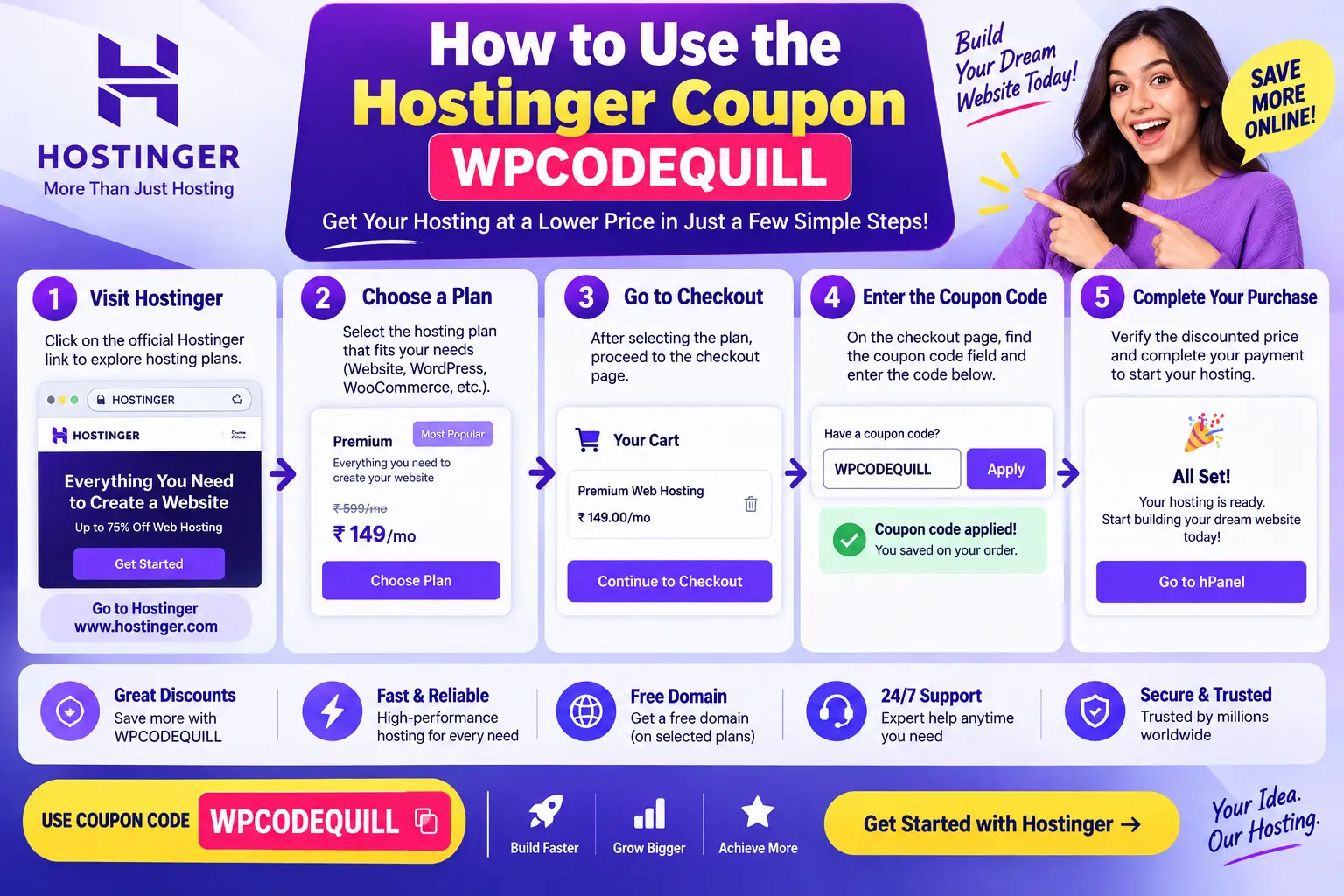
If you want to use the Hostinger discount option associated with WPCodeQuill, the basic process is straightforward.
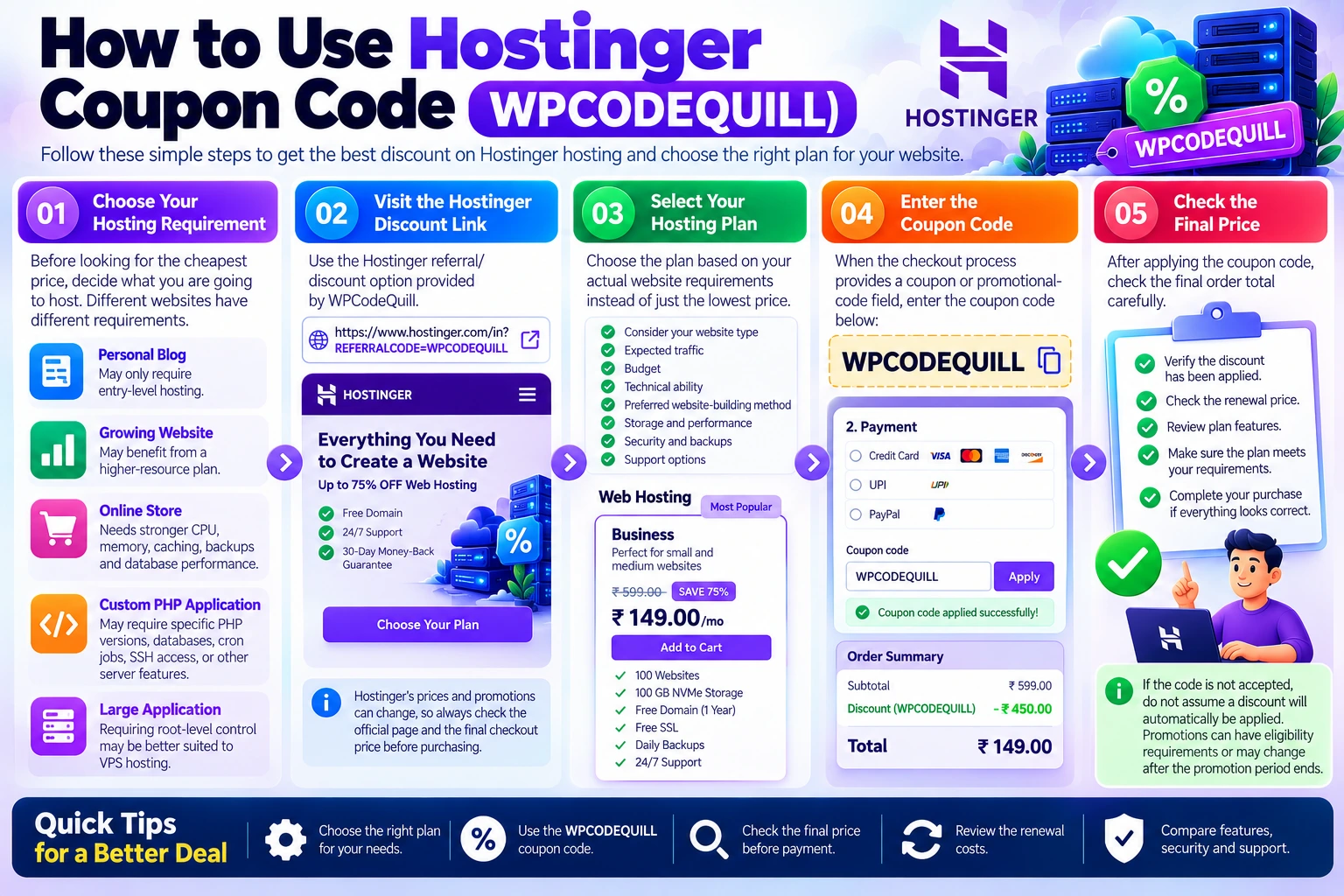
Step 1: Choose Your Hosting Requirement
Before looking for the cheapest price, decide what you are going to host. A simple personal blog has different requirements from a WooCommerce store, a high-traffic news website, or a PHP application.
For example:
- A small personal website may only require entry-level web hosting.
- A growing WordPress website may benefit from a higher-resource hosting plan.
- An online store may require stronger CPU, memory, caching, backups, and database performance.
- A custom PHP application may require specific PHP versions, databases, cron jobs, SSH access, or other server features.
- A large application requiring root-level control may be better suited to VPS hosting.
Step 2: Visit the Hostinger Discount Link
Use the Hostinger referral/discount option provided by WPCodeQuill:
Open the Hostinger discount offer
Hostinger's current Indian hosting pages display hosting plans and pricing directly on its website. Prices and promotional percentages can change, so use the checkout page as the final reference for your purchase.
Step 3: Select Your Hosting Plan
Choose the plan based on your actual website requirements rather than selecting a plan simply because its headline price looks attractive.
Hostinger's own guidance recommends considering website type, expected traffic, budget, technical ability, preferred website-building method, storage, performance, security, backups, and support when choosing a plan.
Step 4: Enter the Coupon Code
When the checkout process provides a coupon or promotional-code field, enter:
WPCODEQUILL
Apply the code and check whether the displayed order total changes. If the code is not accepted, do not assume that a discount will automatically be applied. Promotions can have eligibility requirements or may change after the promotion period ends.
Step 5: Check the Final Price
This is one of the most important steps.
Before paying, check:
- The subscription period.
- The introductory price.
- The renewal price.
- Any taxes or additional charges.
- Whether a domain is included.
- The number of websites allowed.
- Storage limits.
- Backup availability.
- Email availability.
- Any optional products added to the cart.
Hostinger's current published pricing pages clearly distinguish promotional pricing from renewal pricing. For example, current plans displayed on its Indian website show an introductory monthly equivalent alongside a higher renewal rate.
What Does Hostinger Hosting Include?
The exact features depend on the hosting product and plan, but Hostinger currently promotes features such as free SSL, backups, email, WordPress support, AI tools, CDN availability on applicable plans, and 24/7 support across its hosting offerings.
For WordPress users, Hostinger also provides managed WordPress hosting with features designed specifically around WordPress websites. Its current WordPress hosting page describes features including automatic updates, backups, staging, WP-CLI, SSH access, Git integration, PHP version control, and WordPress-oriented performance features, depending on the plan.
Why Hosting Features Matter More Than the Coupon Alone
A coupon can help reduce the purchase price, but hosting is infrastructure. The quality and capacity of that infrastructure affect how easily you can operate your website.
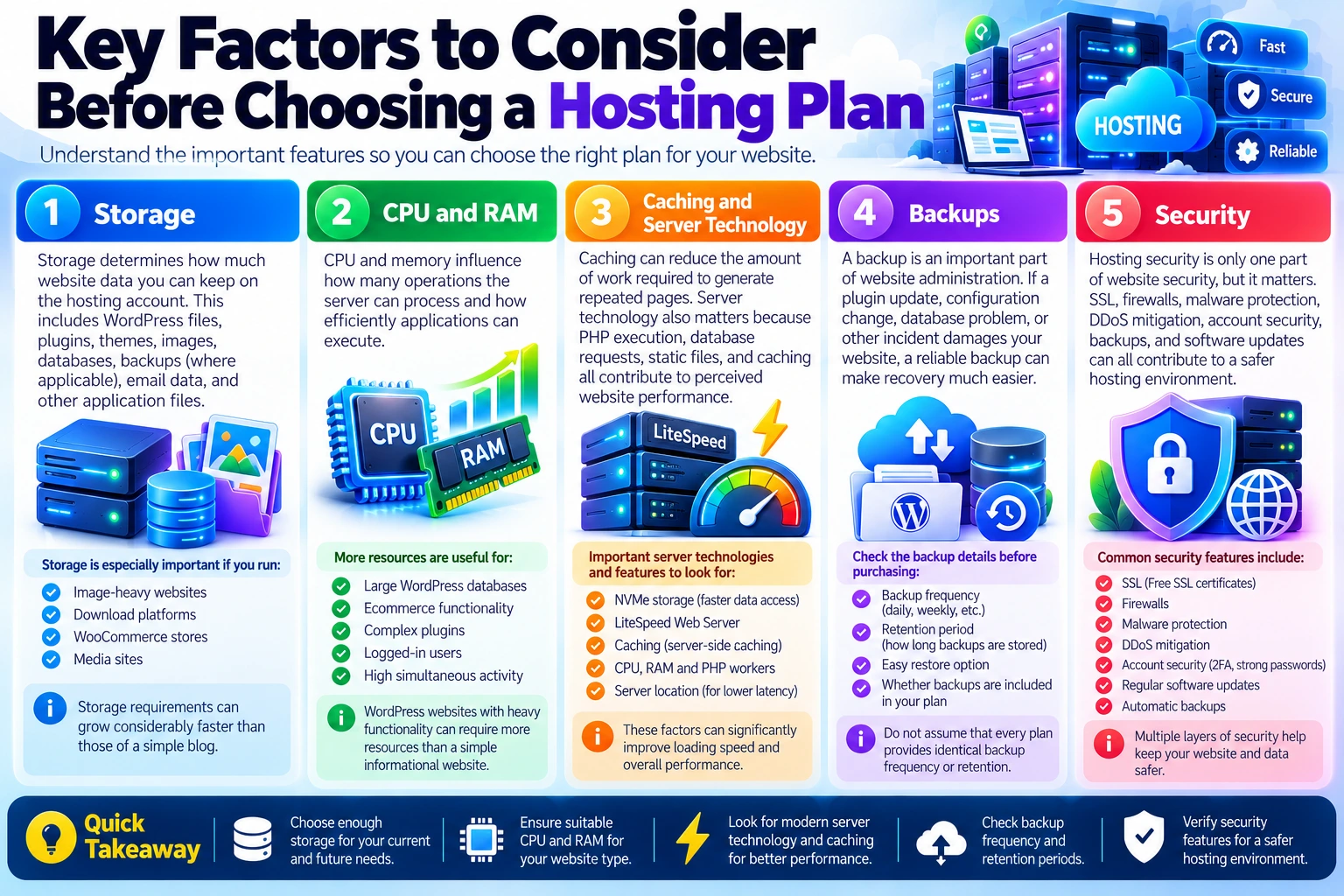
1. Storage
Storage determines how much website data you can keep on the hosting account. This includes WordPress files, plugins, themes, images, databases, backups where applicable, email data, and other application files.
If you operate an image-heavy website, download platform, WooCommerce store, or media site, storage requirements can grow considerably faster than those of a simple blog.
2. CPU and RAM
CPU and memory influence how many operations the server can process and how efficiently applications can execute.
WordPress websites with large databases, ecommerce functionality, complex plugins, logged-in users, or high simultaneous activity can require more resources than a simple informational website.
3. Caching and Server Technology
Caching can reduce the amount of work required to generate repeated pages. Server technology also matters because PHP execution, database requests, static files, and caching all contribute to perceived website performance.
Hostinger's current hosting guidance identifies factors such as NVMe storage, LiteSpeed Web Server, caching, CPU, RAM, PHP workers, and server location as relevant considerations when evaluating performance.
4. Backups
A backup is an important part of website administration. If a plugin update, configuration change, database problem, or other incident damages your website, a reliable backup can make recovery much easier.
Do not assume that every plan provides identical backup frequency or retention. Check the specific plan details before purchasing.
5. Security
Hosting security is only one part of website security, but it matters. SSL, firewalls, malware protection, DDoS mitigation, account security, backups, and software updates can all contribute to a safer hosting environment.
Hostinger currently describes managed WordPress security features including automatic malware removal, firewall protection, DDoS mitigation, and managed security on its WordPress hosting offering.
Which Hostinger Plan Should You Choose?
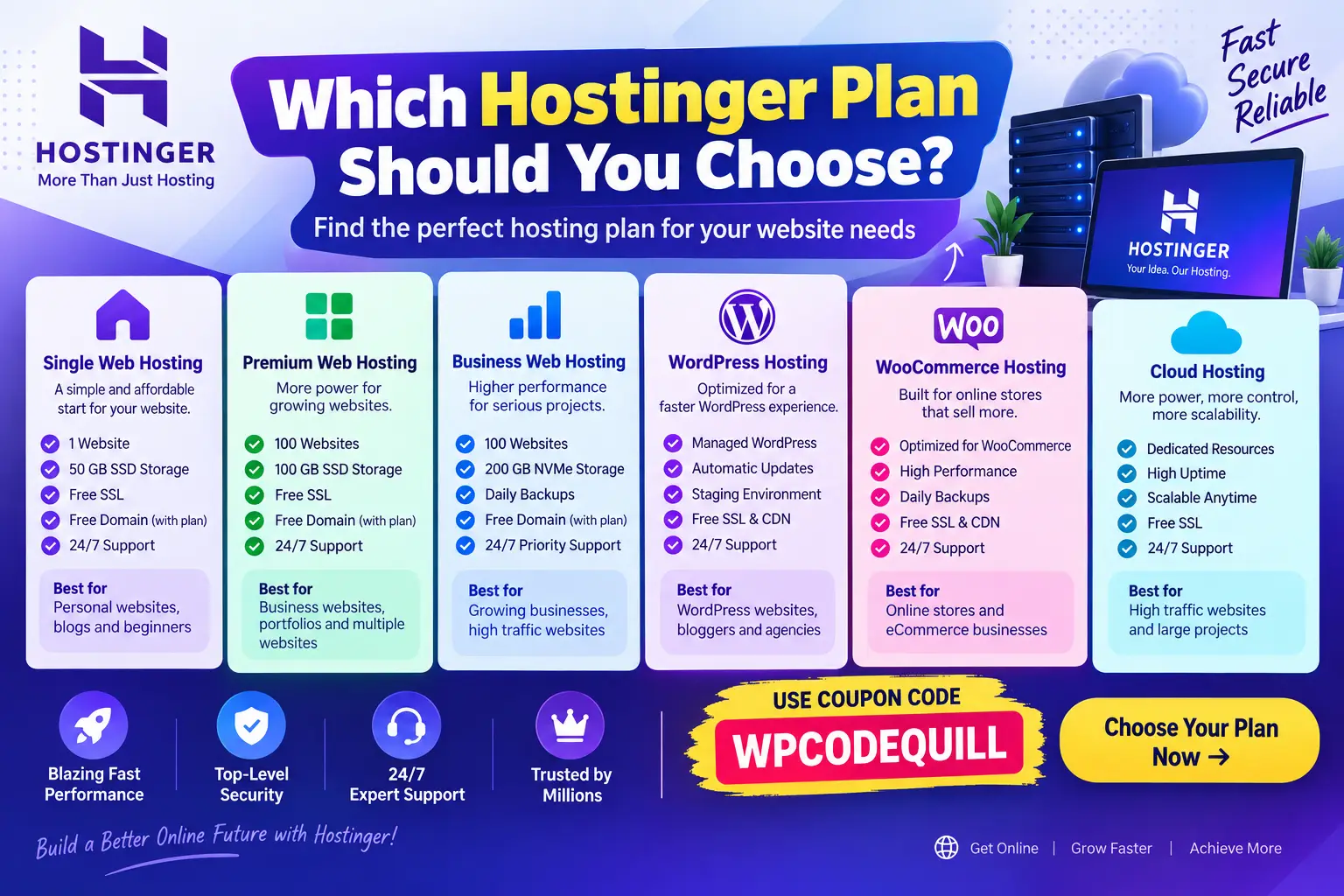
There is no single hosting plan that is appropriate for every website. Hostinger itself recommends matching the hosting type to the project's website type, traffic, budget, technical skill, and scaling requirements.
| Website Type | Potential Starting Point | What to Consider |
|---|---|---|
| Personal blog | Entry-level web or WordPress hosting | Storage, SSL, backups and ease of use |
| Small business website | Web or WordPress hosting | Performance, email, backups and scalability |
| Multiple websites | Higher web hosting plan | Website allowance and resource limits |
| WooCommerce store | WooCommerce or higher-resource WordPress hosting | Database performance, backups and traffic |
| Growing website | Higher-resource or cloud hosting | CPU, RAM and scalability |
| Custom application | Web, cloud or VPS hosting | PHP, database, SSH and server requirements |
For a broader comparison of hosting types and providers, visit the WPCodeQuill hosting comparison page.
Hostinger for WordPress Websites
WordPress users should pay particular attention to hosting configuration because WordPress performance depends on several layers working together: the server, PHP version, database, theme, plugins, images, caching configuration, and third-party services.
Hostinger's managed WordPress offering is designed around WordPress and currently includes features such as automatic WordPress updates, backups, staging, developer tools, and WordPress-focused performance functionality, depending on the plan.
If you are completely new to WordPress, you may also find our WordPress installation step-by-step guide useful after purchasing hosting.
Hostinger Coupon vs WPCodeQuill Giveaway
This is an especially important distinction for WPCodeQuill readers.
WPCodeQuill currently provides two different options for customers purchasing eligible Hostinger hosting:
- Hostinger discount option: Use the Hostinger referral/discount link and apply WPCODEQUILL where accepted.
- WPCodeQuill giveaway option: Purchase eligible Hostinger hosting through the designated giveaway purchase link without using WPCODEQUILL, then complete the WPCodeQuill verification and claim process.
These two benefits are not presented as stackable. WPCodeQuill specifically states that customers who use the discount/coupon option are not eligible for the WPCodeQuill giveaway.
| Option | What You Use | WPCodeQuill Giveaway |
|---|---|---|
| Hostinger Discount | Hostinger referral link + WPCODEQUILL where accepted | Not eligible |
| WPCodeQuill Giveaway | Designated giveaway purchase link without WPCODEQUILL | Eligible subject to the applicable rules |
If you are specifically interested in the giveaway rather than the coupon, read the WPCodeQuill Hostinger Partner & Giveaway page before purchasing because the eligibility rules and product quantities depend on the hosting plan and subscription period.
Why You Should Check Renewal Pricing
One of the most common mistakes people make when purchasing hosting is looking only at the introductory monthly equivalent.
A promotional price may apply only during the initial subscription period. After that period, the hosting service can renew at the standard renewal rate shown during checkout.
For example, Hostinger's current Indian hosting pages show both introductory pricing and renewal pricing for displayed plans. The exact figures can change, so the checkout page should always be treated as the final pricing reference.
Before purchasing a multi-year plan, calculate the total amount you will pay initially and consider what the renewal cost will be if you continue using the service after the promotional term.
How to Save More on Web Hosting Without Choosing the Wrong Plan
Choose the Correct Billing Period
Hosting companies frequently advertise lower monthly-equivalent prices for longer subscription periods. However, the customer generally pays for the selected period upfront rather than paying only the displayed monthly equivalent.
Calculate the total checkout price before making your decision.
Do Not Buy Resources You Do Not Need
If you are launching a small blog, you may not need a high-end cloud or VPS server on day one. Starting with an appropriate plan and upgrading when your project grows can be more practical.
Do Not Choose Only by Price
A very low price does not automatically mean a good fit. Compare resource limits, backups, security, support, migration options, renewal costs and scalability.
Keep Your Website Lightweight
Hosting performance is only part of the equation. A poorly optimized WordPress theme, oversized images, excessive plugins, inefficient database queries, and third-party scripts can slow a website even when the server is capable.
Google's guidance emphasizes creating useful, reliable, people-first content and providing a satisfying page experience rather than focusing on search-engine manipulation.
Common Mistakes to Avoid When Using a Hostinger Coupon
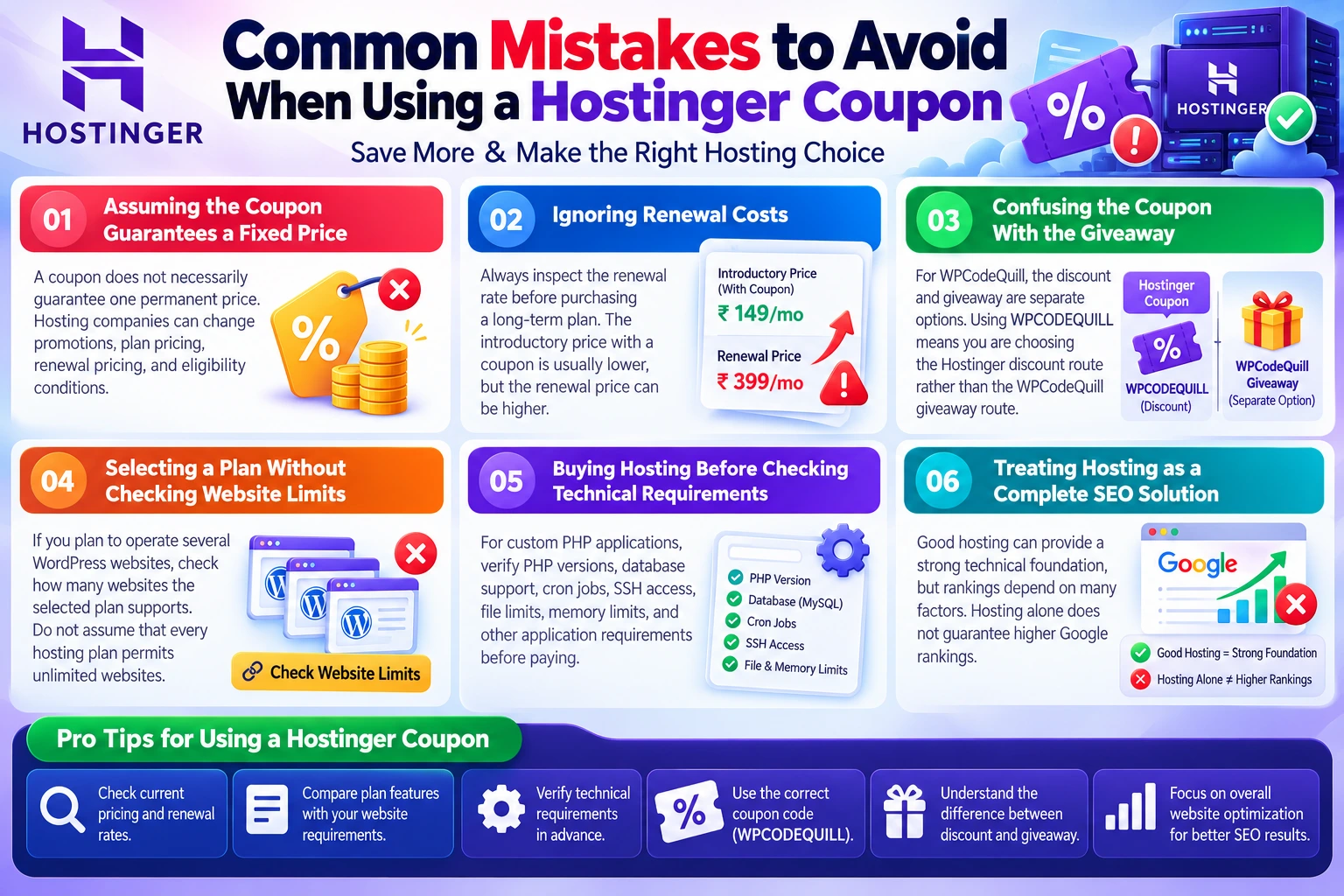
Mistake 1: Assuming the Coupon Guarantees a Fixed Price
A coupon does not necessarily guarantee one permanent price. Hosting companies can change promotions, plan pricing, renewal pricing, and eligibility conditions.
Mistake 2: Ignoring Renewal Costs
Always inspect the renewal rate before purchasing a long-term plan.
Mistake 3: Confusing the Coupon With the Giveaway
For WPCodeQuill, the discount and giveaway are separate options. Using WPCODEQUILL means you are choosing the Hostinger discount route rather than the WPCodeQuill giveaway route.
Mistake 4: Selecting a Plan Without Checking Website Limits
If you plan to operate several WordPress websites, check how many websites the selected plan supports. Do not assume that every hosting plan permits unlimited websites.
Mistake 5: Buying Hosting Before Checking Technical Requirements
For custom PHP applications, verify PHP versions, database support, cron jobs, SSH access, file limits, memory limits, and other application requirements before paying.
Mistake 6: Treating Hosting as a Complete SEO Solution
Good hosting can provide a strong technical foundation, but rankings depend on many factors. Hosting alone does not guarantee higher Google rankings.
Hostinger Hosting for Different Types of Websites
For Bloggers
Bloggers typically need reliable WordPress hosting, SSL, backups, reasonable storage, caching, and a straightforward control panel. The right entry-level or managed WordPress plan can provide the foundation needed to publish content without managing a server manually.
For Small Businesses
A small business website should prioritize reliability, professional email requirements, SSL, backups, performance, and room for growth. If the website is responsible for leads or sales, downtime can have a direct business impact.
For WooCommerce Stores
WooCommerce sites often require more resources than simple informational websites because product pages, searches, carts, checkout processes, customer accounts, and database queries can generate additional server work.
Choose a plan based on expected traffic and store complexity rather than simply choosing the lowest advertised price.
For Developers
Developers should check technical controls such as PHP version management, SSH, Git, WP-CLI, databases, cron jobs, staging, and resource limits. Hostinger's managed WordPress offering currently lists several developer-oriented tools, although availability depends on the selected plan.
For High-Traffic Applications
If an application needs predictable resources, custom server configuration, or root access, VPS or cloud hosting may be more appropriate than entry-level shared hosting.
Hostinger Coupon WPCODEQUILL: Quick Checklist
Before completing your order, use this checklist:
- Choose the hosting type that matches your website.
- Check how many websites the plan supports.
- Review storage and resource limits.
- Check included backups.
- Check SSL availability.
- Review security features.
- Check the available support options.
- Review the initial subscription price.
- Review the renewal price.
- Enter WPCODEQUILL where the coupon is accepted.
- Confirm the final checkout total.
- Keep your purchase confirmation and order information.
Authoritative Resources for Hosting and WordPress
If you are making a hosting decision, it is useful to verify important technical information against primary documentation rather than relying entirely on coupon websites.
- Hostinger Web Hosting – current hosting products, features and pricing.
- Hostinger Managed WordPress Hosting – WordPress-specific hosting features and plan information.
- Hostinger's guide to choosing a web hosting plan – factors to consider when selecting hosting.
- Google Search Central: Creating Helpful, Reliable, People-First Content – Google's guidance for creating useful and trustworthy content.
Conclusion
If you are searching for a Hostinger coupon, the WPCodeQuill code to check is WPCODEQUILL. Use the Hostinger referral/discount link, apply the code where accepted, and carefully review the final checkout amount before completing your purchase.
However, the coupon should be only one part of your hosting decision. Consider your website type, expected traffic, storage requirements, performance needs, backups, security, technical requirements, scalability, and renewal price before choosing a plan.
For WordPress users, Hostinger currently offers managed WordPress hosting with a range of features designed to simplify website management, while its broader hosting portfolio includes options for different project sizes and technical requirements.
Finally, remember the important WPCodeQuill promotion rule: the Hostinger discount option using WPCODEQUILL and the WPCodeQuill giveaway are separate benefits and cannot be combined. If you want the discount, use the coupon route. If you want to pursue the WPCodeQuill giveaway, follow its separate purchase and verification rules without applying the coupon.
Before purchasing, compare the current Hostinger offer, confirm the applicable price and renewal terms, and select the plan that actually fits your website. That approach is more valuable than choosing a hosting package based on a coupon alone.
Frequently Asked Questions
Q: What is the Hostinger coupon code from WPCodeQuill?
The coupon code promoted by WPCodeQuill is WPCODEQUILL. It is intended for the Hostinger discount/referral option and can be applied where accepted during checkout.
Q: How do I use the Hostinger promo code WPCODEQUILL?
Open the Hostinger referral/discount page, choose an eligible hosting product, proceed to checkout, enter WPCODEQUILL where the coupon field is available, and verify the final order total before payment.
Q: Does WPCODEQUILL work on every Hostinger plan?
Do not assume that a coupon applies identically to every product or promotion. Coupon availability and terms can change. The Hostinger checkout should be used to confirm whether WPCODEQUILL is accepted for the product and order you are purchasing.
Q: Can I use WPCODEQUILL and claim the WPCodeQuill giveaway?
No. According to the current WPCodeQuill Hostinger Partner page, the giveaway and coupon discount are separate benefits. A purchase made using the discount/coupon option is not eligible for the WPCodeQuill giveaway.
Q: Is Hostinger good for WordPress?
Hostinger offers managed WordPress hosting with WordPress-specific features such as automatic updates, backups, staging, developer tools, and performance features, depending on the plan. Whether it is appropriate for your website depends on your traffic, technical requirements, budget, and expected growth.
Q: Should I choose the cheapest Hostinger plan?
Not necessarily. The appropriate plan depends on your website requirements. A simple blog and a busy WooCommerce store have very different resource requirements. Hostinger's own hosting guidance recommends considering website type, traffic, budget, technical skill, performance, security, storage, and scalability when selecting a plan.
Q: Does Hostinger hosting include a domain?
Some Hostinger plans include a free domain for an applicable initial period, but this depends on the product, plan, subscription term, and current offer. Check the exact plan details before purchasing. Hostinger's current Indian web hosting and WordPress pages show free-domain benefits on applicable plans.
Q: Does Hostinger offer a money-back guarantee?
Hostinger currently advertises a 30-day money-back guarantee on its Indian web hosting and managed WordPress hosting pages. Always check the current terms and exclusions applicable to the specific service you purchase.




Discussion (0)
Join the Conversation
Please log in to post a comment.
Log In to Comment