
 INR
INR  USD
USD 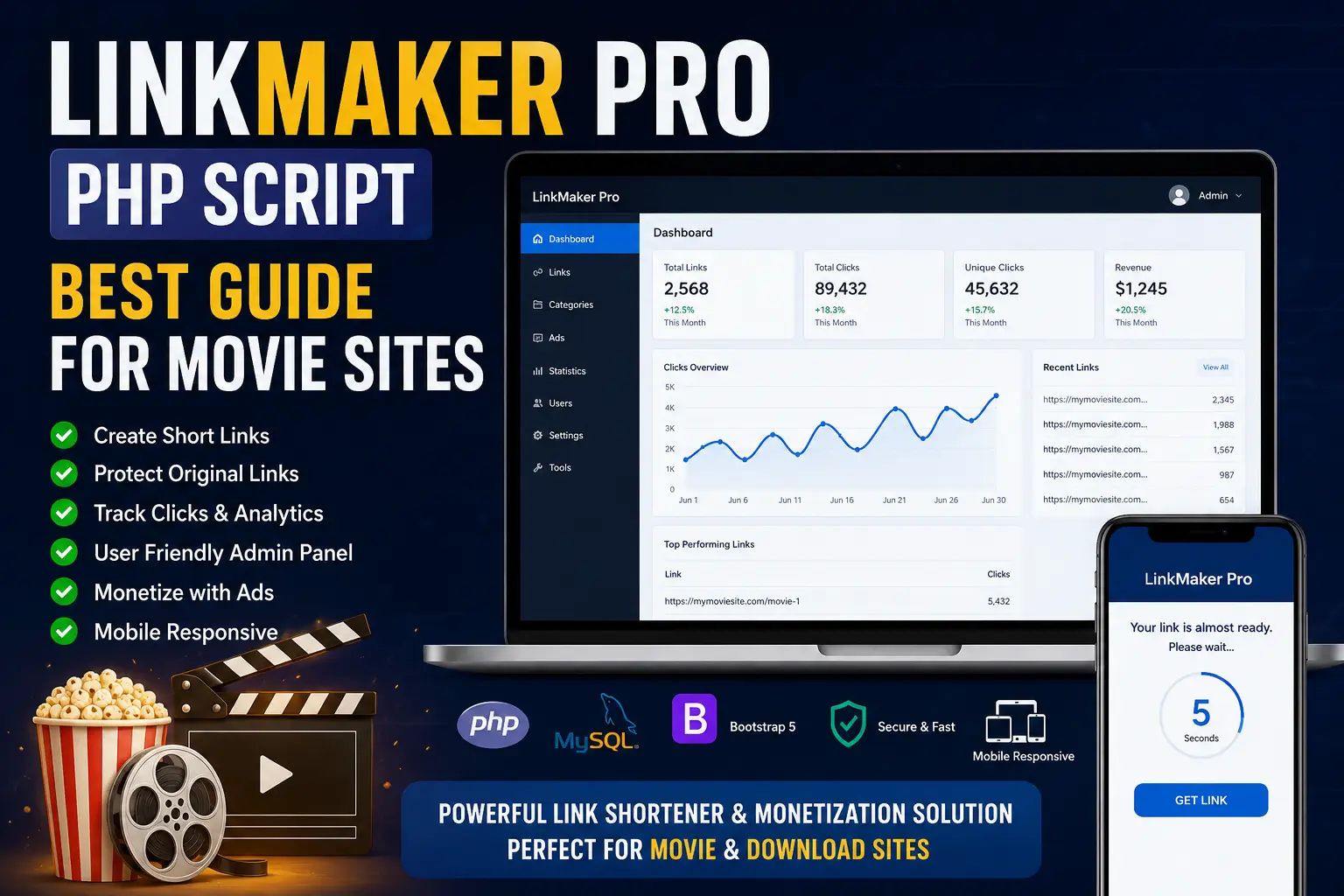
LinkMaker Pro PHP Script: The Ultimate Link Management Guide for Movie & Song Lyrics Sites
Managing a high-traffic media portal is one of the most challenging tasks for any webmaster. Whether you run a platform dedicated to the latest cinematic releases or a comprehensive database for song lyrics and soundtracks, handling thousands of outbound links requires precision, security, and smart monetization strategies. If you simply paste direct download links onto your pages, you are leaving your files vulnerable to scraping, automated takedowns, and lost revenue. This is where the LinkMaker Pro PHP Script comes into play.
In this comprehensive guide, we will explore everything you need to know about the LinkMaker Pro PHP Script. We will dive deep into why it is considered the industry standard for media portals, how it protects your valuable assets, and how you can seamlessly integrate it into your existing infrastructure. By the end of this article, you will have a complete understanding of how to deploy this powerful tool to enhance user experience while maximizing your site's earning potential.
Understanding the LinkMaker Pro PHP Script
At its core, the LinkMaker Pro PHP Script is a highly advanced, self-hosted URL shortener and link protection gateway. Unlike standard commercial shorteners that offer limited control and take a cut of your traffic data, LinkMaker Pro is hosted directly on your own servers. This gives you 100% ownership of your data, complete control over the user journey, and the ability to customize the gateway to match your brand's aesthetic.
When users click on a download link for a movie file, a subtitle pack, or an archive of song lyrics, they are not immediately taken to the third-party file host (such as Google Drive, Mega, or Dropbox). Instead, the script routes them through a secure, intermediary gateway page. This page serves multiple critical functions: it verifies that the user is human, it provides a space for targeted advertising, and it encrypts the final destination URL to prevent bots from stealing your links.
For webmasters optimizing your web development workflow, utilizing a dedicated PHP script for link management reduces database bloat on your main content management system (CMS) and significantly improves overall site performance.
Why the LinkMaker Pro PHP Script - for Movie Download Sites is Essential
Running a movie download site involves unique challenges that standard blogs or e-commerce stores simply do not face. Let's break down exactly why the LinkMaker Pro PHP Script - for Movie Download Sites is an indispensable asset for your digital infrastructure.
1. Defense Against Automated Scraping and DMCA Bots
The internet is crawling with bots designed to scrape websites for direct download links. Once these bots harvest your links, they can be published on competitor sites or targeted by automated Digital Millennium Copyright Act (DMCA) bots. When your files are hosted on public cloud drives, a single automated report can result in your files being permanently deleted, leading to dead links and frustrated users. LinkMaker Pro uses advanced tokenization and base64 encoding to mask the final destination. To learn more about how bots interact with websites, you can read Cloudflare's authoritative guide on bot management and mitigation.
2. Enhanced Monetization Capabilities
Server hosting, domain renewals, and content acquisition cost money. Media portals traditionally rely on display ads, but gateway pages provide a highly lucrative alternative. By routing traffic through the LinkMaker Pro PHP Script, you can display banner ads, native advertisements, or use secure pop-unders while the user waits for a countdown timer to finish. This captive audience guarantees high ad impressions, which translates directly to higher CPM (Cost Per Mille) payouts.
3. Seamless Handling of Song Lyrics and Audio Files
While primarily marketed for video content, this script is equally powerful for audio-centric sites. If your platform offers original song lyrics in PDF format, MP3 soundtracks, or high-fidelity audio stems, the script allows you to batch-generate protected links for entire albums in seconds. This flexibility ensures that no matter what type of media you distribute, your delivery mechanism remains consistent and secure.
4. Dead Link Management and Analytics
A broken link is a terrible user experience. LinkMaker Pro tracks every click and can alert you when a destination URL is no longer responding. Furthermore, the built-in analytics dashboard provides granular data on user geography, referring domains, and browser types. If you want to dive deeper into advanced SEO strategies for download portals, understanding where your traffic comes from is the first crucial step.
Core Features of LinkMaker Pro
To truly appreciate the value of this software, we must examine its technical features. The developers have packed this script with functionalities tailored specifically for high-volume media sites.
- Custom Domain Support: You can host the script on a subdomain (e.g., downloads.yoursite.com) or a completely different domain to isolate traffic and protect your main domain's SEO reputation.
- Mass Link Generator: Paste up to 500 URLs at once, and the script will output protected gateway links in a fraction of a second.
- API Integration: Developers can connect the script directly to WordPress or other CMS platforms using a robust REST API, allowing for automated link generation upon post publication.
- Advanced Countdown Timers: Fully customizable timers (e.g., 10, 15, or 30 seconds) keep users on the page long enough to register ad impressions.
- Multi-Page Gateways: Force users to click through multiple pages to maximize page views and ad revenue before revealing the final link.
- Invisible CAPTCHA Integration: Block automated traffic seamlessly without frustrating genuine human users.
Step-by-Step Guide: Installing LinkMaker Pro PHP Script
Installing the script is a straightforward process for anyone familiar with basic web hosting. Follow these steps to get your link manager up and running.
Step 1: Verify Server Requirements
Before you begin, ensure your hosting environment meets the necessary specifications. The script is lightweight but requires modern software to function securely. You will need an Apache or Nginx server, PHP version 7.4 or higher, and MySQL 5.6 or MariaDB equivalent. For official documentation on PHP environments, consult the official PHP installation guide.
Step 2: Create a MySQL Database
Log into your hosting control panel (such as cPanel or DirectAdmin). Navigate to the MySQL Databases section. Create a new database, a new database user, and generate a strong password. Assign the user to the database and grant "All Privileges." Note down the database name, username, and password, as you will need them shortly.
Step 3: Upload the Files
Using an FTP client like FileZilla, or your control panel's File Manager, upload the compressed LinkMaker Pro PHP Script file to your desired directory. If you are dedicating a specific domain to the script, upload it to the root public_html folder. Once uploaded, extract the contents of the zip file.
Step 4: Run the Web Installer
Open your web browser and navigate to the URL where you extracted the files (e.g., https://yourdomain.com/install). The script features an automated setup wizard. It will check your server for required PHP extensions (like cURL, PDO, and JSON). Once the system check passes, enter your database credentials. Finally, create your admin account by providing an email and a secure password.
If you encounter database errors during this process, you may want to review our guide on choosing the best hosting for PHP scripts to ensure your server configuration is optimal.
Comparing LinkMaker Pro with Standard URL Shorteners
Webmasters often wonder if they can just use free, third-party services. The table below illustrates why a self-hosted solution is superior for media portals.
| Feature | LinkMaker Pro PHP Script | Third-Party Services (e.g., Bitly) |
|---|---|---|
| Data Ownership | 100% Hosted on your server. You own all data. | Data is owned by the third-party company. |
| Monetization | Keep 100% of ad revenue generated on gateway pages. | No direct monetization, or revenue is split unfavorably. |
| Link Protection | Advanced base64 and tokenized URL hiding. | Destination URLs are easily revealed via basic tools. |
| Account Bans | No risk of bans; you control the hosting environment. | High risk of sudden bans for hosting movie or lyrics links. |
| Customization | Full HTML/CSS control over the gateway appearance. | Extremely limited customization, often requires enterprise plans. |
Tips and Best Practices for Maximizing Performance
Installing the script is only half the battle. To truly succeed with the LinkMaker Pro PHP Script - for Movie Download Sites, you must configure it strategically. Here are industry best practices designed to keep your users happy and your search engine rankings intact.
Optimize the User Experience (UX)
While monetization is important, alienating your users will destroy your traffic in the long run. Keep your countdown timers reasonable—between 10 and 15 seconds is the industry sweet spot. If users are forced to wait 60 seconds to download a simple text file of song lyrics, they will bounce back to the search engine. Ensure that your download buttons are clearly visible and distinguish them from deceptive ad graphics.
Adhere to Google's Interstitial Guidelines
If your gateway pages are indexed by search engines, you must ensure they comply with modern web standards. Google penalizes sites that use intrusive pop-ups that obscure main content, especially on mobile devices. Ensure your ads are embedded cleanly within the page layout. For detailed rules on how search engines treat page layouts, review Google Search Central's documentation on valid page structure and metadata.
Regular Maintenance and Updates
PHP scripts require maintenance to remain secure against vulnerabilities. Always keep your server's PHP version updated. Regularly back up your MySQL database—ideally once a week—so that your thousands of generated links are safe in the event of a server crash. If you are unsure how to handle local backups, check out our tutorial on setting up a local server environment for testing and backups.
Common Mistakes to Avoid
Even seasoned webmasters can make critical errors when implementing a link protection gateway. Avoid these common pitfalls to ensure smooth operation:
- Overloading with Ads: Placing ten different banner ads and aggressive pop-ups on a single gateway page will severely impact page load times. Slow sites lead to high bounce rates.
- Ignoring Mobile Responsiveness: The majority of internet traffic, including users searching for movie downloads and song lyrics, comes from mobile devices. Ensure your gateway template is 100% mobile-friendly.
- Failing to Monitor Uptime: If the server hosting your LinkMaker Pro script goes down, all outbound links on your main site will break instantly. Use an uptime monitoring tool to stay informed.
- Using Weak Admin Passwords: Because this script controls the flow of your site's traffic, the admin panel is a prime target for hackers. Always use a complex, unique password and enable two-factor authentication if available.
- Hardcoding Links Unnecessarily: Always utilize the script's API or bulk tool rather than manually pasting raw HTML gateways into your CMS. Proper integration is key to custom PHP script development and management.
The SEO Impact of Link Gateways
A common concern among webmasters is how using an intermediary script affects Search Engine Optimization (SEO). Will Google penalize your main site for using gateway links?
The short answer is no, provided it is configured correctly. The primary site (your movie or song lyrics portal) will simply contain standard hyperlinks pointing to your gateway domain. To search engine crawlers, these are standard outbound links. However, to prevent search engines from indexing millions of thin gateway pages, it is highly recommended to use a robots.txt file on the LinkMaker Pro installation to block crawlers from indexing the protected URLs. Additionally, using standard HTTP status codes correctly ensures bots understand the nature of the page. You can read the Mozilla Developer Network's technical explanation of HTTP status codes to understand how redirects impact crawling.
By keeping the gateway pages out of Google's index, you preserve the crawl budget for your main content pages, ensuring your high-quality articles, movie reviews, and lyrics databases rank higher in search results.
Frequently Asked Questions (FAQs)
1. Is the LinkMaker Pro PHP Script compatible with WordPress?
Yes, absolutely. While it is a standalone PHP script, it can be integrated with WordPress seamlessly. You can install the script on a subdomain (e.g., link.yoursite.com) and link out to it from your WordPress posts. Many webmasters also use the script's API to automatically convert standard links within WordPress into protected gateway links.
2. Can I use this script for files other than movies, like software or song lyrics?
Definitely. The script does not discriminate based on the type of content you are linking to. Whether you are redirecting users to an MP3 file, a PDF of song lyrics, a ZIP file of software, or a massive 4K movie download, the routing, protection, and monetization processes work exactly the same way.
3. What are the minimum server requirements to run this script?
The script is incredibly lightweight. You need standard shared, VPS, or dedicated hosting running Apache or Nginx, PHP 7.4 or newer, and a MySQL database. It does not require intensive CPU resources unless you are pushing hundreds of thousands of clicks per hour, at which point a VPS is recommended.
4. How does the script protect links from DMCA bots?
Standard bots scrape the HTML of a page looking for recognizable URLs from hosting sites like Mega or MediaFire. LinkMaker Pro encrypts these URLs. When a bot scrapes your page, it only sees a generic link to your gateway. Because bots usually do not execute JavaScript or wait for countdown timers, they cannot reach or report the final destination URL.
5. Is the script safe from ad-blockers?
Ad-blockers are a challenge for all monetization efforts. However, LinkMaker Pro uses intelligent routing that prevents ad-blockers from breaking the core functionality of the site. While ads may be hidden from users with strict ad-blockers, the countdown timer and redirect mechanism will continue to function properly, ensuring the user still reaches their requested file.
6. Can I customize the look and feel of the gateway page?
Yes. The script comes with an accessible template folder. If you have basic HTML and CSS knowledge, you can easily modify the colors, logos, text, and layout of the gateway page to match the branding of your main movie or song lyrics website.
7. Does the script host the actual files?
No. LinkMaker Pro is purely a link routing and protection manager. It does not host video, audio, or text files. It merely acts as a secure bridge between your website and the third-party server where your files are actually stored.
8. How many links can the system handle?
Because the data is stored in an optimized MySQL database, the script can easily handle millions of links. The limitation lies entirely with your server's storage capacity and database optimization, not the script itself.
Conclusion
Running a successful media download platform requires more than just offering great content; it requires intelligent asset management. Unprotected links lead to stolen bandwidth, deleted files, and a massive loss of potential ad revenue. The LinkMaker Pro PHP Script provides an elegant, self-hosted solution to these persistent problems.
By routing your outbound traffic through a customized, monetized gateway, you simultaneously protect your valuable links from automated bots and create a highly profitable new revenue stream. Whether you are managing massive video files for a movie download site or distributing archives of song lyrics, this script offers the flexibility, speed, and security needed to scale your operations effectively.
Investing the time to set up and configure a dedicated link manager is one of the highest ROI (Return on Investment) activities a webmaster can undertake. Take control of your outbound traffic today, secure your digital assets, and optimize your user journey for maximum profitability.




Discussion (0)
Join the Conversation
Please log in to post a comment.
Log In to Comment