
 INR
INR  USD
USD 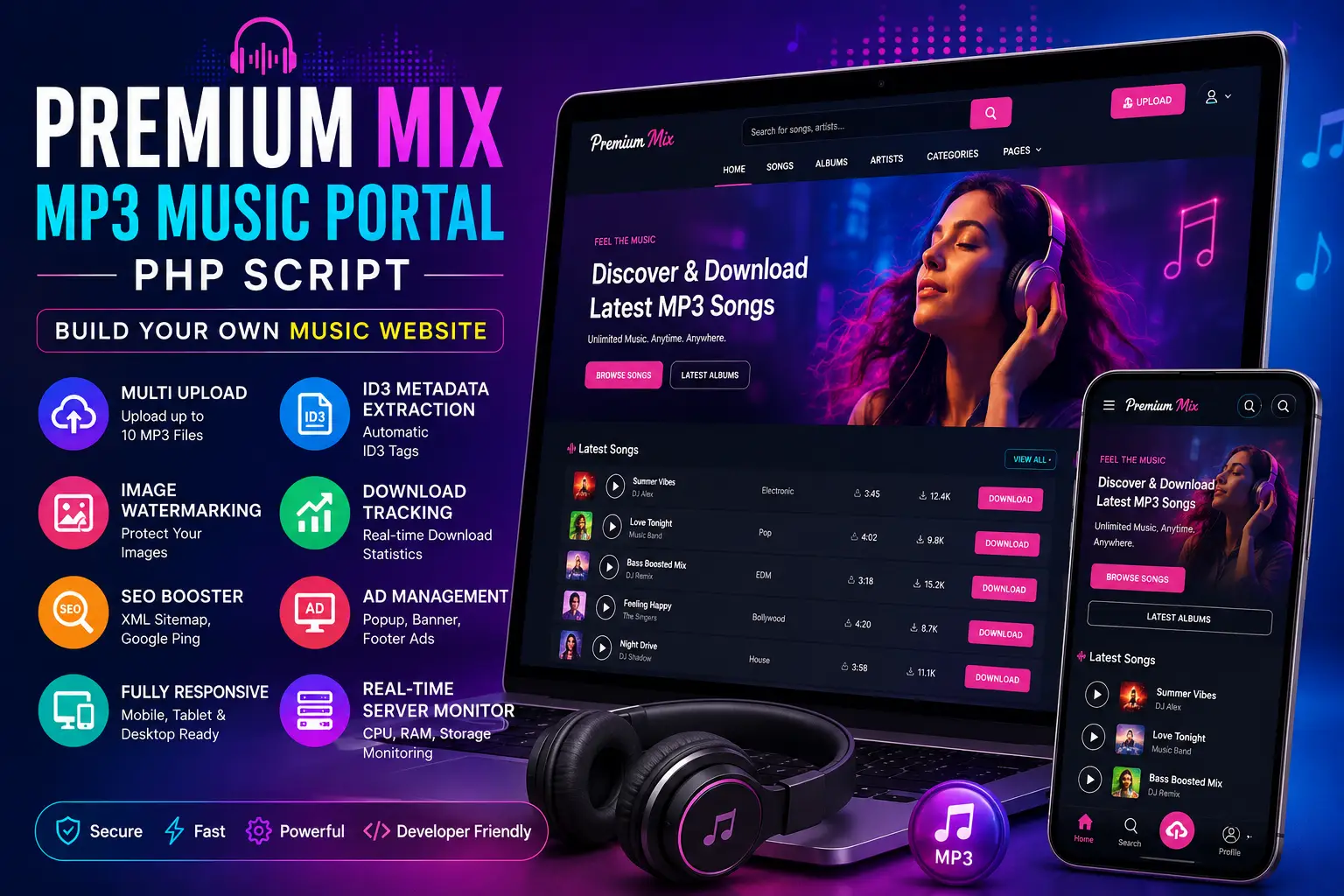
Premium Mix MP3 Music Portal PHP Script
Building a professional music website can involve much more than uploading a few audio files and adding a download button. A serious MP3 Music Portal PHP Script needs to handle music metadata, categories, images, downloads, search-engine visibility, administration, advertising, and a smooth experience across phones and desktops. It also needs to give the site owner practical tools for managing an expanding audio library without turning every new upload into a manual, repetitive process.
Premium Mix MP3 Music Portal PHP Script is designed as a dedicated PHP music CMS for creating and managing an MP3-focused website. The current product documentation describes features such as a smart multi-upload engine for up to 10 MP3 files, automatic ID3 metadata extraction, image watermarking, SEO tools, XML sitemap and Google ping functionality, download tracking, an advertising manager, responsive design, licensing controls, and a real-time server monitor. The listed current release is v2.2.4. View the Premium Mix MP3 Music Portal product page for the latest details, licensing information, and release notes.
This article explains what the script does, who it may suit, how its main features can fit into a music publishing workflow, what the installation process looks like, how to structure a legal and sustainable music website, and what to check before putting the site into production.
What Is Premium Mix MP3 Music Portal PHP Script?
Premium Mix MP3 Music Portal is a standalone PHP-based music CMS intended for websites that publish and organize audio content. The product page describes it as a high-performance system for DJs, musicians, webmasters, and publishers of original or properly licensed music content.
Unlike a general-purpose blogging platform, a dedicated music portal can organize its workflows around audio. That means the site architecture can focus on songs, singers or artists, categories, music images, downloads, metadata, and music-specific SEO rather than forcing a generic content management system to handle everything through custom plugins.
This distinction can matter for developers who want a purpose-built starting point. Instead of creating every music-related component independently, the script provides an existing framework that can be configured and, where permitted by the license and source architecture, customized to match a specific website.
The platform is especially relevant for people planning websites around:
- Independent music releases
- DJ and producer catalogs
- Original audio libraries
- Licensed music collections
- Artist and label websites
- Regional or community music projects
- Music discovery and download portals using legally authorized content
The important qualification is that the software and the music are two separate things. Buying a PHP script gives you software rights under the applicable license; it does not automatically give you permission to upload, stream, reproduce, or distribute copyrighted recordings.
Why a Dedicated MP3 Music Portal PHP Script Can Be Useful
A music website has a distinct publishing workflow. A webmaster might need to upload several tracks, extract metadata, add cover artwork, organize content into categories, publish search-friendly pages, monitor download activity, and manage advertising. Doing those tasks one by one can become inefficient as the library grows.
A dedicated CMS can reduce that friction by putting related functions into one administration environment.
For example, imagine a publisher has 30 newly authorized tracks to add. A generic content workflow might require the operator to create many individual posts, manually copy titles and artist information, resize or brand images, and configure download links. A music-focused system with bulk upload and metadata extraction can potentially reduce the amount of repetitive work involved.
The goal is not simply speed. Consistency matters too. When information such as artist name, song title, album, and category is entered consistently, visitors can navigate the catalog more easily and search engines can better understand the pages.
Key Features of Premium Mix MP3 Music Portal
Smart Multi-Upload Engine
One of the most practical features listed for the script is its Smart Multi-Upload Engine. The product page states that administrators can upload up to 10 MP3 files at a time, with automatic ID3 metadata extraction.
Bulk uploading is useful when launching a new catalog or publishing a batch of music. Instead of repeatedly opening a separate upload form for every file, an administrator can process multiple tracks in a single workflow.
The real benefit comes from the metadata step. MP3 files may already contain embedded information, such as title, artist, album, and related tags. A system that can read that information can reduce manual data entry.
That does not mean every MP3 will contain clean or complete metadata. Poorly tagged files can still require human review. A professional workflow should therefore combine automation with editorial quality control.
Automatic ID3 Metadata Extraction
ID3 tags are metadata embedded in many MP3 files. Depending on the file, metadata can contain information such as track title, artist, album, genre, and other fields.
Automatic extraction can improve publishing efficiency because the administrator does not need to manually retype information already stored in the file.
For a music website, metadata can also help build a more structured catalog. Consistent artist and album information makes it easier to create category pages, related-content sections, search results, and internal navigation.
There is still a reason to review metadata before publication. A file may contain a misspelled artist name, outdated album information, inconsistent capitalization, or placeholder text. Automation should accelerate editorial work, not eliminate human verification.
Image Watermarking
The script includes automated branding and image watermarking.
Watermarking can be useful when a website publishes original cover artwork, promotional images, artist graphics, or other visual assets that the publisher wants to identify as belonging to the site or brand.
A sensible watermark should remain visually unobtrusive enough that it does not damage the visitor experience. It should also be applied to images that you own or are licensed to modify. Watermarking an image does not create ownership rights over someone else's copyrighted artwork.
SEO Booster With XML Sitemap Support
The product documentation lists a built-in SEO Booster with XML sitemap generation and Google ping functionality. Later releases also added a global SEO manager for homepage, post, and category templates, together with support for dynamic shortcodes such as title, site name, singer, and category.
These features can be useful for a large music catalog because every song page creates another piece of content that needs sensible titles, descriptions, URLs, internal links, and discoverability.
However, an XML sitemap is not a substitute for high-quality content. Google recommends creating helpful, reliable, people-first pages rather than producing large amounts of thin content primarily for search traffic. Google also specifically warns against scaled content abuse and keyword stuffing. Read Google's people-first content guidance and Google Search spam policies when planning the site's SEO strategy.
Download Tracking
One of the more recent additions documented in version 2.2.3 is a dedicated download handler. The product page says this system can hide the original file path from users, while an AJAX download counter updates download counts without requiring a browser refresh.
Download tracking can help a webmaster understand which releases receive the most engagement. It can also support basic reporting and content planning.
Analytics should be interpreted carefully. A download count is an interaction metric, not automatically proof that a track was fully consumed, that a user is unique, or that a file was legally distributed. Depending on the implementation, automated requests, repeated downloads, crawlers, or technical retries may affect counts.
Advertising Manager
The script includes an advertising manager with configurable advertising placements. The current documentation lists options including popup, popunder, banner, and footer ad injection, while the changelog also mentions header code injection for services such as AdSense, Analytics, and custom advertising code.
This gives publishers flexibility, but advertising should never be allowed to overwhelm the core purpose of the website. Excessive popups, confusing download buttons, misleading advertisements, or aggressive interstitials can damage trust and usability.
For Google advertising products, publishers must also follow the applicable policies. Review Google AdSense Program Policies before adding ads, particularly around invalid clicks, deceptive implementation, and user experience.
Responsive Design
The product documentation describes the interface as fully mobile responsive.
This is especially important for music websites because visitors may browse from smartphones while discovering artists, listening to previews, or accessing downloads.
A responsive layout should not simply shrink the desktop page. Navigation, typography, search controls, download buttons, audio players, category links, and advertisements should all remain usable on small displays.
Real-Time Server Monitor
Premium Mix also advertises a real-time hardware or server monitor that displays information such as CPU, RAM, and storage.
This can be valuable for a media-heavy website. Audio libraries consume storage, and popular downloads can produce significant bandwidth demand. Monitoring helps administrators identify resource pressure before it becomes a major service problem.
For larger deployments, an application dashboard should not replace proper server monitoring. External monitoring, backups, logs, alerting, and hosting-level metrics can provide additional visibility.
Premium Mix MP3 Music Portal PHP Script System Requirements
The current product page lists PHP 8.2 or higher, MySQL 5.7+ or MariaDB 10.3+, IonCube Loader, and PHP extensions including mysqli, GD, cURL, EXIF, mbstring, JSON, ZIP, and fileinfo. It also recommends at least 100 MB upload and POST limits and a 256 MB memory limit.
| Requirement | Documented Requirement |
|---|---|
| PHP | 8.2.0 or higher |
| Database | MySQL 5.7+ or MariaDB 10.3+ |
| PHP Extensions | mysqli, GD, cURL, EXIF, mbstring, JSON, ZIP, fileinfo |
| Upload Limit | 100 MB+ |
| POST Limit | 100 MB+ |
| Memory | 256 MB+ |
| Loader | IonCube Loader required |
Always check the current product documentation immediately before installation because server requirements can change between releases.
How to Install Premium Mix MP3 Music Portal
The documented setup uses an automated installer. The official installation instructions describe uploading the package, creating a database, opening the installation page, entering the purchase and database details, creating an administrator account, and then removing the installer file after setup.
Step 1: Prepare Your Hosting
Confirm that the server meets the PHP, database, extension, memory, and upload requirements. Enable HTTPS before creating real user-facing functionality.
If you are choosing hosting specifically for a media website, pay attention not only to the advertised disk space but also to CPU capacity, RAM, transfer limits, inode limits, backup policies, database resources, and the ability to scale.
Step 2: Create the Database
Create a dedicated MySQL database and database user with appropriate permissions. Keep the database credentials private and avoid sharing them through public repositories, screenshots, or support posts.
Step 3: Upload the Script
Upload and extract the provided archive into the required web directory, such as public_html or the hosting provider's equivalent document root.
Step 4: Run the Installer
According to the current documentation, the installer can be opened through /install.php. Enter the requested purchase code and database details and follow the setup wizard.
Step 5: Create the Administrator Account
Use a strong administrator username and password. Avoid predictable usernames and passwords, and never reuse credentials from another service.
Step 6: Remove the Installer
The published instructions specifically state to delete install.php after installation. This is an important post-installation security step.
Step 7: Configure the Portal
Log in to the administration area and configure branding, email settings, site information, categories, SEO templates, advertisements, and other options available in the installed release.
The product page specifically describes logo configuration and SMTP mail settings in its setup flow.
How to Build a Better Music Publishing Workflow
A script becomes much more useful when it is supported by a repeatable editorial process.
- Prepare the audio: Confirm that the MP3 is the correct master or authorized publishing version.
- Check metadata: Review the title, artist, album, genre, and other available information.
- Prepare artwork: Use images that you own or are authorized to publish.
- Select a category: Use consistent categories rather than creating a new category for every minor variation.
- Review the page: Check the title, description, download action, player, links, and mobile layout.
- Publish: Only publish content for which the site has the appropriate rights or authorization.
- Monitor: Check download activity, server resources, user feedback, and technical errors.
This workflow combines automation with editorial oversight. That is generally safer and more reliable than automatically publishing every file without review.
Copyright: The Most Important Consideration for an MP3 Website
This section deserves particular attention because the technology and the content are separate.
A sound recording can be protected by copyright. The U.S. Copyright Office explains that copyright in a sound recording protects the particular series of sounds fixed in the recording and can include rights concerning reproduction, distribution, and certain digital audio transmissions. It also explains that a sound recording and the underlying musical composition are separate copyrighted works.
That means downloading an MP3 from somewhere else and uploading it to your own portal is not automatically lawful simply because your website has a working upload form.
A responsible music portal should focus on content such as:
- Music you created yourself
- Music released under licenses that permit your intended use
- Artist or label content you have explicit permission to distribute
- Public-domain material where the relevant rights have actually expired or otherwise permit the intended use
- Music distributed through a licensing arrangement that covers the activities performed by your website
Licensing can vary by territory, use, platform, distribution method, and type of right. A license allowing a song to be streamed does not necessarily allow permanent downloads. Similarly, permission for promotional use may not equal permission for commercial distribution.
For a U.S.-focused explanation of the difference between musical compositions and sound recordings, see the U.S. Copyright Office guide for musicians. Legal requirements in other countries can differ, so site owners should obtain appropriate local legal advice where necessary.
SEO Strategy for an MP3 Music Website
Music portals often generate many similar pages, which makes editorial quality important.
A useful song page should provide real information rather than simply repeating the title several times. Depending on the content you are authorized to publish, a page might include artist information, album context, genre, release information, credits, a concise description, listening options, related authorized releases, and clear navigation.
Internal linking can connect individual song pages with artist pages, albums, categories, and related articles. This helps users discover more content and creates a clearer site structure.
For broader WordPress and website development resources, the WPCodeQuill blog can also be useful when planning supporting content around site setup, SEO, performance, and development.
Google's current guidance emphasizes people-first content and warns against creating large amounts of low-value material simply to capture search traffic. A music site should therefore prioritize useful catalog information, original editorial content, accurate metadata, and a satisfying user experience.
Using XML Sitemaps Correctly
The script includes XML sitemap functionality, which can help search engines discover the URLs that make up a music catalog. A sitemap is particularly useful when a site contains many dynamically generated pages.
However, a sitemap is primarily a discovery mechanism. It does not guarantee indexing or ranking.
Before publishing a large music catalog, make sure your sitemap contains the URLs you actually want indexed. Avoid exposing duplicate, empty, placeholder, search-result, administrative, or low-value URLs unnecessarily.
You can learn more about Google's current search requirements and best practices through Google Search Essentials.
Monetizing an MP3 Music Website
The script includes advertising functionality, giving publishers options for integrating advertisements into the site.
There are several possible monetization approaches for a legitimate music portal, depending on the rights structure and audience:
- Display advertising
- Sponsored content or artist promotion
- Affiliate partnerships
- Premium memberships
- Paid access to original or licensed content
- Artist or label promotional packages
The appropriate model depends on what the website actually offers. Monetizing unauthorized copyrighted music can create legal and platform-policy problems, so the business model should be designed together with the content licensing strategy.
Premium Mix MP3 Music Portal vs WordPress Music Website
| Factor | Dedicated PHP Music Script | WordPress Music Website |
|---|---|---|
| Architecture | Standalone application | CMS plus themes/plugins |
| Music Workflow | Purpose-built for the portal model | Often assembled from multiple components |
| Bulk Upload | Built-in multi-upload feature | Depends on the chosen plugins and setup |
| ID3 Automation | Documented as a built-in capability | Usually requires a specialized implementation |
| SEO Tools | Music portal includes dedicated SEO functionality | Broad ecosystem of SEO plugins |
| Customization | Depends on the source architecture and license | Large plugin and theme ecosystem |
| Maintenance | PHP application maintenance | Core, theme, and plugin maintenance |
There is no universal winner. A dedicated music script can make sense when the primary goal is a focused MP3 portal. WordPress may be more attractive when the site needs extensive editorial publishing, a large plugin ecosystem, or integration with existing WordPress infrastructure.
WPCodeQuill also offers a music-focused WordPress alternative, WP PagalWorld Theme – MP3 & Music Download, which may be worth comparing when deciding between a standalone PHP application and a WordPress-based approach.
Performance Tips for a Music Portal
Optimize Images
Cover artwork and promotional images can become surprisingly large. Resize images before uploading them and use efficient formats where appropriate.
Monitor Disk Space
Audio files accumulate quickly. Keep an eye on storage usage and define a backup strategy that accounts for both the database and media files.
Use Appropriate Caching
Cache pages that are safe to cache, but be careful with personalized pages, account areas, and dynamic download processes. Test caching rules rather than applying a blanket configuration.
Watch Bandwidth
High-volume MP3 downloads can consume significant bandwidth. Hosting plans should therefore be selected based on actual transfer requirements rather than storage alone.
Use a Content Delivery Strategy When Necessary
As traffic grows, you may consider CDN or object-storage strategies for static assets and audio delivery. The right architecture depends on the hosting environment, geographic audience, file sizes, licensing, and traffic patterns.
Security Best Practices
A music portal handles more than public content. It may also contain administrator accounts, database records, email configuration, licensing data, advertising code, and file-storage paths.
Start with the basics: use HTTPS, strong credentials, least-privilege database access, current server software, reliable backups, secure file permissions, and restricted administrator access.
Keep an eye on external scripts and advertising code. Third-party JavaScript can introduce privacy, performance, and security considerations, particularly when inserted into a global header.
Because the product requires IonCube Loader and server-side dependencies, make sure the production environment is configured consistently with the supported release. Do not modify protected files blindly when troubleshooting licensing or loader-related problems.
For application security concepts, the OWASP Top 10 is a useful industry reference for common web application security risks.
Common Mistakes to Avoid
1. Publishing Copyrighted Music Without Permission
This is the most serious mistake. A functional upload and download system does not make a copyrighted recording free to distribute. Always establish your rights before publishing audio.
2. Treating Automation as Proofreading
ID3 extraction can save time, but metadata should still be reviewed. Incorrect artist names and titles damage both the user experience and the quality of your catalog.
3. Creating Hundreds of Thin Pages
A page containing only a song title, a generic sentence, and a download button may offer little value to users. Build pages around useful information and genuine content.
4. Using Misleading Download Buttons
Visitors should be able to distinguish the actual download control from advertisements. A confusing interface can damage trust and may create compliance issues with advertising platforms.
5. Ignoring Mobile Users
Even a technically responsive theme can have usability issues. Test navigation, audio playback, downloads, search, category pages, and advertising on real smartphones.
6. Forgetting Backups
Keeping the PHP files is not enough. A proper backup strategy should include the database and media library, with periodic recovery tests.
7. Not Checking the Current Release
The product page currently documents v2.2.4, with recent updates addressing installation, external-download handling, SEO management, download tracking, advertisement management, database repair, and file handling. Features can change in future releases, so always check the live product page before deployment.
Who Should Consider Premium Mix MP3 Music Portal?
Independent Music Publishers
Creators with authorized catalogs can use a dedicated platform to organize releases, artist information, artwork, and downloads in one place.
DJs and Producers
For DJs or producers distributing their own mixes and original releases, a focused music portal can provide a branded destination instead of relying entirely on third-party platforms.
Web Developers
Developers may appreciate having an existing music-specific foundation that can be customized according to project requirements and the applicable license.
Digital Agencies
Agencies building music websites for artists, labels, or content owners can evaluate the script as an alternative to assembling a music publishing system from multiple independent components.
Who Should Look for Another Solution?
The script may not be ideal for every project.
A company that needs a fully custom streaming service, sophisticated subscription billing, advanced recommendation algorithms, complex licensing administration, native iOS and Android apps, or large-scale media infrastructure may eventually require custom development or a more specialized platform.
Likewise, if the main objective is a general editorial website with only a small audio section, WordPress or another CMS may be simpler. The best platform depends on the actual requirements, not simply the number of features advertised.
Pre-Launch Checklist for an MP3 Music Portal
- Confirm your music rights and licenses.
- Verify PHP and database compatibility.
- Enable HTTPS.
- Create a secure administrator account.
- Set up database and media backups.
- Delete the installation file after setup.
- Test MP3 uploads and metadata extraction.
- Review images and watermark settings.
- Check download tracking.
- Configure SEO titles and descriptions.
- Verify XML sitemap output.
- Test the mobile experience.
- Check every download button and advertisement placement.
- Configure SMTP if required.
- Monitor server CPU, memory, storage, and bandwidth.
- Publish clear privacy, terms, copyright, and contact information.
If you need help with other website or PHP development projects, explore WPCodeQuill's PHP script development and web development services.
Frequently Asked Questions
What is Premium Mix MP3 Music Portal PHP Script?
Premium Mix MP3 Music Portal is a standalone PHP music CMS designed to help create and manage an MP3-focused website. Its current product documentation lists multi-upload, automatic ID3 metadata extraction, image watermarking, SEO features, download tracking, advertising management, responsive design, and server monitoring.
How many MP3 files can be uploaded at once?
The documented Smart Multi-Upload Engine supports uploading up to 10 MP3 files at a time. The product page also says the system can automatically extract available ID3 metadata.
Does the script automatically add song metadata?
It is documented as supporting automatic ID3 metadata extraction. However, administrators should still review imported metadata because the quality and completeness of ID3 tags can vary from file to file.
What PHP version does Premium Mix require?
The current product page lists PHP 8.2.0 or higher as a requirement, together with MySQL 5.7+ or MariaDB 10.3+ and several PHP extensions.
Does Premium Mix include SEO features?
Yes. The documented feature set includes an SEO Booster, XML sitemap functionality, Google pinging, and a global SEO manager introduced in a recent release.
Can I monetize a music website built with the script?
The platform includes an advertising manager and supports configurable advertising placements. However, monetization depends on your content, advertising provider, applicable policies, and especially your right to distribute the music you publish.
Can I upload commercial songs from other artists?
Not simply because the script allows uploads. You need appropriate authorization or licensing for the intended use. Copyright can apply separately to the sound recording and the underlying musical composition, so rights should be verified before distribution.
Is Premium Mix suitable for a beginner?
The automated installer can simplify the initial setup, but operating a production music website still requires knowledge of hosting, databases, security, content management, copyright, backups, and performance. Beginners should test the application carefully before inviting public users.
Conclusion
Premium Mix MP3 Music Portal PHP Script is a focused software solution for people who want to build a dedicated music website without developing every music-management function from scratch.
The documented feature set is centered around the practical needs of an MP3 portal: multi-file uploading, ID3 metadata extraction, image watermarking, SEO management, XML sitemap functionality, download tracking, advertising controls, responsive design, automated installation, and server monitoring. The current product page also documents a series of recent updates, including download-path handling, AJAX download counters, global SEO templates, ad management, database repair tools, and performance-oriented code changes.
The most important consideration, however, is not the software alone. A successful music portal needs a legitimate content strategy, reliable hosting, accurate metadata, useful pages, clear navigation, strong security, backups, responsible advertising, and an understandable rights-management process.
For developers, DJs, independent publishers, musicians, and webmasters working with original or properly licensed content, the script can provide a useful foundation for organizing and publishing an online music catalog. Before purchasing or deploying it, review the latest release, server requirements, license terms, and supported functionality on the official product page.
Explore Premium Mix MP3 Music Portal PHP Script to check the current product information, updates, licensing options, and purchase details.
Editorial note: Product features and technical requirements in this article reflect the publicly documented product information available at the time of writing. Pricing, compatibility, features, licensing terms, and included components may change. Copyright and licensing requirements also vary by jurisdiction and use case; obtain appropriate permission before publishing or distributing music you do not own.






Discussion (0)
Join the Conversation
Please log in to post a comment.
Log In to Comment