Trending Searches
WooCommerce Bulk Price
SaaS Admin Panel
AI Content Generator
Categories Plugins Themes
Categories Plugins Themes
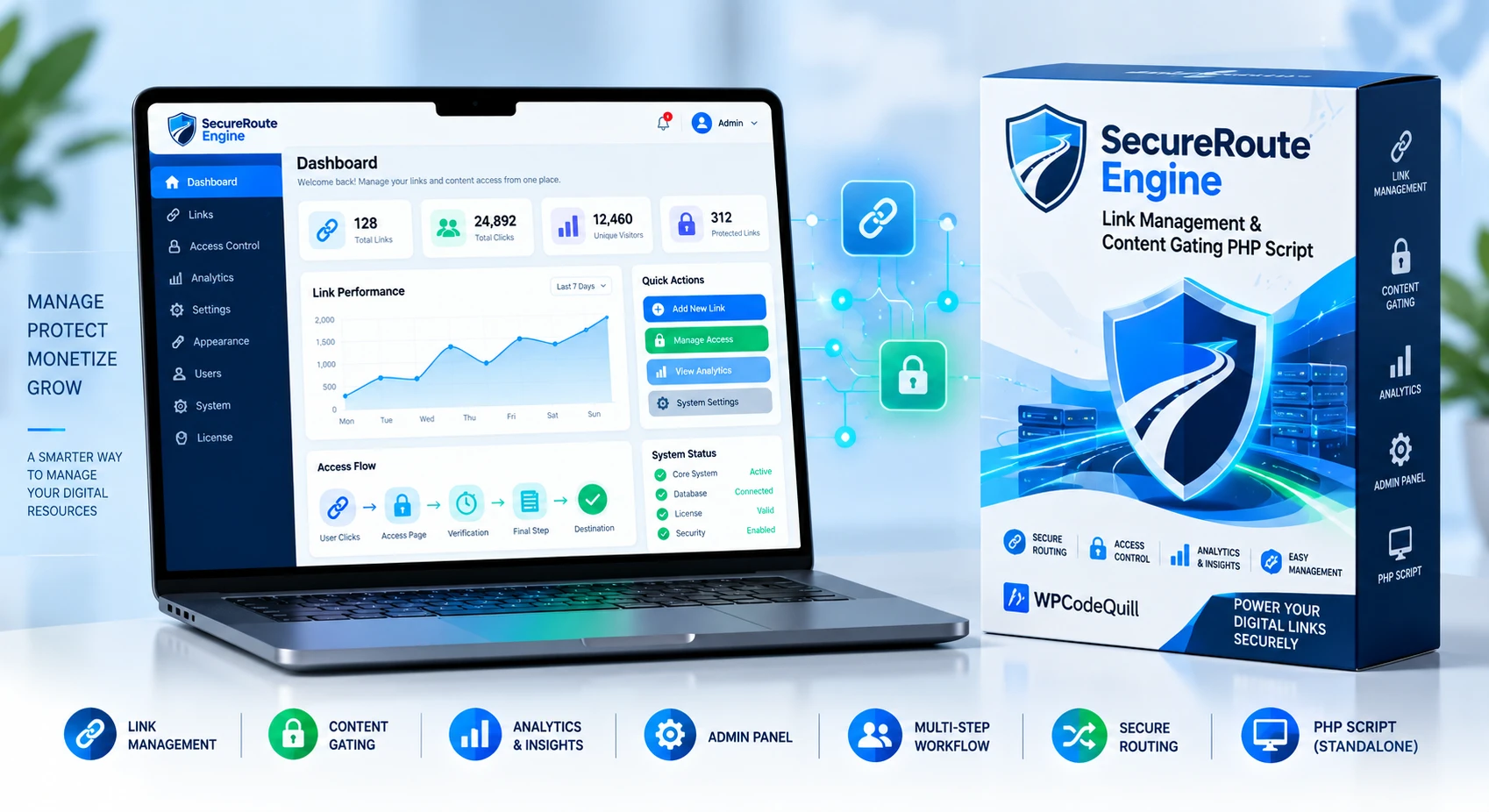
SecureRoute Engine is a powerful PHP link management and content gating script with an admin panel, secure routing, access controls, and flexible digital resource management.
A multi-step workflow for websites that require additional stages. work with multiple safelink domains.
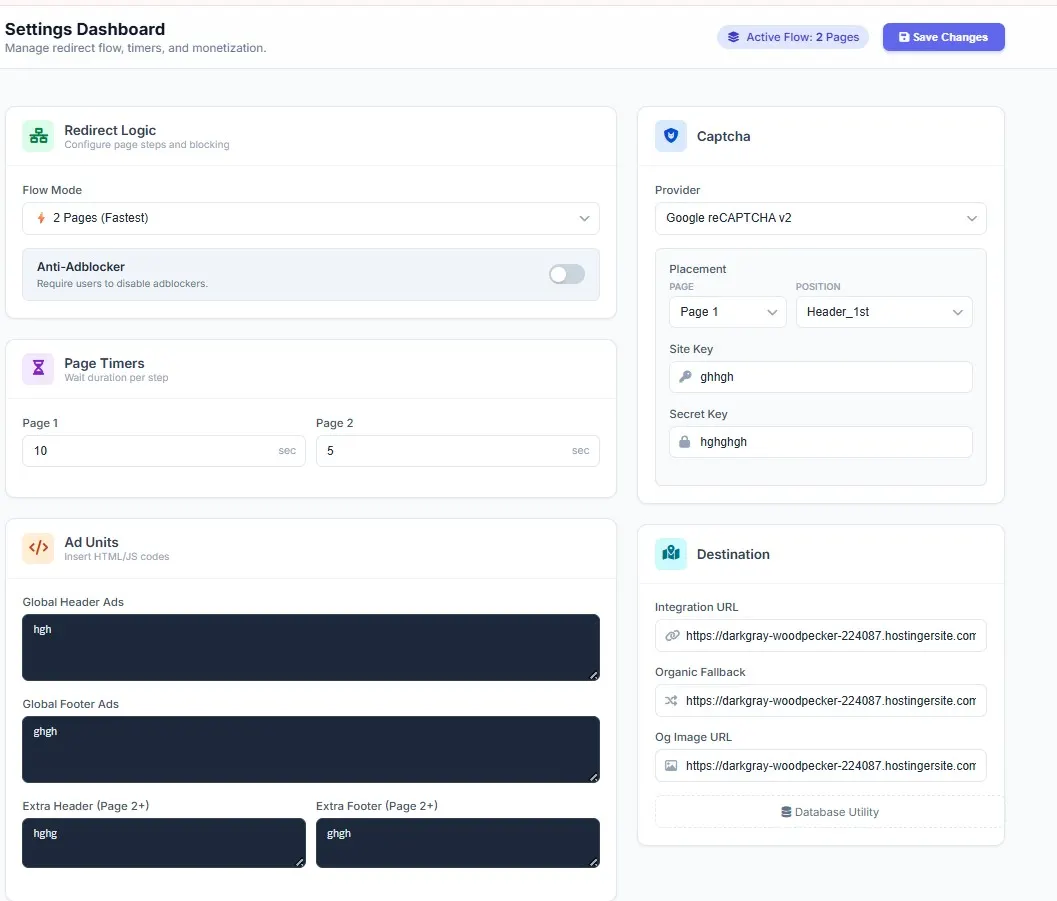
Monetize supported safelink pages by adding your advertising code to dedicated ad areas. Organic Safelink LinkGuard provides configurable spaces for HTML and JavaScript advertising code within the safelink workflow.
Modern websites need to work across smartphones, tablets, and desktop computers. Organic Safelink LinkGuard includes responsive safelink templates designed to provide a cleaner experience across different screen sizes.
SecureRoute Engine is designed to work as part of a broader WordPress website and content strategy. However, a safelink plugin itself should not be considered a guarantee of higher Google rankings.
SecureRoute Engine is a powerful PHP link management and content gating script with an admin panel, secure routing, access controls, and flexible digital resource management.
SecureRoute Engine is a professional PHP link management and content gating platform designed for businesses, developers, publishers, creators, agencies, and digital platforms that need greater control over links, digital resources, access workflows, and destination routing.
Built as a standalone PHP application with a dedicated admin panel, SecureRoute Engine provides a centralized environment for managing links, configuring access workflows, organizing digital resources, and creating structured routing experiences.
Whether you are building a digital resource portal, premium content platform, membership website, business resource hub, or custom web application, SecureRoute Engine provides a flexible foundation for professional link and content-access management.
Explore more PHP scripts and standalone web applications from WPCodeQuill to compare solutions for different types of digital platforms.
Managing multiple destination URLs across a growing website can become difficult when links, resources, and access rules are handled manually.
SecureRoute Engine brings these workflows into one centralized PHP platform, helping administrators organize destination links and create controlled access experiences through a dedicated administration interface.
Instead of maintaining separate systems for different resources, administrators can use the available platform features to manage supported links, routing settings, content-access workflows, and other configuration options from one location.
If you are comparing link-management solutions, you can also explore LinkMaker Pro PHP Script, another WPCodeQuill product focused on link management, URL routing, and monetization workflows.
SecureRoute Engine provides a structured environment for creating and managing destination links. Administrators can organize supported URLs and configure routing behavior according to their project requirements.
Centralized link management can make it easier to maintain digital resources, update destinations, and keep link-based workflows organized as your website or application grows.
For another PHP-based URL management solution, see the LinkMaker Pro product page and compare its supported functionality with your project requirements.
Content gating allows websites and digital platforms to introduce an access step before users reach selected resources.
SecureRoute Engine can be used as a foundation for structured content-access workflows where certain digital resources require an additional access stage before becoming available.
This makes the platform suitable for premium resources, member content, digital libraries, business resources, campaign assets, and other legitimate content-access scenarios.
If your project specifically needs social-action-based unlocking, you can also review Sub4Unlock Pro, a separate PHP content-locking and URL-management solution from WPCodeQuill.
SecureRoute Engine supports configurable multi-step workflows designed to provide administrators with greater control over how users progress through supported access and routing stages.
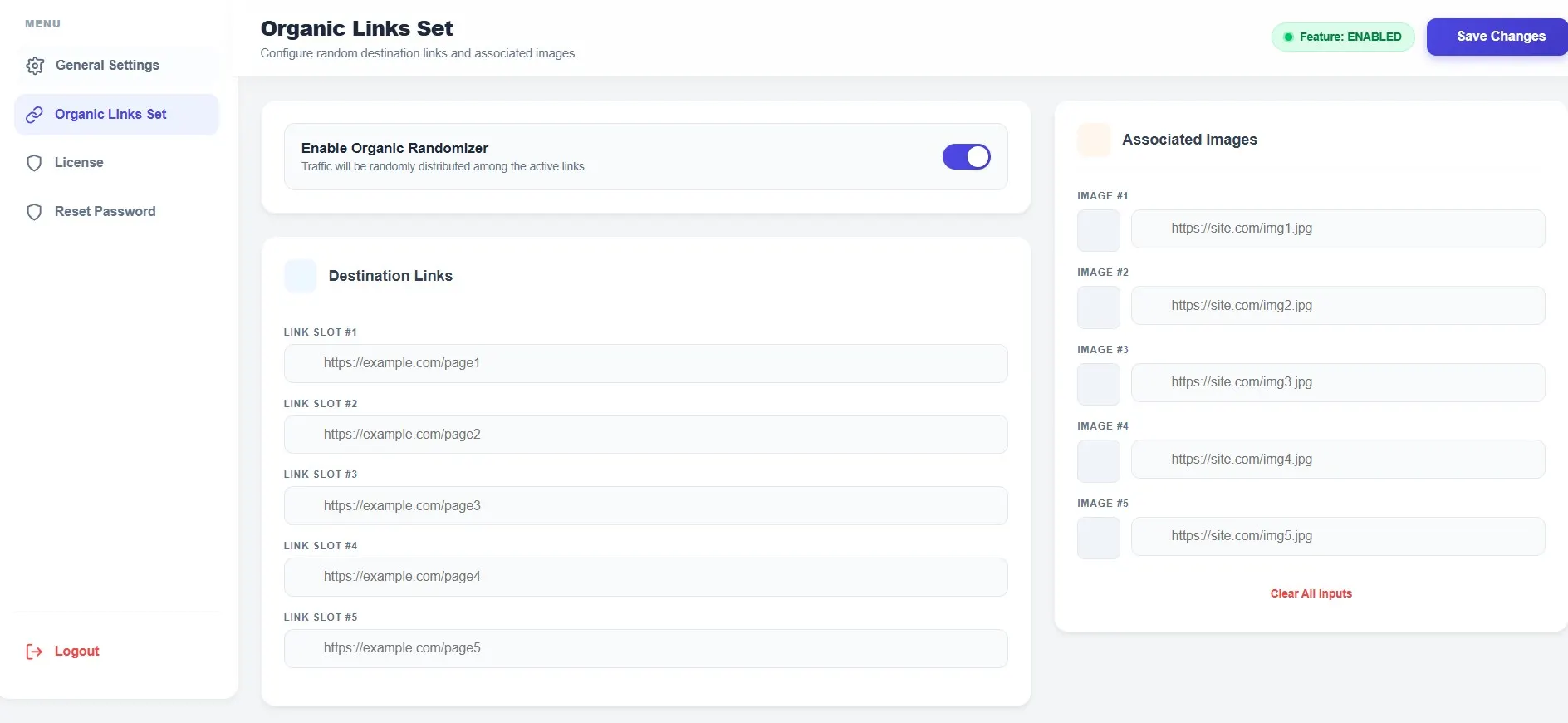
SecureRoute Engine provides controlled routing capabilities for websites that need to manage how visitors reach configured destination resources.
Administrators can organize supported destination URLs and configure the routing experience from the platform's management interface.
This approach can be useful for businesses and developers managing external resources, campaign destinations, digital assets, partner links, and other legitimate web resources.
When managing third-party destinations, only link to resources you trust and have permission to promote. Google also recommends using relevant, descriptive anchor text so users and search engines can understand the destination. Read Google's link best practices.
The dedicated SecureRoute Engine admin panel provides a centralized interface for managing the platform and configuring available features without repeatedly modifying application files.
Depending on the installed version and enabled functionality, administrators can manage links, routing settings, access workflows, timers, content-gating options, system settings, and other supported configuration options.
Digital businesses often manage a large number of resources, destination URLs, documents, downloads, campaign assets, and external resources.
SecureRoute Engine provides a centralized platform that can help organize supported digital-resource links and create controlled access workflows around selected resources.
This can be especially useful for digital product websites, resource libraries, membership platforms, agencies, publishers, and internal business applications.
For websites selling or distributing digital resources, you can also explore WPGPL MarketPro where available, or browse the broader WPCodeQuill marketplace for related digital-business tools.
Create a more structured access experience with configurable countdown timers where supported by the application.
Timer settings can help users understand when they can continue to the next stage of an access workflow while giving administrators greater control over the overall experience.
Modern digital platforms need to work across smartphones, tablets, laptops, and desktop computers.
SecureRoute Engine is designed around a responsive interface so supported management and visitor-facing experiences can adapt to different screen sizes.
A mobile-friendly implementation can provide a more consistent experience for users accessing digital resources from different devices.
Google's developer guidance also recommends that websites be secure, fast, accessible, and functional across devices. See Google's SEO guide for web developers.
Understanding how users interact with managed links can help website owners evaluate their digital-resource structure and improve their user experience.
Where analytics functionality is enabled, SecureRoute Engine can provide supported visitor and link-usage information through the administration interface.
These insights can help administrators understand link activity and make informed decisions about their content and resource-management strategy.
For supported configurations, SecureRoute Engine can be used with multiple destination URLs and compatible domains.
This can be useful for agencies, businesses, developers, and publishers managing resources across multiple websites or external services.
Always configure connected domains and destination URLs carefully and ensure that all resources are authorized and properly maintained.
Unlike a WordPress plugin, SecureRoute Engine is a standalone PHP application.
This makes it suitable for developers who want to deploy the platform independently of WordPress and integrate it into a broader PHP-based web environment.
The standalone architecture can provide greater flexibility for custom deployments, dedicated web applications, resource portals, and specialized link-management projects.
Developers can refer to the official PHP documentation for language, configuration, and server-side development references.
SecureRoute Engine is designed to provide a straightforward installation and configuration experience for supported PHP hosting environments.
After uploading the application to your server and completing the required configuration, administrators can access the dedicated control panel and configure the available platform features.
Before deploying any PHP application to production, verify that the hosting environment supports the PHP version required by your purchased release. The official PHP supported versions page provides the current PHP support lifecycle.
SecureRoute Engine provides a straightforward workflow for managing links and controlled-access resources.
SecureRoute Engine can be used as part of a broader digital platform where controlled link management and content access are important.
The system is suitable for legitimate use cases including digital resources, premium content, business assets, membership resources, marketing campaigns, and external-link management.
For larger PHP-based platforms, the AioTalent Hub PHP Script provides a different architecture focused on job portals, online tools, memberships, and recruitment workflows.
Businesses often need to provide selected resources to customers, members, partners, or internal users without exposing every resource directly through their website structure.
SecureRoute Engine can provide a foundation for creating structured access workflows around supported digital resources.
Use the platform to organize your resources, manage supported destination links, and create a more controlled digital access experience.
For applications involving authentication and access permissions, administrators should follow established security practices. The OWASP Authentication Cheat Sheet is a useful external security reference.
Developers and agencies can use SecureRoute Engine as a foundation for projects requiring centralized link and resource management.
The standalone PHP architecture allows the application to operate independently from WordPress, making it suitable for custom PHP environments and dedicated web applications.
Agencies can also use the platform as part of client projects where centralized link management or controlled resource access is required.
For custom development requirements, WPCodeQuill also provides PHP script development and custom web development services.
SecureRoute Engine can be incorporated into a broader website architecture, but the software itself should not be considered a guarantee of higher Google rankings or organic traffic.
For sustainable SEO, focus on helpful original content, clear website architecture, descriptive URLs, strong internal linking, fast page performance, mobile usability, structured data where appropriate, and technically sound indexing.
A link-management platform should support your overall website strategy rather than replace high-quality content and responsible SEO practices.
Google's SEO Starter Guide explains practical ways to make website content easier for search engines to crawl, understand, and discover.
Google also recommends using relevant internal links and descriptive anchor text rather than adding links simply for the sake of increasing link counts.
SecureRoute Engine can support legitimate digital-resource workflows across a variety of website types.
If you are evaluating different standalone PHP applications, the following resources may help you choose the right architecture for your project:
For additional development and digital-platform information, explore these related resources from WPCodeQuill:
SecureRoute Engine includes a license verification system designed to validate authorized installations.
License validation helps protect the premium application while allowing legitimate customers to access supported updates and product features according to their license.
After installation, enter your valid WPCodeQuill license information through the application's license interface and complete the activation process.
For licensing information and product support, visit the official WPCodeQuill marketplace.
SecureRoute Engine is designed for modern PHP hosting environments and uses server-side functionality for supported application, configuration, and license operations.
Before installation, verify that your hosting environment meets the required PHP version, database configuration, extensions, and server requirements specified with your purchased version.
Keeping your PHP environment, database software, web server, and application components updated is an important part of maintaining a secure production website.
For database administration and technical reference, developers can consult the official MySQL documentation.
Important: Server requirements can change between releases. Always verify the technical requirements included with your purchased SecureRoute Engine package before deployment.
Businesses can use SecureRoute Engine to organize digital resources and controlled-access links.
Publishers can create structured access experiences around selected premium resources.
Creators can manage links and digital resources from a centralized platform.
Agencies can deploy the platform for suitable client projects requiring link and resource management.
Developers can use the standalone PHP architecture as a foundation for custom applications and specialized workflows.
SecureRoute Engine is a standalone PHP link management and content gating platform with an administration panel for managing supported links, routing workflows, access controls, and digital resources.
No. SecureRoute Engine is a standalone PHP application and does not require WordPress.
You can use it for legitimate digital-resource portals, content-access workflows, membership resources, business platforms, creator websites, agency projects, and centralized link management.
Yes. The application includes a dedicated administration interface for managing supported settings and link-management functionality.
The standalone PHP architecture makes SecureRoute Engine suitable for developers who want to integrate or customize the application for compatible projects.
Yes. The platform is designed around centralized management and controlled routing of supported destination URLs.
Yes. SecureRoute Engine can be used to create structured content-access workflows around selected digital resources, subject to the features included in your purchased version.
No. It is designed as an independent PHP application and can be deployed on compatible PHP hosting without installing WordPress.
Yes. PHP has multiple actively supported and security-supported release branches. Because support periods change over time, check the official PHP supported versions page before selecting a production PHP version.
For application-security guidance, developers can reference the OWASP Cheat Sheet Series, which provides practical security guidance for authentication, authorization, session management, input validation, and other application-security areas.
Internal links help users and search engines discover related content and understand website structure. Use natural, descriptive anchor text and link to pages that genuinely provide additional value. See Google's official link best-practices documentation for more guidance.
If you need a standalone PHP link management and content gating platform with a dedicated admin panel, SecureRoute Engine provides a professional foundation for organizing links, managing digital resources, and creating controlled access workflows.
Whether you are a developer, business owner, publisher, creator, or agency, SecureRoute Engine gives you a centralized environment for managing supported digital-link workflows.
Explore the WPCodeQuill PHP Scripts collection if you want to compare SecureRoute Engine with other standalone PHP applications before choosing the right solution.
Build a more organized, controlled, and professional digital resource experience with SecureRoute Engine.
Explore WPCodeQuill | Browse PHP Scripts | Custom PHP Development
Affordable, fast, and beginner-friendly hosting with great performance for WordPress and PHP projects.
👉 Get HostingPremium cloud hosting with excellent uptime, free migrations, and powerful performance for growing websites.
👉 Explore Planspublish_html.zip to the public_html/ directory and unzip it into public_html/my-link/.https://yourdomain.com/my-link/create_admin_debug.php to create the required database.create_admin_debug.php to set your admin username and password, then delete this file for security.
@wpcodequill
Member since 2025
 INR
INR  USD
USD